 Download Online Help
 Print
|
|
|
|
|


Select a part number and click on the Find  button. Choose the desired record. Click on the Select
 button.
The Inventory Supervisor Detail, General tab displays batch information regarding the selected part.
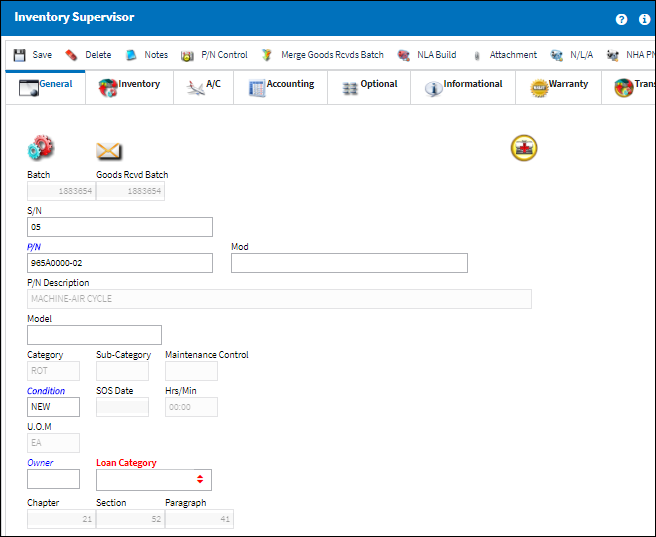
The following options/information is available in this window:
_________________________________________________________________________
Batch
The batch number that is associated with a part when introduced/received into the system.
Goods Rcvd Batch
The original batch number when the part was initially introduced/received into inventory.
S/N
The Serial Number for the specific serialized part.
P/N
The Part Number reference for the aircraft part.
Mod
Module information.
P/N Description
The description of the part.
Model
Model number.
Category
The category of the part as defined in Settings/ Explorer/ System Transaction Code Explorer/ Settings/ P/N Category (e.g. Rotable, Consumable, Repairable) and entered for the particular part in the P/N Master.
Sub-Category
The Sub Category for each part.
Maintenance Control
Maintenance Control code (hard time, condition monitored, etc.)
Condition
The condition of the part.
SOS Date
The date the part is designated as SOS, or Save or Spares. This field is only available when the part's SOS eligibility is not overridden.
Hrs/Min
The length of time the part is to be designated SOS. This field is only available when the part's SOS eligibility is not overridden.
UOM
The unit of measure. This will default if associated with a Part Number as defined in the P/N Master. Transactions for parts can be conducted in a different UOM than defined in the P/N Master. However, upon receiving the UOM, conversion will automatically adjust the quantities, providing that the conversion rate is defined in the UOM System Transaction Code (via Setting/Explorer/System Transaction Code).
Owner Loan Category drop down
The name of the owner of the part, when applicable.
Loan Category drop down
The loan part category
Consigned - The part is still associated with the specified owner and does not yet belong to your company. Ownership is changed when the part is issued to an aircraft or Work Order. Once initial loaded, from the Inventory Transaction window, this part will be flagged as 'CONSIGNED.' For more information refer to Initial Loading Consigned Inventory. Once the consigned part is issued to an Aircraft, that part will then belong to the your company and Journal Entries will be written at that time (if Inventory Switch  CONSINED is set to Yes). A new P/O will be created and closed automatically to capture this transaction. For more information refer to Purchasing and Issuing Consigned Parts (P/Os) via the Inventory Training Manual.
Short Loan - Loaned parts not to exceed one year.
Pool - Parts belonging to a pool agreement with the vendor.
Long Loan - Loaned parts one year or greater.
Manage - Maintenance organization manage parts in their inventory that are owned by a particular owner and are to be used only for a particular customer's aircraft.
Chapter/Section/Paragraph
The ATA chapter/section/paragraph, as applicable.
_________________________________________________________________________
Download Online Help
Print
|
©1997-2018 Trax USA Corp. All rights reserved. This manual may not be copied, photocopied, reproduced, translated, or converted to any electronic or machine-readable form, in whole or in part, without prior written approval from Trax USA Corp. |
 |