 Download Online Help
 Print
|
|
|
|
|


Select a part number and click on the Find  button. Choose the desired record. Click on the Select
 button. Select the Optional tab.
The Inventory Supervisor Detail, Optional Tab displays any related Receiving, Receiving Inspection, and Expiration information related to the part. Unlike the Inventory Transaction, here in the Supervisor the user may update the below information:
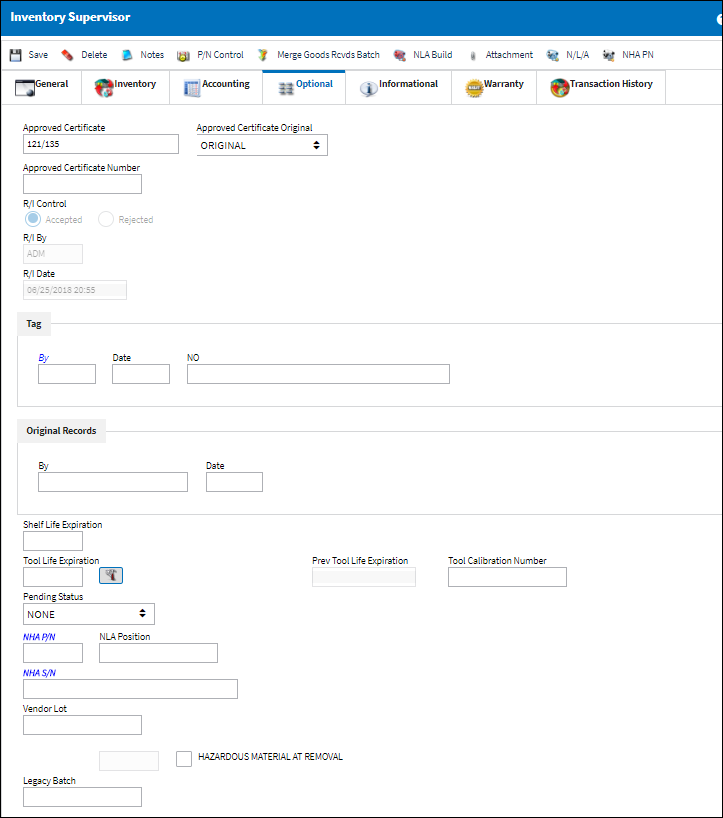
The following options/information is available in this window:
_________________________________________________________________________
Approved Certificate
The type of certificate approving the part (ie. Form 1, EASA etc.). The user may choose from a pre-defined transaction code, or enter the Approval Certificate manually.
Approved Certificate Number
The Approved Certificate Number. This is a free text field.
R/I by
Name of person/group who performed the Receiving Inspection.
R/I date
Date of the Receiving Inspection.
Tag by
Vendor Tag By information.
Tag Date
Date of the Tag.
Tag NO
The tag number associated with the part.
Original Records By
Name of person/group in charge of Original Records.
Shelf Life Expiration
The shelf life expiration date of the part, as applicable.
Tool Life Expiration
The tool life expiration date of the part, as applicable.
Pending Status
The current status of this transaction.
Previous Tool Life Expiration
This is the previous expiration date for the tool (if applicable). Not all tools have an expiration date.
Tool Calibration Number
This is a unique number used to define a tool.
N/H/A P/N
The part’s Next Higher Assembly P/N (if applicable).
N/L/A Position
The position of the Next Lower Assembly.
N/H/A S/N
Next Higher Assembly (NHA) serial number.
Vendor Lot
Vendor batch number of the part entered upon receiving or intial load, as applicable.
Legacy Batch
The original batch number from the Legacy system from where the data was migrated.
_________________________________________________________________________
Download Online Help
Print
|
©1997-2018 Trax USA Corp. All rights reserved. This manual may not be copied, photocopied, reproduced, translated, or converted to any electronic or machine-readable form, in whole or in part, without prior written approval from Trax USA Corp. |
 |