 Download Online Help
 Print
|
|
|
|
|


Select a part number and click on the Find  button. Choose the desired record. Click on the Select
 button. Select the Transaction History Tab.
The Inventory Supervisor Detail, Transaction History tab displays any transactions that the part has undergone since its entry into the system.
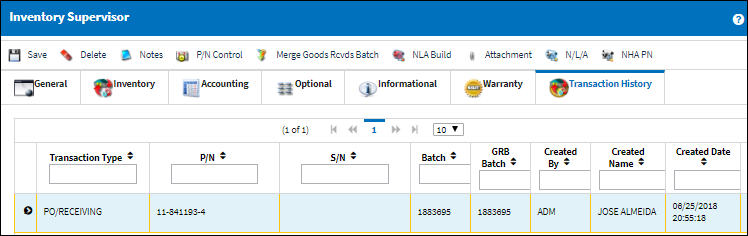
The following options/information is available in this window:
_________________________________________________________________________
Transaction Type
The type of transaction record.
P/N
The Part Number reference for the aircraft part.
S/N
The Serial Number for the specific serialized part.
Batch
The batch number that is associated with a part when introduced/received into the system.
GRB Batch
The batch number that is associated with a part when introduced/received into the system.
Created By
The user who created the record.
Created Name
The user who created the record.
Created Date
The date the record was created.
_________________________________________________________________________
Download Online Help
Print
|
©1997-2018 Trax USA Corp. All rights reserved. This manual may not be copied, photocopied, reproduced, translated, or converted to any electronic or machine-readable form, in whole or in part, without prior written approval from Trax USA Corp. |
 |