 Download Online Help
 Print
|
|
|
|
|


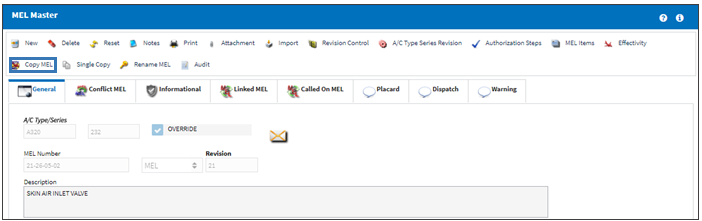
From the MEL Master, users can copy the MEL for one A/C Type/Series to another A/C Type/Series by selecting the Copy MEL  button. For example, from the MEL Master window select the Copy MEL button.
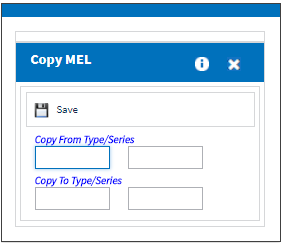
Once selected, the Copy MEL window appears. Enter the Type/Series that the MEL is being copied from and the Type/Series that the MEL is being copied to. Select the Save  button.
A progress bar appears indicating each MEL that is being copied over. Once copied over, the same A/C Effectivity is applied to each MEL for the new Type/Series.
Once all MELs have been copied and been made effective, the status bar reads "Copy completed". At this point all MELs have been successfully copied.
Download Online Help
Print
|
©1997-2018 Trax USA Corp. All rights reserved. This manual may not be copied, photocopied, reproduced, translated, or converted to any electronic or machine-readable form, in whole or in part, without prior written approval from Trax USA Corp. |
 |