 Download Online Help
 Print
|
|
|
|
|


Customer Authorization
The Customer Authorization window is used to query for Customer Contracts based on the following search criteria. From this window, the user may view the status of a customer invoice, and may also accept or reject a customer invoice.
Enter any of the below search criteria to query for a desired Customer Contract and select the Find  button.
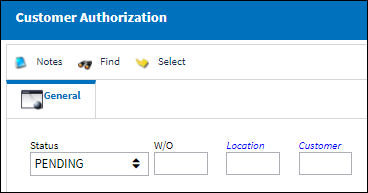
The following options/information is available in this window:
_________________________________________________________________________
Logic drop down 
Select one of the following logic functions to filter for data:
<= Less than or equal to.
<> Not equal to.
= Equal to.
>= Greater than or equal to.
Like Show data like or similar to.
Status drop down
The status of the Customer Contract. The options include:
- Accepted
- All
- Pending
- Rejected
W/O
The Work Order used to categorize, manage, and schedule work requirements for aircraft maintenance.
Location
The Location for maintenance events, inventory stores, orders, transactions, or training events.
Customer
The customer whom the agreed upon terms are for.
_________________________________________________________________________
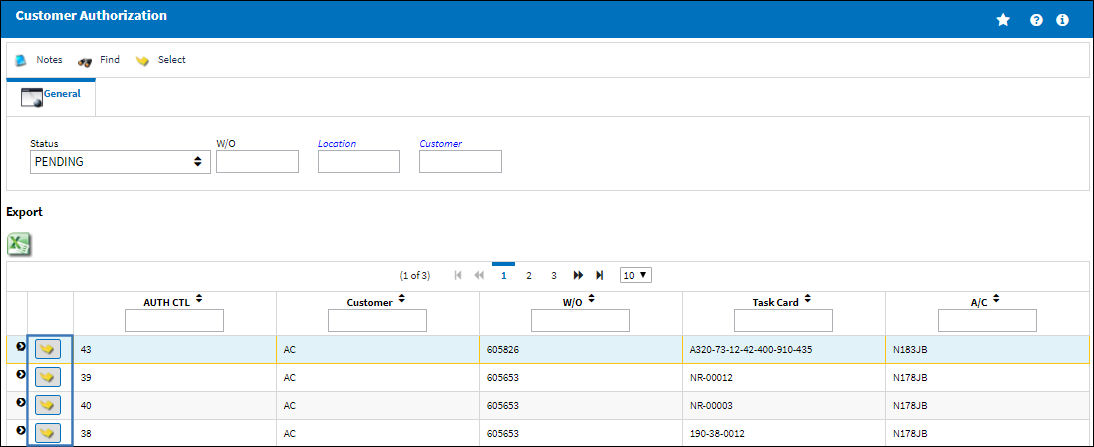
The following results appear. Click on the Select  button.
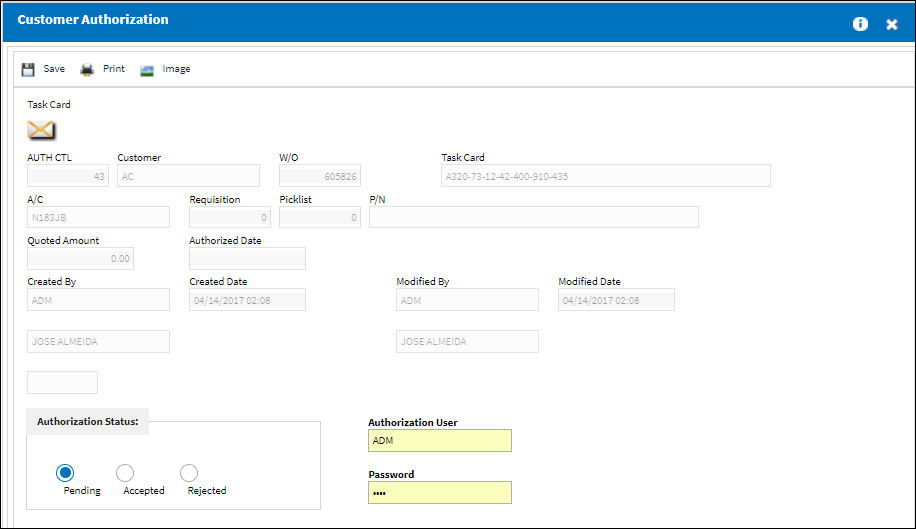
The system displays the following window. Select the 'Accepted' radio button and select the Save  button.
The Save prompt appears. Select 'OK.'
Refresh the Customer Authorization window.
When the user attempts to query for the below Work Order, the following information box appears. The Customer Contract is no longer in 'Pending' status. It is now authorized.
The following buttons offer additional functionality:
This update window is also available in query mode where users can view the records provided in this window but cannot create new records or edit existing data. Refer to this module's Query menu.
Download Online Help
Print
|
©1997-2018 Trax USA Corp. All rights reserved. This manual may not be copied, photocopied, reproduced, translated, or converted to any electronic or machine-readable form, in whole or in part, without prior written approval from Trax USA Corp. |
 |