 Download Online Help
 Print
|
|
|
|
|


W/O Closing
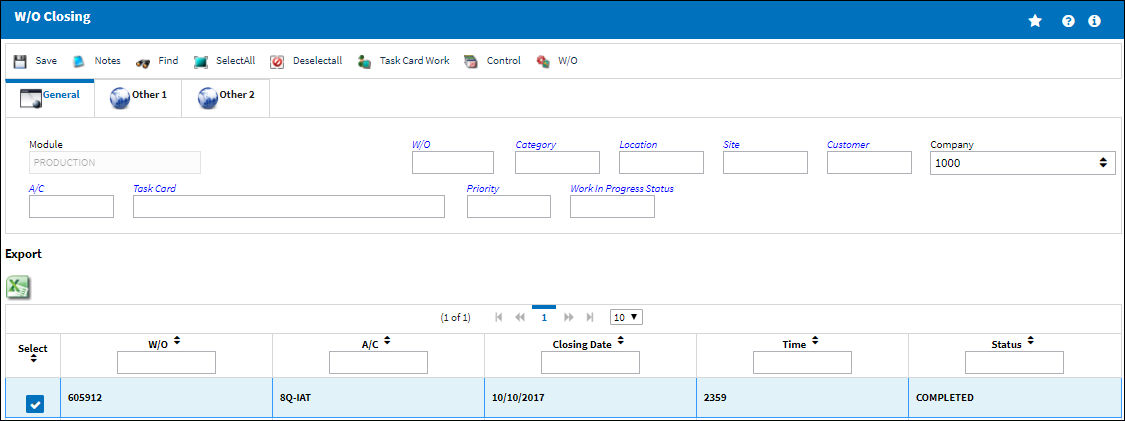
The Work Order Closing option is used to close a Work Order and reset the counts on all associated controls (such as E/C compliance). In addition, all historical records are created.
Note: If Sub-Work Orders are closed, the system checks if the completion date is within the actual opening and closing date of the parent Work Order. A warning will pop up if the date is not within that range.
The 'Closing' performs three main functions:
- Updating all Technical Information (such as writing E/C compliance and resetting P/N control data and repeat intervals).
- Updating Financial Information (by moving data from Work In Progress to final expense accounts).
- Removing Zero available consumable batches that are showing in inventory (on hold awaiting any return of unused parts from the Work Order).
If the Work Order is not closed, this data will remain outstanding.
Note: There are four stages of Work Order status: Generation, Open, Completed, and Closed. Before closing a Work Order, it must go from 'Open' to 'Completed' status (i.e. the W/O cannot go from 'Open' directly to 'Closed').
All Task Cards on the Work Order must be 'Closed' in order to close the Work Order.
A warning will be provided when E/Cs on the Work Order are not completed when closing takes place.
Once a Work Order has been 'Completed', the next stage is to 'Close' the Work Order. If any Task Cards were deferred, a separate report will be produced that will show these items.
It is critical that the Completion Date and Time is correct on the Work Order when writing the compliance records for the Engineering Controls that have been updated. This can be changed through the Production/ Update/ Work Order option or by clicking on the Work Order button in the A/C Planning Query window.
Records can be queried through entering search criteria in the following tabs
Refer to the following steps for detailed information on the W/O Closing process:
The following buttons are available for additional functionality to review the associated record:
 Download Online Help
Print
|
©1997-2018 Trax USA Corp. All rights reserved. This manual may not be copied, photocopied, reproduced, translated, or converted to any electronic or machine-readable form, in whole or in part, without prior written approval from Trax USA Corp. |
 |