
 Share
Share
 Print
Print
|
|
|
|
|


Task Card Control Master, General Tab
Users can query for existing Panels and Zones using the Code and A/C Type/Series search fields at the top of the window or use the New  button to create a new Panel or Zone.
Once Panel and Zone codes have been created, they can be linked to a Task Card via the Panel  button and Zone
  button, via Task Card Buttons.
Panel and Zone codes are created based on A/C Type/Series. If required, the same Panel and Zone code can be re-used and entered for a different A/C Type/Series.
When Switch  TC/CTL is set to Yes, the system will validate that a Panel/Zone exists in the Task Card Control Master before it can be associated to a Task Card. When set to No, the system will not validate the Panel/Zone exists and any data can be entered in the Task Card Panel and Zone field.
To create a new Panel or Zone, select the applicable radio button and select the New button.
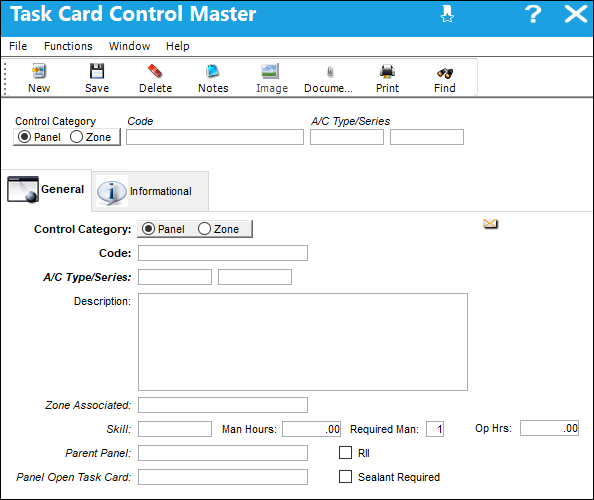
The following information/options are available in this window:
_____________________________________________________________________________________
Control Category
Select the radio button for the type of control (Panel or Zone) to be created.
Code
Enter a valid code to represent the Panel or Zone.
Type/Series
The Aircraft Type and Series/Fleet assignment.
Description
The Panel description information.
The Zone description for the Task Card.
Zone Associated
Select an associated Zone defined in TRAX.
Skill
Select the required skill related to working on the Task Card with this zone or panel.
Man Hours
The labor hours (per person) required for this Item.
Required Man
The number of personnel required for this Item.
Op Hrs
Operation Hours.
Parent Panel
Reference to a panel that must be opened before accessing the selected panel.
Panel Open Task Card
When the selected panel is linked to a Task Card and the Task Card is added to a W/O, the Panel Open Task Card will automatically be called on to the W/O.
The Panel Open Task Card will only be added to the W/O if it is effective to the A/C on the W/O.
RII checkbox
Required Inspection Item. Select this checkbox if the item requires inspection. This is informational only.
Sealant Required checkbox
Check if sealant is required. This is informational only.
_____________________________________________________________________________________
For additional information, refer to Attaching a Task Card Panel to a Work Order and Attaching a Task Card Zone to a Work Order.
Share
Print
|
©1997-2026 Trax USA Corp. All rights reserved. This manual may not be copied, photocopied, reproduced, translated, or converted to any electronic or machine-readable form, in whole or in part, without prior written approval from Trax USA Corp. |
 |