
 Share
Share
 Print
Print
|
|
|
|
|


Manual Category
The System Transaction Codes are displayed with both the Code Names and Descriptions. The Code Descriptions directly illustrate their functionality and role in the system, as fields are populated and tasks are performed.
Module: |
Library |
Transaction Code: |
Manual Category |
General Description: |
Categories to be associated with each Manual. |
Are Authorization Steps Available? |
Y |
Is System Notification Available? |
Y |
Trax Control Panel Path(s): |
Library/Update/Manual Control |
Windows(s): |
w_manual_control_eu |
Related Switch(s): |
Not Applicable |
Functions: |
Assigns a Category for each Manual which is useful for searches. |
Reports: |
Library Print, most selections allow for a Manual Category filter to be applied. |
Available Functionality:
Also allowing for authorization processes to be follow as required by each manual category.
The Manual Category code may be entered via Setting/Explorer/System Transaction Codes, as seen below:
Set-up is identical to the creation of any other System Transaction Code and has the added functionality of Manual Category authorization process steps set-up, as seen below:
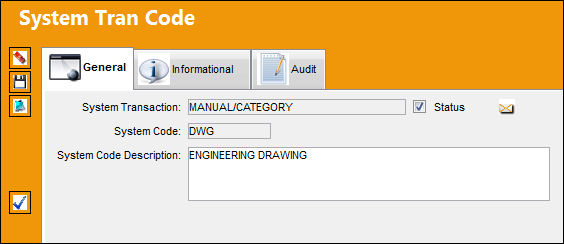
The following information/options are available in this window:
_____________________________________________________________________________________
Authorization Step  button
Select this button to configure the authorization steps for the specified transaction code. This authorization process works as it does system-wide. For more information, see below.
_____________________________________________________________________________________
Authorization Processes:
Users may pre-define authorization processes for the Manual Category. In order to define the Manual Category’s Authorization Processes, the user must select Authorization Steps button, as follows:
The user will receive the following authorization set-up window:
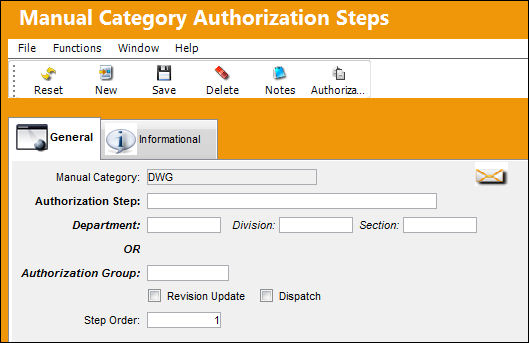
The following information/options are available in this window:
_____________________________________________________________________________________
Manual Category
The type/category of the Manual.
Authorization Step
A description of the Authorization Step; each Authorization Step can have its own unique description to describe the steps general purpose.
Department
The department which has authority for approval of this step. The Authorization Step can only be performed by an individual in the department specified here. See Settings/ Update/ Employee Master to verify that the employee is assigned to the appropriate department. Authorizing employees must have security access to the appropriate Authorization Explorer option. When this field is left blank, the Authorization Group field is available.
Division
The division which has authority for approval of this step. The Authorization Step can only be performed by an individual in the division specified here.
Section
The section which has authority for approval of this step. The Authorization Step can only be performed by an individual in the section specified here.
Authorization Group
The Authorization Group which has authority for approval of the step. The Authorization Step can only be performed by an individual that is included in the Authorization Group specified here.
Revision Update
Select this checkbox to close the revision status of the manual. Once the Revision Update checkbox and the Dispatch checkbox are selected, and the step is accepted, the system will issue the Manual revision Assignment and load a Revision Receiving record.
Dispatch checkbox
Select this checkbox to distribute the revision for serialized copies. Once the Revision Update checkbox and the Dispatch checkbox are selected, and the step is accepted, the system will issue the Manual revision Assignment and load a Revision Receiving record.
Step Order
This number indicates the order of Steps if one or multiple Steps are created. This number is automatically created and can be overridden and changed to any number. It is recommended that the user enter Steps in a standard incremental pattern (i.e. Step 5, Step 10, Step 15, etc.) to allow for the insertion of Steps into the sequence at a later time if required.
_____________________________________________________________________________________
The user will be able to set-up multiple authorization steps by the nomenclature which best describes it.
Users may define who will be able to authorize the step using either the Department/Division/Section or the Authorization Group option.
For a user to be able to authorize a step requiring this option, that user’s employee record via Setting/Update/Employee Master must be active and the Department, Division, and/or Section required for the authorization of the step. Please note that the Department is the only mandatory option to employee this feature.
In order for a user to be included in the authorization process the Task Card Authorization Group must be set up via the System Trans Codes and that User must be added to the required authorizing group via Library/Explorer/Library Authorization Group Explorer.
For a user to be able to authorize by either of the above mention methods the user will need security access to the Manual Authorization Explorer via System Administration/Explorer/Security Explorer.
Step Order:
Authorization Processes within Manual Category will be auto assigned a default step order value beginning with 1.

By assigning this default Step Order TRAX is able to know the sequential authorization step order to follow.
Final Authorization Step:
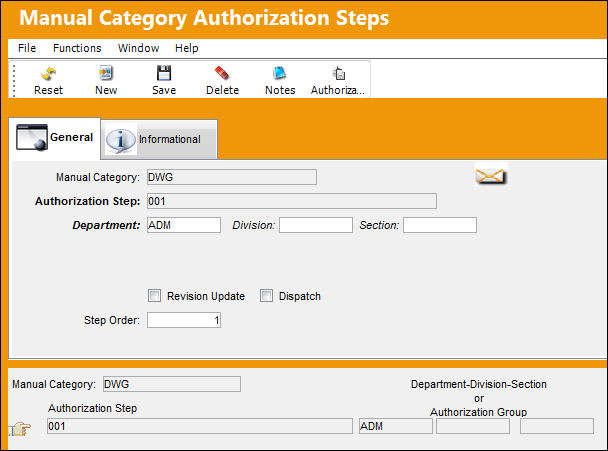
In order to indicate that a step in the final authorization step within a process the user must select the Revision Update and Dispatch checkboxes as indicated below:

By selecting the Revision Update checkbox this will Close the Revision Status and the Dispatch checkbox will distribute the Revision for serialized copies. Upon this step being accepted, TRAX will issue the Manual Revision Assignment and load a Revision Receiving Record via Library/Update/Revision Receiving.
During the creation of the Manual Category Authorization Process, the user will be able to the saved steps on the lower portion of the Manual Category Authorization Process window, as seen below:
In addition, to be able to predefine manual authorization steps by the manual category users will also be able to modify those steps on a manual basis via Library/Update/Manual Control/Authorization Steps button, as seen below:
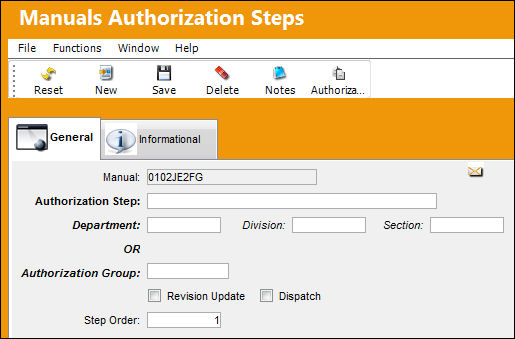
Any modifications to the default Manual Authorization must be performed prior to the entry of any new created manuals or revisions.
Share
Print
|
©1997-2026 Trax USA Corp. All rights reserved. This manual may not be copied, photocopied, reproduced, translated, or converted to any electronic or machine-readable form, in whole or in part, without prior written approval from Trax USA Corp. |
 |