
 Share
Share
 Print
Print
|
|
|
|
|


Tech Pub Request Type
The System Transaction Codes are displayed with both the Code Names and Descriptions. The Code Descriptions directly illustrate their functionality and role in the system, as fields are populated and tasks are performed.
Module: |
Library |
Transaction Code: |
Tech Pubs Request Type |
General Description: |
Type of Tech Pub Request. |
Are Authorization Steps Available? |
Y |
Is System Notification Available? |
Y |
Trax Control Panel Path(s): |
Library/Update/Tech Pub Request |
Windows(s): |
w_tech_pub_request_eu |
Related Switch(s): |
TPUBSEQ |
Functions: |
Categorizes the Tech Pub Request by Type |
Reports: |
Not Applicable |
Available Functionality:
This transaction code also allows for the authorization processes to be followed as required by each Request Type.
The Tech Pub Request Type code may be entered via Setting/Explorer/System Transaction Codes.
Set-up is identical to the creation of any other System Transaction Code and has the added functionality of Tech Pubs Request Type authorization process steps set-up, as shown below:
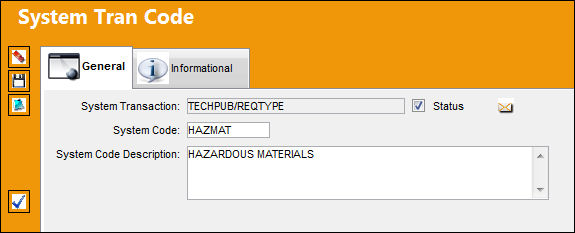
The following information/options are available in this window:
_____________________________________________________________________________________
Authorization Step  button
Select this button to configure the authorization steps for the specified transaction code. This authorization process works as it does system-wide. For more information, see below.
_____________________________________________________________________________________
Tech Pub Request Authorization Steps via the Authorization Steps button:
Users may pre-define authorization processes for Tech Pubs Request Types. In order to define Request Type Authorization Processes the user must select Authorization Steps button the user will receive the following authorization set-up window:
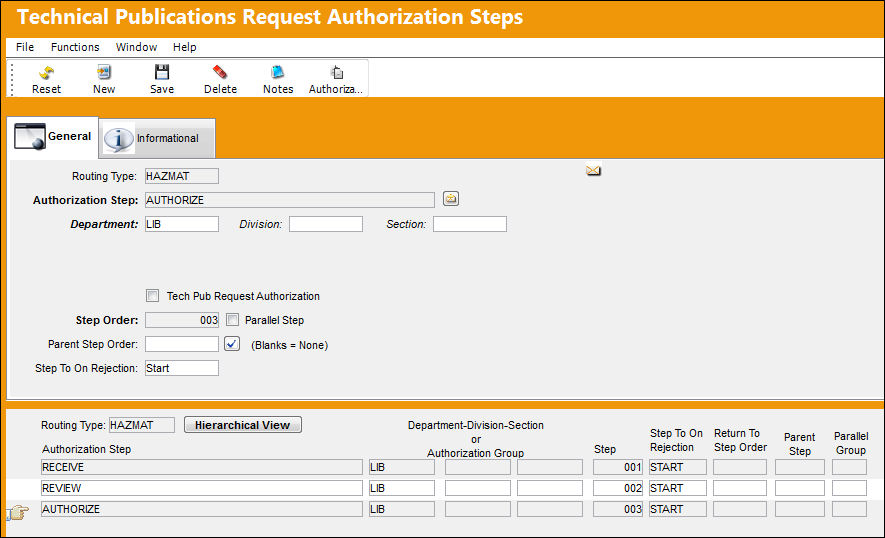
The following information/options are available in this window:
_____________________________________________________________________________________
Routing Type
Authorization Step
A description of the Authorization Step; each Authorization Step can have its own unique description to describe the steps general purpose.
Department
The department which has authority for approval of this step. The Authorization Step can only be performed by an individual in the department specified here. See Settings/ Update/ Employee Master to verify that the employee is assigned to the appropriate department. Authorizing employees must have security access to the appropriate Authorization Explorer option. When this field is left blank, the Authorization Group field is available.
Division
The division which has authority for approval of this step. The Authorization Step can only be performed by an individual in the division specified here.
Section
The section which has authority for approval of this step. The Authorization Step can only be performed by an individual in the section specified here.
Tech Pub Request Authorization checkbox
Select this checkbox to indicate that a step in the final authorization step within this process.
Step Order
This number indicates the order of Steps if one or multiple Steps are created. This number is automatically created and can be overridden and changed to any number. It is recommended that the user enter Steps in a standard incremental pattern (i.e. Step 5, Step 10, Step 15, etc.) to allow for the insertion of Steps into the sequence at a later time if required.
Parallel Step checkbox
The Parallel Step functionality allows for the grouping of a set of steps to be authorized in conjunction with one another during the Authorization Process. This is useful when several departments are required to authorize steps at the same time before the Authorization Process can continue on to the next step. When this checkbox is selected, the Parallel Group field becomes available.
Parent Step Order
The Parent Step Order field allows for the creation of a Parent/Child relationship between steps in the Authorization Process. This may be useful if two individuals from the same department need to authorize a particular step (i.e. a Manager and a Supervisor).
Step To On Rejection
This indicates how the Authorization Process will react when a Step is rejected (Start, Return To, Re-Release).
_____________________________________________________________________________________
The user will be able to set-up multiple authorization steps by the nomenclature which best describes it.
In order for a user to be included in the authorization process, the E/C Authorization Group must be set up via the System Trans Codes and that user must be added to the required authorizing group via Library/Explorer/Tech Pub Authorization Group Explorer.
For a user to be able to authorize by either of the above mentioned methods, the user will need security access to the Tech Pub Request Type Authorization Explorer via System Administration/Explorer/Security Explorer.
Step Order:
Authorization Processes within Tech Pubs Request Type will be auto assigned a default step order value beginning with 001.

By assigning this default step Order TRAX is able to know the sequential authorization step order to follow.
Parallel Authorization Groups:

Authorization Steps may be included in parallel authorization processes the steps included in a particular parallel group may be authorized in any order but all steps within this parallel authorization group must be authorized in order to move to the following step which is not part of said group.
Select the  button to view the below window:
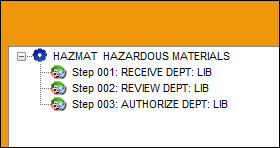
Steps 002 and 003 are part of the same parallel authorization group, 003 may be accepted prior to step 002. However both will require authorization prior to moving onto step 004.
When creating parallel authorization steps TRAX will auto assign parallel group numbers, upon saving the newly created parallel step the user will receive the following prompt:
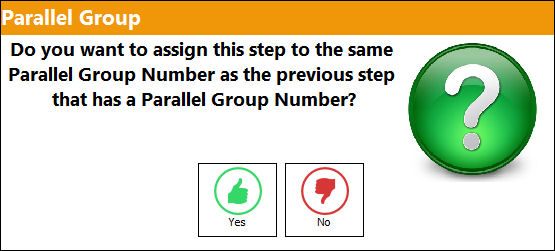
When the parallel checkbox is selected the prompt will ask the user to define the group to associate the newly created step to, if yes is selected then this step will be tied to the previously flag parallel step. If no is selected, then the next available parallel group number will be assigned to this step.
Parallel Authorizations Steps may not include the first step, child step or final authorization step in a process. TRAX will prevent the user from doing so.
Parent Step:
Steps may also be assigned a parent Step as seen below:

This will require the authorization of the child step prior to moving on to the next authorization step. The user will be able to associate an authorization from a subordinate to review of a supervisor by creating the parent/child authorization step process.
Users may also define a reject process flow per authorization step:

Users will have the opportunity to a return, back to ‘Start’ the beginning of the authorization process, to a particular step at rejection within the authorization process:

Or Re-Release, send the revision back to the issuer of the Tech Pubs Request, which is usually flagged against the final authorization step in the process.
Final Authorization Step:
In order to indicate that a step in the final authorization step within a process the user must select the Tech Pub Request Authorization checkbox as indicated below:

Upon the acceptance of this step TRAX will issue the Revision of the E/C to the Engineering Control window, via Engineering/Update/Engineering Control, which will allow for its attachments to Work Orders.
During the creation of the Tech Pubs Request Type authorization process, the user will be able to view their progress on the bottom portion of the Technical Publications Request Authorization Steps window as seen below:
Share
Print
|
©1997-2026 Trax USA Corp. All rights reserved. This manual may not be copied, photocopied, reproduced, translated, or converted to any electronic or machine-readable form, in whole or in part, without prior written approval from Trax USA Corp. |
 |