 Download Online Help
 Print
|
|
|
|
|


The user also has the option to delete a compliance record, however if a compliance record is deleted, the system will not roll back to effective date of the E/C. To change the effective date of an E/C, the user must do so manually via the A/C button or the P/N CTL button of the Engineering Control. If the user deletes the compliance for a Parent E/C, this will not remove any dependencies for any Child E/Cs. To do so, the user must delete the compliance for any Child E/Cs individually.
Note: If a P/N E/C is complied with that modifies the Part Number and the Compliance is later deleted, the P/N will have to be changed manually via Inventory Transaction, P/N Serial Number Change.
Upon deleting a Compliance record, select the Delete  button and the following warning appears:
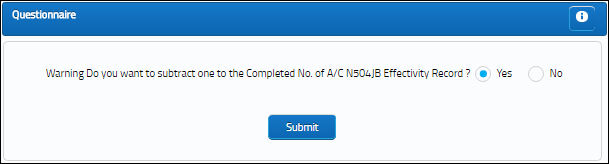
Note: When deleting a Compliance record against an A/C or P/N S/N, the Status, Completed Number, and Modified By/Modified Date fields will be updated accordingly.
Download Online Help
Print
|
©1997-2018 Trax USA Corp. All rights reserved. This manual may not be copied, photocopied, reproduced, translated, or converted to any electronic or machine-readable form, in whole or in part, without prior written approval from Trax USA Corp. |
 |