
 Share
Share
 Print
Print
|
|
|
|
|


The Task Card Authorization, Optional 1 tab allows the user to view authorization information regarding the T/C prior to authorizing it. The information in this window is a copy of the Task Card, Optional 1 tab, and can be edited or updated with the appropriate security privileges.
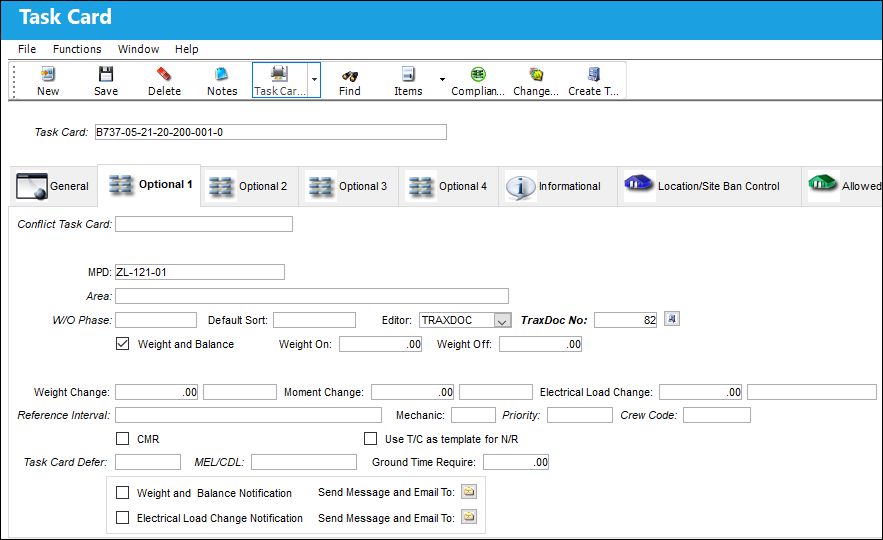
The following information/options are available in this window:
_____________________________________________________________________________________
Conflict Task Card
If a Task Card is specified here, it indicates that the current Task Card should not be performed should it appear in a Work Order with the specified Task Card.
MPD
The Maintenance Planning Document reference for this Task Card.
Area
The Area of the aircraft which this Task Card is related to, as defined in the Trans Code.
Work Order Phase
The phase of the Work Order on which the Task Card work is carried out on.
Default Sort
The default sort priority of this Task Card when it is printed on a Work Order.
Editor
The application that will be used to edit the Task Card information. The application will also be used to edit Task Cards when those Task Cards are placed on Work Orders via Production/Update/Work Order. Selectable formats include: Word ®, TASKCARD, or the default Powerbuilder ® RTF (i.e. NONE). This is a customized layout for the Task Card.
Using the Editor drop-list on the Optional 1 Tab of the Task Card, the user can choose the editor that will be used to edit each Task Card Item (Step) on an individual basis. The user may set the value for all new Task Cards with the following configuration switch.
 TCEDITOR - (Task Card Item Editor) Enter the default application editor to be used in the Config Other field.
This Editor functionality is only supported when using Oracle ® version 8i and up. Also, this functionality is compatible with Microsoft ® Word 2000 and later versions.
TRAXDOC - The TRAXDOC Editor uses uploaded Style Sheets in TRAXDOC as a template for a print. The Task Card print layout can be defined by a TRAXDOC Style Sheet. Task Cards of each TRAXDOC can have a different layout based on the criteria of the TRAXDOC (i.e. fleet type, customer). TRAXDOC allows the user to modify Task Cards using Style Sheets. The TRAXDOC Editor is not a RTF Editor. When the TRAXDOC Editor is selected, the following field and button appears. For additional information regarding how the TRAXDOC Editor functions, refer to the TRAXDOC Editor via the Task Card Editor section of the Engineering - T/C Training Manual.
TASKCARD (Stylesheet) - The Style Sheet Editor is a RTF (Rich Text Format) Editor which allows the user to enter the Task Card item text using the available RTF options. Please see descriptions for the various options and buttons below. For more information refer to the TASKCARD Editor via the Engineering - T/C Training Manual.
TraxDoc No.
Enter the TraxDoc number. This is a record number that is automatically generated within TraxDoc.
TraxDoc  button
Select the TraxDoc button. The TraxDoc Document window appears.
Weight and Balance checkbox
Select this checkbox if this Task Card is for a Weight and Balance Check on the aircraft. If selected, the Weight and Balance button appears.
Settings Switch OEWUPD automatically updates the Operating Empty Weight in the A/C Master, Other 2 Tab.
Weight and Balance  button - Select the Weight and Balance button. The Weight and Balance window appears. Enter the Weight and Arm values here.
Engineering Switch TCWEIBAL enables the Weight & Balance button allowing for multiple entries of Weight and Arm amounts.
Weight Change
The difference between the Weight On and Weight Off. The data entered here will be stored in the weight change table and can be viewed for the aircraft in the Aircraft Weight Movement Print (from A/C Master).
Moment Change
The weight change at a specific location on the A/C or Engine (i.e. a wing).
Electrical Load Change
Select this checkbox if there have been changes in power on the aircraft due to electrical unit changes.
Reference Interval
The Task Card / Non-Routine Task Card reference interval is the schedule for this work requirement. This is an informational field and the schedule is derived from the E/C that the Task Card is associated to.
Mechanic
The number of mechanics needed to complete this task. This is informational only.
Priority
The priority of the Task Card (e.g., Normal, Urgent).
Crew Code
Any crew code associated with the Task Card.
CMR checkbox
Certification Maintenance Requirement. This is required by the FAA in order to maintain certification of aircraft.
Task Card Defer
The Defect type that will be allowed for the Task Card if it is deferred to a line defect.
MEL/CDL (Minimum Equipment List/Configuration Deviation List)
The MEL/CDL field allows the user to enter the MEL or CDL reference related to the deferral. MEL/CDL may be defined, entered or digitally imported in the MEL Master.
Ground Time Require
The time required to complete the work for turnaround time estimates. The time format is user defined and can be minutes, hours or days. This field is informational.
Weight and Balance Notification checkbox
Select this checkbox to set up a system notification regarding the weight and balance check on the aircraft.
System Notification  button - Select this button to set up a system generated notification regarding the weight and balance check for the Task Card. The user may select from one of the following actions.
Compliance radio button - Select this radio button to send a notification to a user that a weight and balance related Task Card has been complied with.
Authorized radio button - Select this radio button to send a notification to a user that a weight and balance related Task Card has been authorized.
Deleted radio button - Select this radio button to send a notification to a user that a weight and balance related Task Card has been deleted.
Electrical Load Change Notification
Select this checkbox to set up a system notification regarding changes in power on the aircraft due to electrical unit changes.
_____________________________________________________________________________________
Share
Print
|
©1997-2026 Trax USA Corp. All rights reserved. This manual may not be copied, photocopied, reproduced, translated, or converted to any electronic or machine-readable form, in whole or in part, without prior written approval from Trax USA Corp. |
 |