
 Share
Share
 Print
Print
|
|
|
|
|


The A/C Readiness import is useful when creating master data for an aircraft. This import can be used to create, add, enhance, or modify the template being used to import aircraft information.
The A/C Readiness Records text file must be laid out as shown in the table below. It is recommended that the A/C Readiness File is opened in Microsoft Excel and inspected to make sure that the criteria defined in the table below is met.
First, the user must prepare the file. For information regarding how to prepare the import file, refer to Preparing File For Import, via the Import Button of the System Standards Training Manual.
Criteria for A/C Readiness Import file:
Column Name |
Limitation |
Path |
Program ID |
20 |
N/A |
Line Number |
5 |
N/A |
Variable |
5 |
N/A |
Propulsion |
5 |
N/A |
Basic |
5 |
N/A |
Model Number |
10 |
Inventory/ Update/ Inventory Transaction/ Inventory Detail, General tab. |
ARL Zone |
8 |
N/A |
MPD Zone |
3 |
N/A |
Part Description |
80 |
Inventory/ Update/ Inventory Transaction/ Inventory Detail, General tab. Also used for P/N in P/N Master (if doesn't exist already). Note: This field is mandatory. |
Used On |
32 |
N/A |
Part Number |
35 |
Inventory/ Update/ Inventory Transaction/ Inventory Detail, General tab. Note: This field is mandatory. |
Spec Number |
32 |
N/A |
Cage Code |
6 |
Settings/ Update/ Vendor Master, Optional tab. Note: This field is mandatory. |
Vendor Name |
27 |
Settings/ Update/ P/N Master, General tab. If Load P/N checkbox is selected, Vendor will be assigned against P/N in P/N Master (if doesn't already exist). Note: This field is mandatory. |
Quantity |
6 |
N/A Note: This field is mandatory. |
Serial/ Lot Number |
27 |
Inventory/ Settings/ Inventory Transaction/ Inventory Detail, General tab/ Serial Number field. Note: This field is mandatory. |
Misc Location |
20 |
Inventory/ Settings/ Inventory Transaction/ Inventory Detail, A/C tab/ Installed Position field. Note: This field is mandatory. |
X Station |
13 |
N/A |
Y Buttockline |
10 |
N/A |
Z Waterline |
10 |
N/A |
Source |
3 |
N/A |
ATA Chapter |
12 |
Settings/ Update/ P/N Master, General tab. Only applicable is P/N Load checkbox is selected. Note: This field is mandatory. |
Mfg Date |
10 |
P/N Control Reset Date, P/N E/C Effectivity date, P/N Birth Date |
Hst Date |
10 |
N/A |
Pack Date |
10 |
N/A |
Batt Exp Date |
10 |
N/A |
Test Date |
10 |
N/A |
Batt Mfg Date |
10 |
N/A |
Exp Date |
10 |
N/A |
Install Date |
10 |
N/A |
Country Code |
3 |
N/A |
Hex Code |
15 |
N/A |
Alt Authority |
32 |
N/A |
Life Limited Ind |
1 |
N/A |
Press Ves Flag |
1 |
N/A |
AD Affected |
1 |
N/A |
Refurb Hours |
10 |
N/A |
Refurb Cycles |
10 |
N/A |
Filler |
32 |
N/A |
Go to Engineering/ Update/ Manufacturer Data Import.
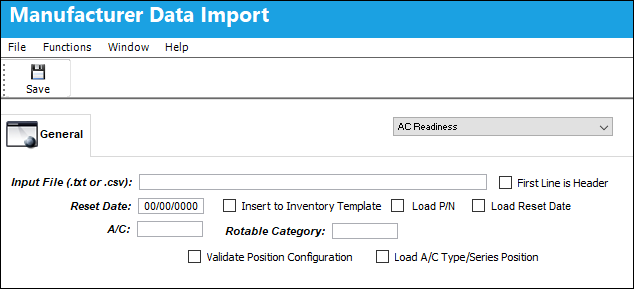
The following information/options are available in this window:
_____________________________________________________________________________________
Input File (.txt or .csv):
Select into the field to select the Tab Delimited Aircraft Readiness Record Text File that was supplied by the manufacturer.
Make sure that A/C Readiness Text File is properly set up.
First Line is Header checkbox
Check to indicate that the first line in the Tab delimited text file represents a Header line and should not be imported.
Reset Date
This date entered will be used for the component's aircraft Installed Date, Birth Date, P/N Controls Reset Date, and P/N E/Cs Effective Date. This is usually the service date of the aircraft.
AC
The individual aircraft tail number. Select an Aircraft Tail Number to load the Aircraft Readiness Records for. If the Load P/N checkbox is selected, A/C Effectivity is created against the P/N in the P/N Master that is entered in the import file.
The Aircraft must exist in the Aircraft Master.
Insert to Inventory Template checkbox
Check to load the A/C Readiness Records to the A/C Initial Template Load in Technical Records where the records can be verified and updated before loading to inventory.
If this is checkbox is not selected, the records will be loaded directly to inventory.
Rotable Category
The P/N Category to assign to new parts that will be created in the P/N Master.
Load P/N checkbox
When selected the system inserts new parts.
Load Reset Date checkbox 
When selected, the date entered in the Mfg Date column of the import file will be used as the component's Birth Date, P/N Controls Reset Date, and P/N E/Cs Effective Date; the Reset Date field will be used to determine the component's aircraft Installed Date. If the checkbox is not selected, the components Birth Date, P/N Controls Reset Date,and P/N E/Cs Effective Date will default to the date entered in the Reset Date field.
Note: In the import file, if the Mfg Date is not populated for a specific component, the system will automatically use the previous component's Mfg Date.
Update Template Control checkbox
When selected, the parts that are loaded to the A/C Initial Template Load will appear grayed out and those parts' previously existing P/N Controls will automatically be imported. Each of these P/N Controls will have their Reset Dates defined in the Manufacturer Data Import Window.
This checkbox does not create new P/N Controls.
Not selecting this checkbox will force the user to select the P/N Control button and update times for each part loaded.
Load A/C Type/Series Position checkbox
When selected the system adds all positions to the imported parts.
 This checkbox is security controlled via Engineering/ Update/ Manufacturer Data Import. For additional information, refer to the Security Explorer via the System Administration Training Manual.
_____________________________________________________________________________________
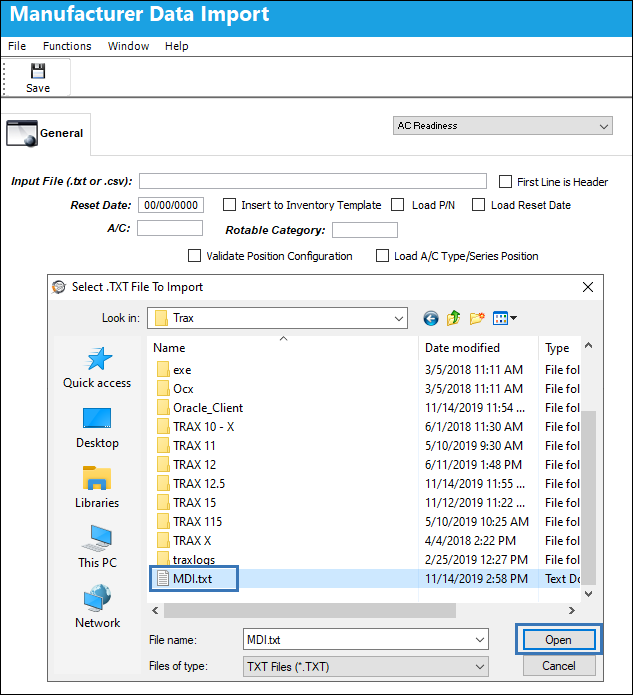
Select into the Input File (.txt or .cvs) field and the Select .TXT File To Import pop-up window appears. Navigate to the desired .txt file and select the Open button.
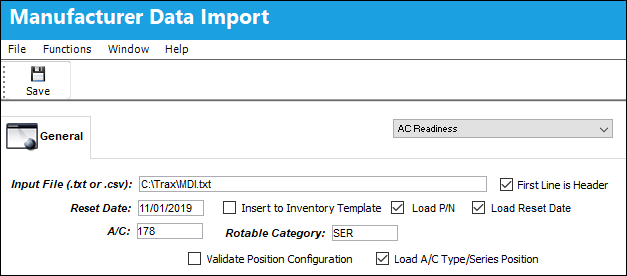
Populate the mandatory fields and select the desired checkboxes then select the Save  button.
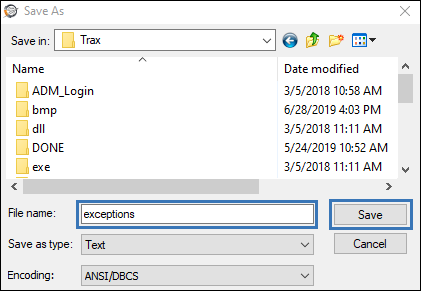
Once the file has been imported, a Save As window will appear to save an exceptions report.
Example:
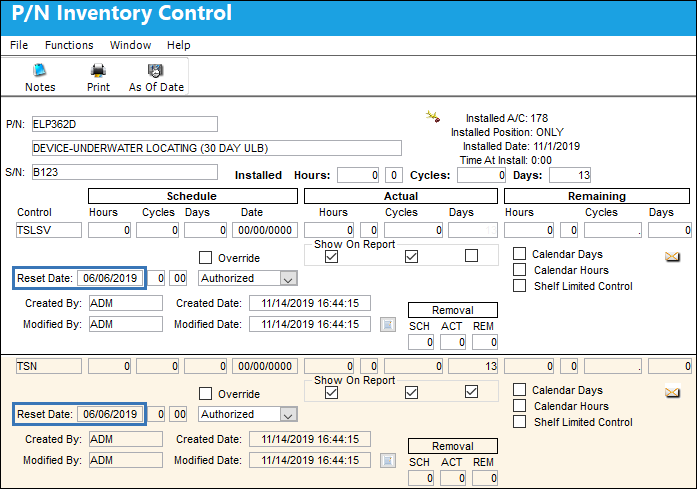
The example below shows how the system works when a manufacturer date is entered in the Mfg Date field of the import file, and the Load Reset Date checkbox is selected. This import was carried out 11/14/2019.
The import file has the component's manufacturer date entered in the Mfg Date column, 06/06/2019; the excel file is then saved as a .txt file to be imported into the system.

The required fields are populated in the Manufacture Data Import window and the Load Reset Date checkbox selected; notice the date entered in the Reset Date field is 11/01/2019.
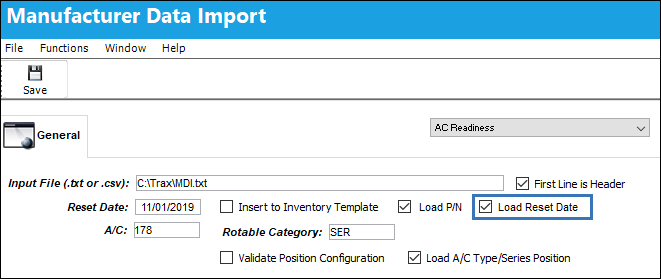
The Save button is selected and the component is loaded into the system.
The component has been created and its details can be viewed via Inventory/ Update/ Inventory Transactions.

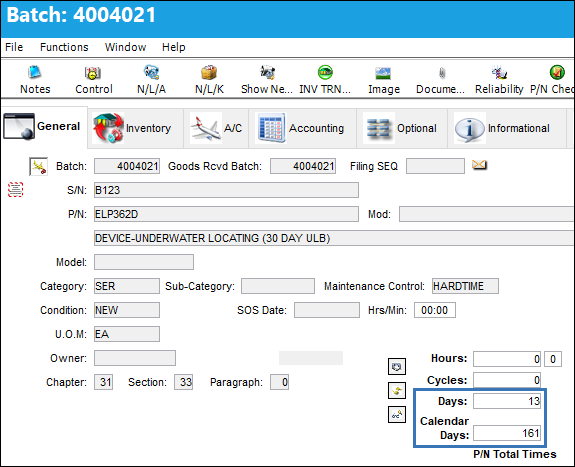
From the Inventory Detail, General tab, the time breakdown shows:
- the component has been installed for 13 days (11/01/19 [Reset Date] - 11/14/19 [file import date] = 13 days), and
- the component has a Birth Date of 161 days (06/06/19 [Mfg Date] - 11/14/19 [file import date] = 161 days).
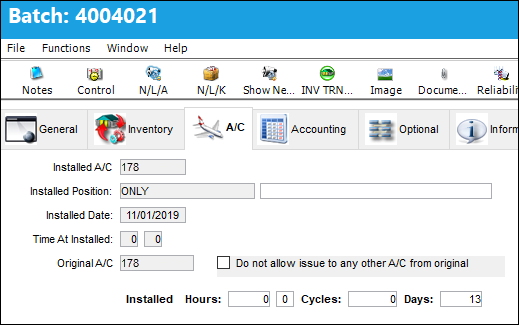
The A/C tab displays the installed aircraft, position, and installed date; notice the install date is 11/01/2019 (the Reset Date from the Manufacturer Date Import).
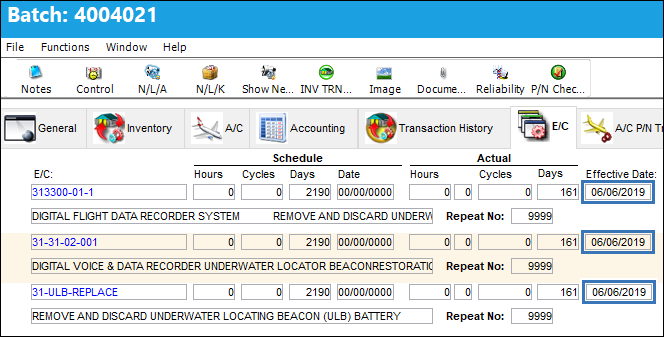
The E/C tab displays the E/Cs Effective Dates have populated with the Mfg Date specified in the import file, 06/06/2019.
The P/N Control  button displays the P/N Controls Reset Dates have populated with the Mfg Date specified in the import file, 06/06/2019.
Share
Print
|
©1997-2026 Trax USA Corp. All rights reserved. This manual may not be copied, photocopied, reproduced, translated, or converted to any electronic or machine-readable form, in whole or in part, without prior written approval from Trax USA Corp. |
 |