
 Share
Share
 Print
Print
|
|
|
|
|


An Exceptions Report is generated after the Aircraft Readiness Records are imported indicating any errors, changes, omissions, etc.
The exceptions report can include the following items:
- Records that do not have a serial number.
- If the record in the A/C Readiness File does not have a serial number (i.e. Serial/Lot Number field is empty) it will not be loaded into TRAX. The A/C Readiness Manufacturer Data Import is to import only rotable parts.
- Records where the vendor does not exist in the Vendor Master in TRAX.
- The A/C Readiness Record is not loaded if the vendor in the Vendor Name Field of the A/C Readiness File does not exist in the TRAX Vendor Master.
Row_Number 1 will always be in the exception report if it a header row.
- The A/C Readiness Record is not loaded if the vendor in the Vendor Name Field of the A/C Readiness File does not exist in the TRAX Vendor Master.
- Records where the P/N and S/N already exist in TRAX (i.e. it is a duplicate).
- The A/C Readiness Record is not loaded because the Part Number and Serial Number already exists in TRAX inventory. It is recommended that you investigate why there is a duplicate and where that particular part is actually installed.
- Records where the P/N contains a space or a hard return in a P/N or S/N. The generated exception will read 'Format of PN or SN is invalid'. This exception is in effect only with CSV import files, not delimited text files.
 Item number 4 pertains to V11 and all later releases of TRAX.
 - Records where the P/N exists in TRAX but is not designated as a rotable.
- The A/C Readiness Record is not loaded because the P/N exists in the TRAX PN Master and it is not designated as a rotable (serialized) part.
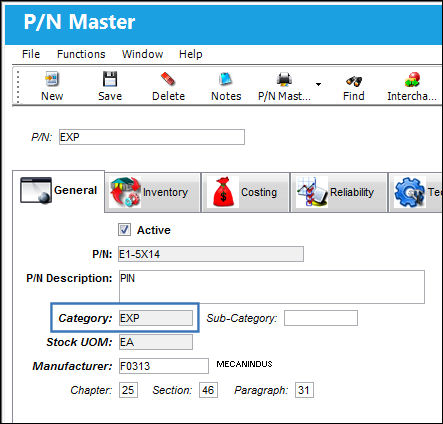
- Records that created new parts in the TRAX P/N Master.
- P/N Position Header Configuration is not set up for P/N: XXXX Position: YYYY
- P/N S/N loaded with duplicate position (this will happen if the qty in the file did not match the quantity in the import file).
- Record has no Quantity information (quantity is not defined for the position).

In this exception report the 1st row was a header row. Select the 'First Line is Header' checkbox so that the import program will ignore the header.
The Exception Report lists all exceptions (errors) by Row Number. It is recommended that the A/C Readiness file is opened with Microsoft Excel and all exceptions and errors from the exception report are investigated against the A/C Readiness File. Any discrepancies found during this investigation should be corrected and updated in the TRAX P/N Master and Inventory Entries that were created by the Manufacturer Import Program.
If the A/C Readiness Records are loaded to the A/C Initial Template Load verify and correct (or add additional information) before the records are saved to inventory.
Additional information is detailed in the following:
Share
Print
|
©1997-2026 Trax USA Corp. All rights reserved. This manual may not be copied, photocopied, reproduced, translated, or converted to any electronic or machine-readable form, in whole or in part, without prior written approval from Trax USA Corp. |
 |