
 Share
Share
 Print
Print
|
|
|
|
|


Shop W/O Closing, General Tab
The Shop W/O Closing, General tab contains the following information.
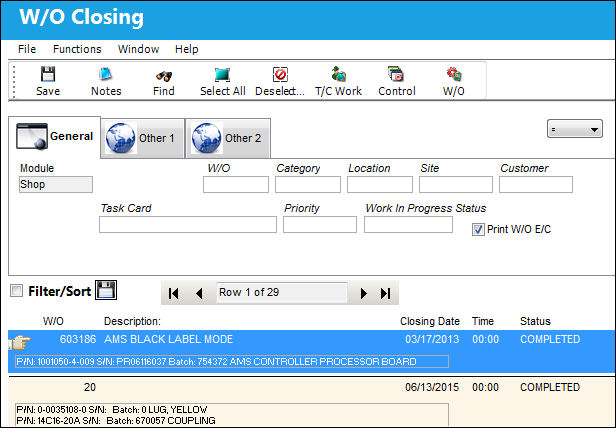
The following information/options are available in this window:
_____________________________________________________________________________________
Module
This field is set to Shop by default.
W/O
The Work Order used to categorize, manage, and schedule work requirements for aircraft maintenance.
Category
Work Order Category code.
In the Interactive Planner, the W/O Category can allow for graphical color assignment by category.
Location
The Location for maintenance events, inventory stores, orders, transactions, or training events.
Site
The Site where the work is to be carried out (if applicable).
Customer
The customer for whom the Work Order was created.
This field is also available on the Work Order, Other 1 tab. If the Customer field is populated in the Shop Work Order, General tab, the system will not allow the user to utilize this field in the Shop Work Order, Other 1 tab.
Task Card
The Task Card / Job Card that details the scheduled maintenance work. Users can search for all Shop Work Orders linked to a particular Task Card.
Priority
The priority of the Work Order (e.g., Urgent).
Work In Progress Status
Select a System Transaction Code to query by. This field is informational only and used for the purpose of querying for specific Work Orders.
Print W/O E/C checkbox
Selecting this checkbox will allow the user to have the system automatically print all Engineering Controls associated with the Shop Work Order when the Shop Work Order is closed.
_____________________________________________________________________________________
For more details on the Shop W/O Closing process, refer to the Shop W/O Closing window.
Share
Print
|
©1997-2026 Trax USA Corp. All rights reserved. This manual may not be copied, photocopied, reproduced, translated, or converted to any electronic or machine-readable form, in whole or in part, without prior written approval from Trax USA Corp. |
 |