
 Share
Share
 Print
Print
|
|
|
|
|


Control Button, via Shop W/O Closing
The Control  button allows users to update the Engineering Control for the selected Shop Work Order. If the dependency (i.e the Task Card) on this E/C has been completed, deferred, or canceled, updates to the following editable fields (Status, Function and Reset Date) can only be updated via this window. If the dependency has not been closed, updates to the E/C can be done via the Engineering Control button. For additional information, refer to the Engineering Control Button via the Shop Work Order Detail buttons.
 The Control button is security controlled via Security Explorer/ Production/ Update/ W/O/ W/O Engineering Control Update. For additional information, refer to the Security Explorer via the System Administration Training manual.
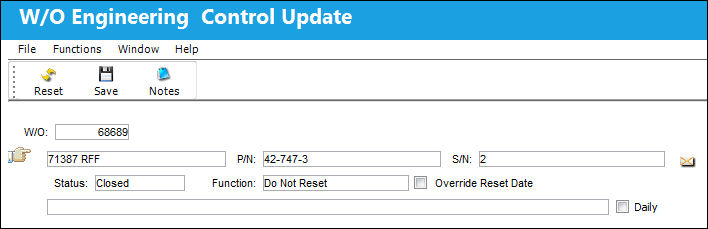
The following information/options are available in this window:
_____________________________________________________________________________________
W/O
The Work Order used to categorize, manage, and schedule work requirements for aircraft maintenance.
Control
The Engineering Control or Part Number Control linked to the Work Order.
P/N
The Part Number reference for the aircraft part. This part is linked to the P/N E/C or P/N Control.
S/N
The Serial Number for the specific serialized part. This is the particular part linked to the P/N E/C or P/N Control.
Status
The current status of the E/C. For more information refer to the Engineering Control, General tab.
Function drop down
This field defines how the Control's times will be treated once its requirements are met. The Function drop down has three selections, including Reset, Do Not Reset, and Has Been Reset.
Reset - Reset the time controls to zero.
The Reset option is security controlled via the Security Explorer/ Production/ Update/ W/O/ Reset. For additional information, refer to the Security Explorer via the System Administration Training manual.
Do Not Reset - Do not reset the time controls to zero.
The Do Not Reset option is security controlled via the Security Explorer/ Production/ Update/ W/O/ Do Not Reset. For additional information, refer to the Security Explorer via the System Administration Training manual.
Has Been Reset - The time control has already been reset to zero.
The Has Been Reset option is security controlled via the Security Explorer/ Production/ Update/ W/O/ Has Been Reset. For additional information, refer to the Security Explorer via the System Administration Training manual.
Override Reset Date checkbox
Select this checkbox to override the E/Cs Reset Date. When this checkbox is selected, the Date and time fields will appear.
Reset Date/Time - Enter the E/Cs Reset Date and time. This field appears when the Override Reset Date checkbox is selected.
Daily checkbox
When the Daily checkbox is selected, actual hour/cycles (time) are reset and a compliance record is written for this E/C upon the completion of the Task Cards on an 'Open' Work Order rather than at the closing of the W/O. This feature is useful for the scheduling of recurrent daily E/Cs. (In this window, this checkbox is view only)
_____________________________________________________________________________________
Additional information can be included through the Notes  button.
Share
Print
|
©1997-2026 Trax USA Corp. All rights reserved. This manual may not be copied, photocopied, reproduced, translated, or converted to any electronic or machine-readable form, in whole or in part, without prior written approval from Trax USA Corp. |
 |