
 Share
Share
 Print
Print
|
|
|
|
|


Defect Report Query
The Defect Report Query allows the user to query for Defect Reports that have been created in the system. The user can search all statuses when searching for a Defect Report.
As with the majority of the query selections on the system, it is better to select as many parameters as required to minimize the search result.
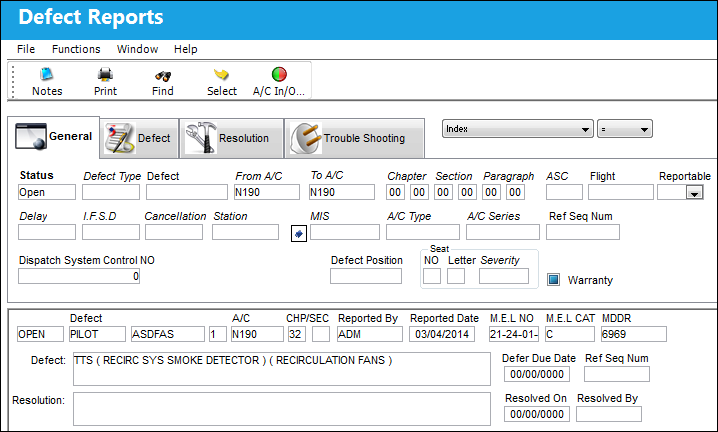
Query
The following information/options are available in this window:
_____________________________________________________________________________________
General Tab
Status - The status of the Defect Report.
Defect Type - The type of defect found on the aircraft (for example, Pilot Report, MX Report).
Defect - The defect number (or log book number).
From-To A/C - The individual aircraft tail number.
Chapter - The ATA Chapter classification associated to the Defect Report. The chapters which appear for selection are those ATA Chapters which are flagged for Defect in the ATA Master. This Chapter/Section must have Alert levels set up in order for Recurrent Items to be created via the Reliability module.
Section - The specific Section of the ATA Chapter associated to the Defect Report. The Sections which appear for selection are those ATA Chapters which are flagged for Defect in the ATA Master. This Chapter/Section must have Alert levels set up in order for Recurrent Items to be created via the Reliability module.
Paragraph - The ATA Chapter/Paragraph classification of the Defect.
ASC - The Aircraft System Code.
Flight - The flight reference number/information.
Reportable drop down - Select Yes, No, or All to filter for reportable defects.
Delay - The Delay Code (i.e. Equipment Failure, Scheduled Ground Time).
I.F.S.D - The Engine In-Flight Shut Down code (i.e. Foreign Object Debris, Lightning Strike). These codes can be set up via the Technical Records Transaction Codes. Go to Settings/ Explorer/ System Transaction Code/ Technical Records.
Cancellation - The flight cancellation code if applicable (i.e. Maintenance Repairs, Ground Servicing). These codes can be set up via the Technical Records Transaction Codes. Go to Settings/ Explorer/ System Transaction Code/ Technical Records.
Station - The station where the defect was worked on.
MIS - The Mechanical Interruption Summary related to this Defect.
A/C Type/Series - The Aircraft Type and Series/Fleet assignment.
Ref Seq Num - The reference sequence number of this Defect.
Dispatch System Control NO - This number is generated by the system and represents that the defect has been sent to SABRE for those customers with this interface.
Defect Position - The aircraft position of the item.
Seat No - The passenger seat number on the aircraft.
Seat Letter - The passenger seat letter on the aircraft.
Seat Severity - The Seat Severity Code used to indicate the level of severity (i.e damage) of the seat. This can be selected from the list of Seat Severity Transaction Codes via the Technical Records System Transaction Codes.
Warranty Flag - Select this checkbox if the aircraft is associated with a warranty condition
Defect Tab
Defect CAT - The Defect Report's Category Code.
Reported By - The employee that reported the defect.
Reported From-To Date - The date range the defects were reported on.
M.E.L - The Minimum Equipment List Number that flight crews agree to accept as inoperative for short periods. Operator creates an MEL unique to his or her own configuration.
MEL checkbox - Select this checkbox if the Defect was deferred by an MEL.
CDL checkbox - Select this checkbox if the Defect was deferred by a CDL.
GMM checkbox - Select this checkbox if the Defect was deferred by a GMM.
All checkbox - Select this checkbox to include MELs, GMMs and CDLs in the query.
M.D.D.R. - This is also known as a Deferred Maintenance Item (DMI). This field allows users to enter the deferment on one defect report (aircraft log page) by using the MDDR number on another defect report (aircraft log page) so that the user may resolve the MDDR.
Authorization - The Authorization status of the Defect.
Defer - Reason for the defect deferment; for example MEL, Dent, No Parts, WATCH item, etc. This field is part of the functional System Transaction Codes and contents embedded functionality which includes authorization requirements, default requisition prompts and defaulted MDDR closings.
Defer By - The Mechanic/Maintenance employee who is deferring the defect. Populating this field will make the employee's name to appear right below this field. For selection, any employees and/or contractors who have the authority to defer a defect must be entered in the Employee Master via the Settings module.
Defer Category - Category of the deferment. This is the reference if the deferral is operational, or performance related. This field may be used to reference if the deferral is related to a General Maintenance Manual or a Standard Practice Manual.
Defer Due Date - The date and time the deferment must be resolved by.
Defect Description - The description of the defect which describes the problem found or notes the service being performed.
Customer - Customer reference number. This information is pulled from the A/C Master, Other 1 Tab via the Settings/Update/A/C Master/Other 1 Tab.
SDR - The Service Difficulty Report related to this Defect.
Defer From WO - When a Scheduled Maintenance Event is deferred automatically, a 'WO/DEFER' Defect Type is generated. It will reference the Work Order which the Deferred Defect Report was created from in this field.
Defer From TC - When a Scheduled Maintenance Event is deferred automatically, a 'WO/DEFER' Defect Type is generated. This will reference the Task Card in relation to the Work Order which the Deferred Defect Report was created from in this field.
Required Inspection Item - Select this checkbox if the Defect is a a required inspection item.
Resolution Tab
Resolution Category - The Resolution Category, categorized by the available resolution category types.
Resolve By - The employee who resolved the defect.
From-To Resolve Date - The From-To date range that the record was resolved.
W/O - The Work Order used to categorize, manage, and schedule work requirements for aircraft maintenance.
Resolved Station - The station where the defect was resolved.
Resolved On - The log related to the resolution.
Log/Item - The item on the log related to the resolution.
Resolution Description - The description of the resolution of the defect item.
Created Date From-To - The From-To date range that the record was created.
Fault Confirm drop down - To select option from the drop down: All Confirmed, Not Confirmed, Pending.
Trouble Shooting Tab
Station - The Station where the troubleshooting was performed.
Trouble Shooting By - The employee code of the user who performed the troubleshooting.
Trouble Shooting On From-To Date - The From-To date range the trouble shooting was performed.
Status - Select the current status of the trouble shooting Item.
Trouble Shooting On - The date the troubleshooting was performed.
_____________________________________________________________________________________
Results
The following information/options are available in this window:
_____________________________________________________________________________________
Status
The status of the Defect Report.
Defect Type
The type of defect found on the aircraft (for example, Pilot Report, MX Report).
Defect
The defect number (or log book number).
Defect Item
The defect log item number.
A/C
The individual aircraft tail number.
CHP/SEC
The ATA Chapter/Section classification of the Defect.
Reported By
The employee that reported the defect.
Reported Date
The date the defect was reported.
M.E.L NO
The Minimum Equipment List Number that flight crews agree to accept as inoperative for short periods. Operator creates an MEL unique to his or her own configuration.
M.E.L CAT
The Minimum Equipment List (MEL) reference related to the Defect Report deferral. MEL/CDL may be defined, entered, or digitally imported in the MEL Master.
MDDR
This is also known as a Deferred Maintenance Item (DMI). This field allows users to enter the deferment on one defect report (aircraft log page) by using the MDDR number on another defect report (aircraft log page) so that the user may resolve the MDDR.
Defect Description
The description of the defect which describes the problem found or notes the service being performed.
Defer Due Date
The date and time the deferment must be resolved by.
Ref Seq Num
The reference sequence number of this Defect.
Resolution Description
The description of the resolution of the defect item.
Resolved On
The date the defect was resolved.
Resolved By
The employee who resolved the defect.
_____________________________________________________________________________________
Share
Print
|
©1997-2026 Trax USA Corp. All rights reserved. This manual may not be copied, photocopied, reproduced, translated, or converted to any electronic or machine-readable form, in whole or in part, without prior written approval from Trax USA Corp. |
 |