
 Share
Share
 Print
Print
|
|
|
|
|


A/C Controller Panel Query
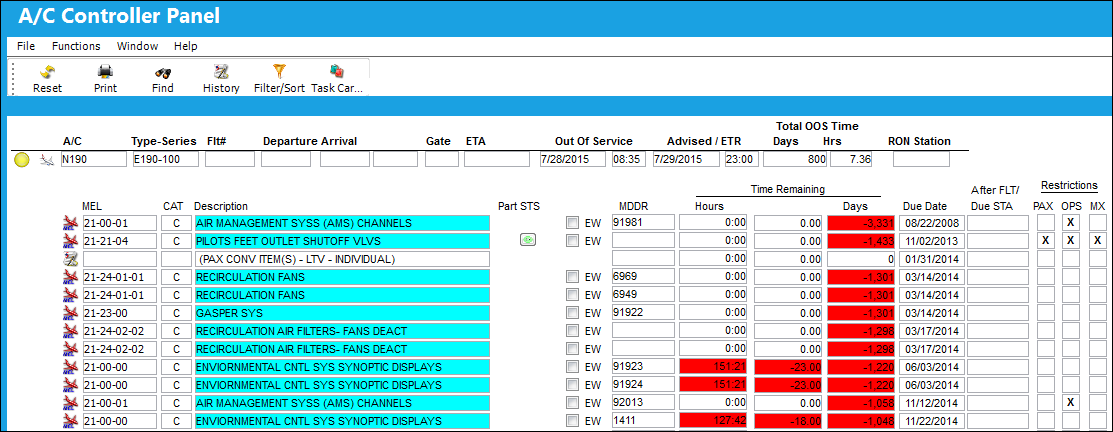
The A/C Controller Panel Query allows users to quickly view the current status of all aircraft in the fleet along with any pending discrepancies. Applicable records, such as pending Defect Reports, can be accessed from this window in query mode.
Actual records cannot be edited from the Query window. For detailed information on the overall functionality of this window and how to manage this type of A/C data, refer to the A/C Controller Panel window.
The following information/options are available in this window:
_____________________________________________________________________________________
A/C
The individual aircraft tail number. Right click on the aircraft symbol to access information dialog actions. Here the user can query the A/C Master details, view open defects, scheduled flights, and fault codes for the selected aircraft. For additional information, refer to Additional Information, via the A/C Controller Panel of the Technical Records Training Manual.
Type-Series
The Aircraft Type and Series/Fleet assignment.
Flt#
The aircraft's next scheduled flight number.
Departure
The departure time.
Arrival
The arrival time.
Gate
The arrival gate number.
ETA
The Estimated Time of Arrival. This information can assist the Maintenance Controller in planning gate activity along with providing advance notice to mechanics, as required.
Out Of Service
The date and time that the aircraft went out of service for required maintenance.
Advised/ETR
The date and time that the discrepancy was reported. The default is the time that the Defect Report is being created and can be edited as required.
Total OOS Time (Days/Hrs)
The total out of service time for the aircraft.
RON Station
This field will display the destination location of the last scheduled flight of that day.
MEL  line item
When the MEL  button appears in the A/C Controller Panel, this indicates that a MEL is currently associated with the aircraft. Double click on the MEL
  button to view the selected Defect details. For additional information, refer to the Defect Report, General Tab.
MEL - The Minimum Equipment List number. Specify either MEL, CDL, or GMM with the appropriate radio buttons.
CAT - The MEL/CDL Category code that is linked to the MEL. This code is automatically populated in the Defect Report when the MEL is used to defer the Defect. This transaction code can contain a default First Schedule for the deferal (refer to MEL/CDL First Schedule below).
Description - A free-text description of the MEL.
Part STS
Indicates the availability of the part/tool required for the service event.
EW (Elementary Work) checkbox
When an MEL has been flagged as EW (Elementary Work), via Settings/ Update/ MEL Master, the following checkbox will default to selected in the A/C Controller Panel.
MDDR
This is also known as a Deferred Maintenance Item (DMI). This field allows users to enter the deferment on one defect report (aircraft log page) by using the MDDR number on another defect report (aircraft log page) so that the user may resolve the MDDR.
Time Remaining (Hours/Minutes/Days)
The system automatically calculates based on the mean hours and cycles per day, the remaining hours/cycles/days which can be flown on that Due Date without the maintenance event being overflown. If a parameter is overdue, it is listed as a negative number (e.g., -5). For additional information, refer to the Due At section via A/C Planning Details which can be found in the Planning Training Manual.
Due Date
The Due Date is calculated based on the Defect Report's Defer Schedule information and the aircraft's mean hours and cycles per day. For additional information, refer to the Defect Report Detail, Defer Tab, via Defect Reports of the Technical Records Training Manual.
After FLT/Due STA
The station the flight is due to arrive.
Restriction checkboxes
Displays which types of restrictions exists for the MEL.
PAX - Indicates that Pax. Conv. Restrictions exist for the MEL.
OPS (Operation) - Indicates the Operation Restriction that exists for the MEL.
MX (Maintenance) - Indicates the Maintenance Restriction that exists for the MEL.
_____________________________________________________________________________________
Share
Print
|
©1997-2026 Trax USA Corp. All rights reserved. This manual may not be copied, photocopied, reproduced, translated, or converted to any electronic or machine-readable form, in whole or in part, without prior written approval from Trax USA Corp. |
 |