 Download Online Help
 Print
|
|
|
|
|


Dashboard Tab
The Dashboard tab provides three sections that provide additional information regarding tasks against a Work Order at a glance. The Overall Check Progress table covers the current progress of all tasks that are linked to the Work Order. This also includes current Status and Man Hours progress. The Defect Statistics table displays all Open and Deferred defects including the Man Hours progress. The Task Statistics table covers a birds-eye view os statistical data of all Task Cards that are linked to the Work Order.
When selected, the Dashboard tab of the Shop Control application displays the following tables.
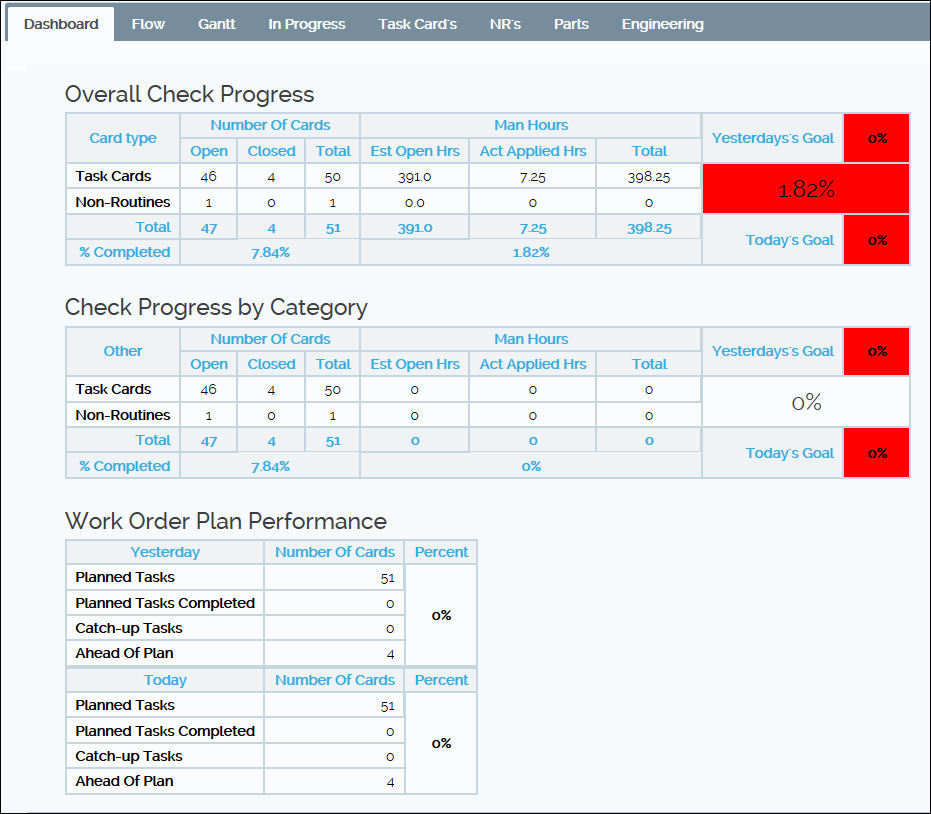
The following tables are available:
_________________________________________________________________________
Overall Check Progress
This table covers the current progress of all of the Task Cards (scheduled and non-routine) that are linked to the Work Order. The table shows how many T/Cs and N/R T/Cs are Open and Closed, and how many Man Hours are linked to each one. The Man Hours section indicates the amount of Estimated Open Hours (amount of hours pending completion) for each card and the amount of Actual Applied Hours for each card. The totals provided in this table determine the current percentages of completion: for overall Tasks, remaining Man Hours requirement, the previous day's tasks, the current day's tasks, and the overall progress of the W/O.
Check Progress by Category
This section contains the same information as the Overall Check Progress section (above), but the Tasks Cards are grouped into different tables based on their Skill Category. Tasks are linked to Skill Categories through the Skill field of the Shop W/O Task Card, Optional 2 tab. The Skills entered in this field are linked to a larger Skill Category in the Skill Master window. The hard-coded Skill Categories are as follows: Mechanical, Avionics, Structures, Propulsion, Interiors, Composites, NDT, and Material Treatment/Coatings.
The Skill Category is listed at the top left box of each table in this section. If the W/O contains any Task Cards that are not linked to one of these Skill Categories, the final table in this section will contain the text 'Other' instead of a hard-coded Skill Category.
Work Order Plan Performance
This section contains the W/O plan for the day and the previous day. Each daily plan consists of individual tasks and the percentage of plans completed for the day. These plans are based on the W/O Task Cards' schedules as specified in the W/O Task Card, Schedule tab.
_________________________________________________________________________
Download Online Help
Print
|
©1997-2018 Trax USA Corp. All rights reserved. This manual may not be copied, photocopied, reproduced, translated, or converted to any electronic or machine-readable form, in whole or in part, without prior written approval from Trax USA Corp. |
 |