 Download Online Help
 Print
|
|
|
|
|


Engineering Tab
The Engineering tab contains Engineering Requests entered against the W/O's Non-Routine Task Cards. These requests are sent to the aircraft manufacturer in the event that additional information/documentation is required in order to complete the Non-Routine task. New requests can be created from this tab.
When selected, the Engineering tab is displayed as follows. The list can be sorted and filtered by column and keywords. Existing entries can be edited or deleted and new entries can also be added from this tab (see below).
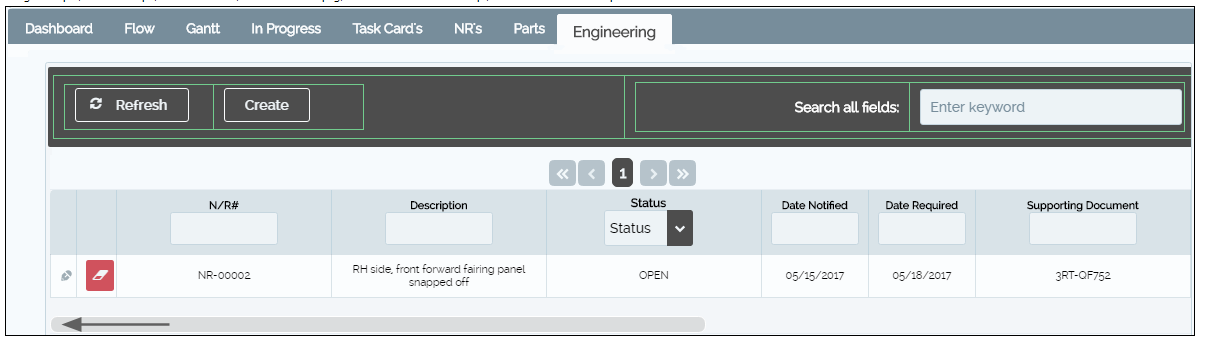
The following Engineering Request information is listed:
_________________________________________________________________________
Refresh  button
Select the Refresh button to refresh any of the Task Card information in this window.
Create button
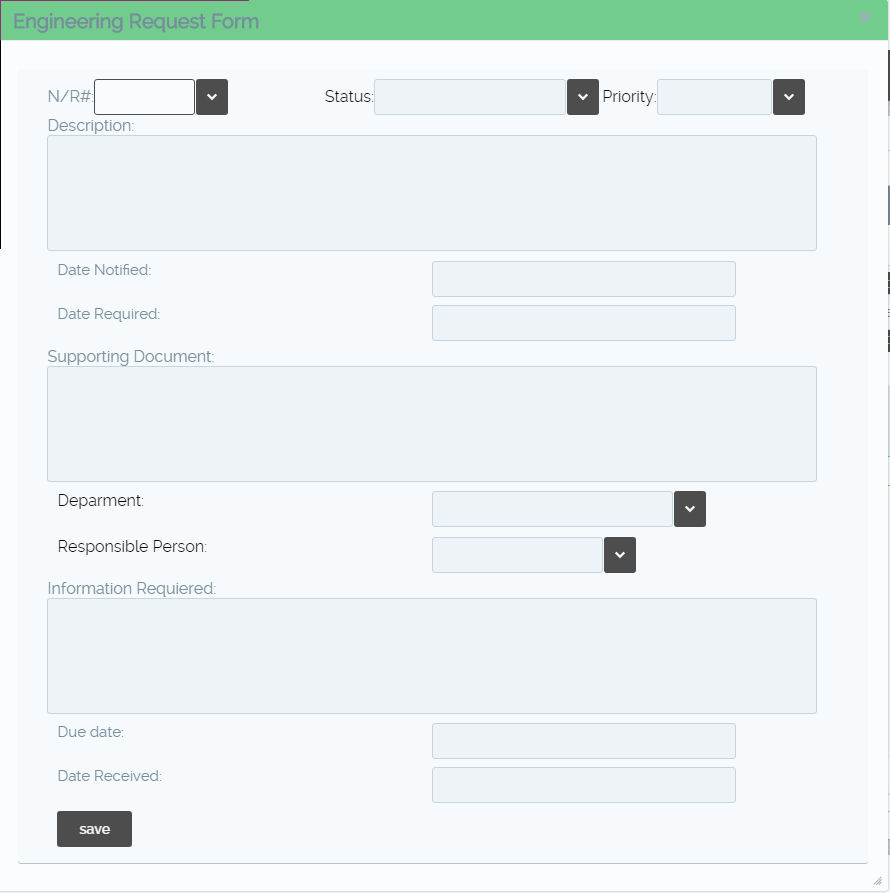
Select this button to create a new Engineering Request. When selected, a window pops up called Engineering Request Form. See below for more information.
Search all fields
The Search all fields option allows the user to enter any key word(s) to filter for a specific Task Card.
Edit  button
Select this button to edit an existing Engineering Request.
Delete  button
Select this button delete the selected Engineering Request.
N/R#
The Non-Routine Task Card linked to the particular Engineering Request.
Description
The reason why the Engineering Request was made. This should explain what is required from the authorities or manufacturer.
Status
The current status of the Engineering Request or WIP (Work In Progress).
Date Notified
The date that the Engineering Request was creating notifying the authorities or manufacturer.
Date Required
The date that the requested document(s) are required.
Supporting Document
The supporting documentation requested to complete the Non Routine.
Due Date
The date that the requested document(s) are due.
Date Received
The date that the requested document was actually received.
Priority
The priority of the requested document.
Responsible Person
The person who created and is responsible for receiving the Engineering Request.
Information Required
Information required to complete the N/R Task Card.
_________________________________________________________________________
This Engineering Request record can be viewed from the ISE Communications Button, via the W/O Non-Routine Task Card window in the main application.
Create Button
To create an Engineering Request from Shop Control, select the Create button. When selected, the following window pops up. Select the Save button to create the record.
Download Online Help
Print
|
©1997-2018 Trax USA Corp. All rights reserved. This manual may not be copied, photocopied, reproduced, translated, or converted to any electronic or machine-readable form, in whole or in part, without prior written approval from Trax USA Corp. |
 |