 Download Online Help
 Print
|
|
|
|
|


In Progress Tab
The In Progress tab lists the required Task Card Items and charts their progress. This table includes each Item's overall percentage of completion, the amount of accumulated man hours vs the amount of required man hours, and the amount of man hours remaining.
When selected, the In Progress tab is displayed as follows. The list can be sorted and filtered by column and keywords.
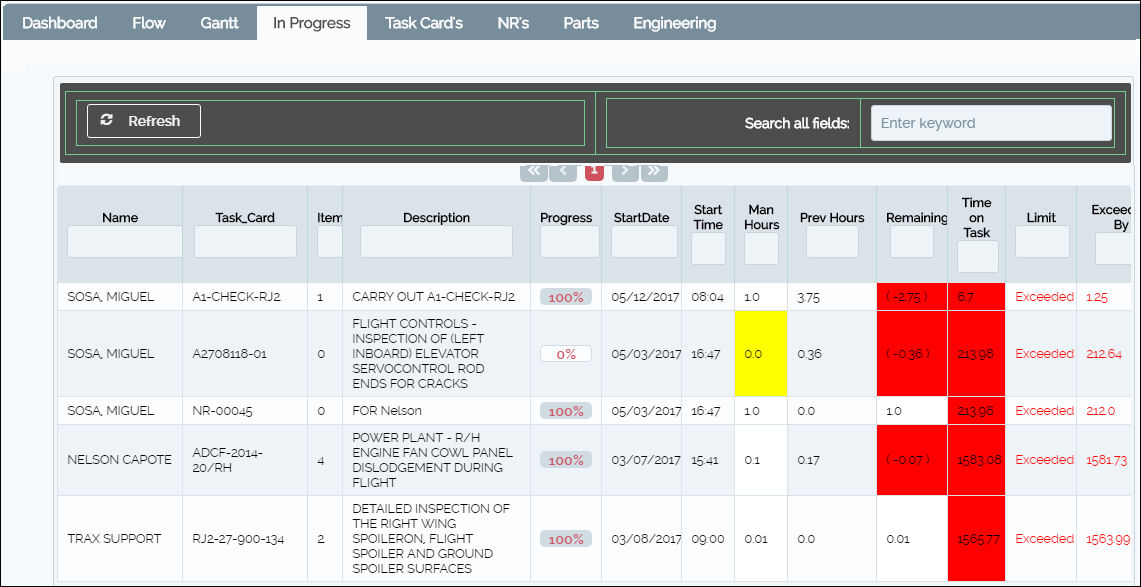
The following information is listed:
_________________________________________________________________________
Refresh  button
Select the Refresh button to refresh any of the Task Card information in this window.
Search all fields
The Search all fields option allows the user to enter any key word(s) to filter for a specific Task Card.
Name
The name of the user that the Task Card Item is assigned to.
Task Card
The Task Card / Job Card that details the scheduled maintenance work.
Item
The Task Card Item assigned to the user.
Description
A description of the Task Card.
Progress
This displays the progress and completion percentage based on actual vs estimated man hours.
StartDate
The concatenated Start Date of the Task Card.
StartTime
The Task Card's start time.
ManHours
The total amount pf man hours for the Task Card Item.
PrevHours
The total amount of actual hours accumulated for the Task Card Item.
Remaining
The difference between estimated hours and Actuals for the Task Card Item. The background is red when the remaining amount of hours is less than 0 hours. Parentheses indicate a negative amount of hours: (-1.0).
-Red background when remaining is < 0hrs. Brackets to indicate negative hrs.
Time on Task
This background is red when the amount of hours is greater than the Remaining hours and yellow when greater than 85% of the Remaining hours.
Limit
Flagged as 'Exceeded' when the actual hours are greater than the estimated amount of hours.
Exceeded By
The amount of hours that the actual hours has exceeded the estimated amount of hours. The text will be in red when the actuals exceed the estimated hours.
_________________________________________________________________________
Download Online Help
Print
|
©1997-2018 Trax USA Corp. All rights reserved. This manual may not be copied, photocopied, reproduced, translated, or converted to any electronic or machine-readable form, in whole or in part, without prior written approval from Trax USA Corp. |
 |