
 Share
Share
 Print
Print
|
|
|
|
|


The Re-sequence  button re-sorts the order of a Task Card's Items according the numbers defined in the Items' Sort Order field.
This button is available from the Engineering module and the Production module (via the W/O Task Card Item).
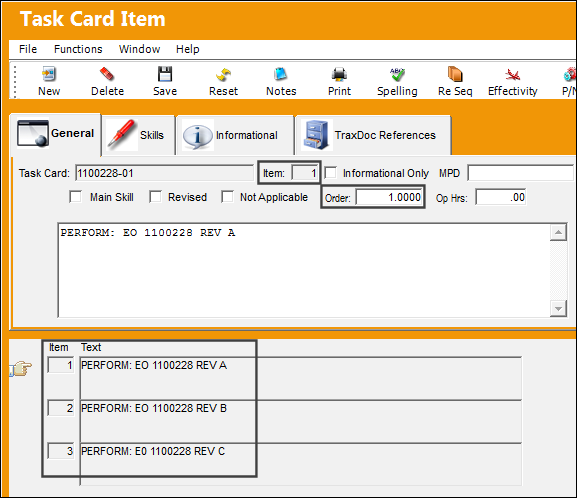
For example, notice that these three Items have Item numbers and Order Sort numbers. Notice that the Item numbers are the same as the Order sort number.
 This button is security-controlled via Engineering/Update/Task Card/Task Card Item Re-Sequence. For more information refer to the Security Explorer.
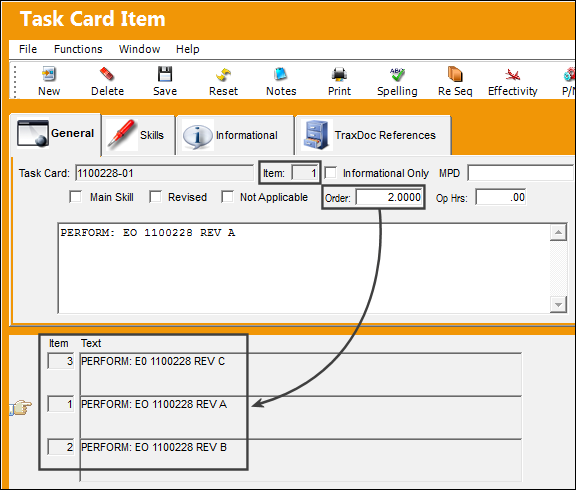
When the sequential order is changed for the Item number, the Items are re-ordered on the list at the bottom of the window. But notice that the Item number has not changed.
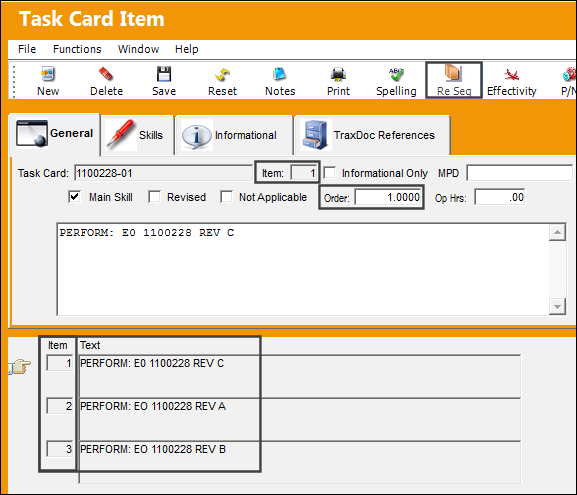
When the Re-sequence button is selected, the Item numbers change to the Order number specified for each Item.
Share
Print
|
©1997-2026 Trax USA Corp. All rights reserved. This manual may not be copied, photocopied, reproduced, translated, or converted to any electronic or machine-readable form, in whole or in part, without prior written approval from Trax USA Corp. |
 |