
 Share
Share
 Print
Print
|
|
|
|
|


The Shipping Information tab in the Customer Order pop-up window is used to specify shipping address for the Customer that's inked to the 3rd Party Work Order.
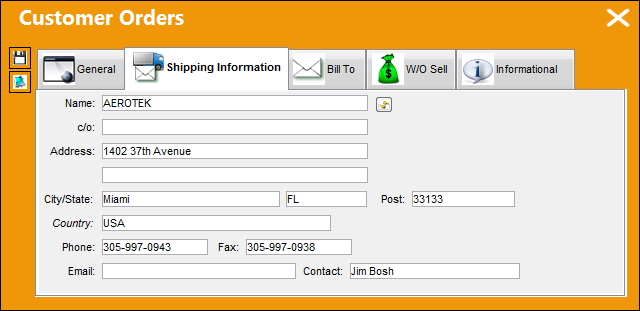
The following information/options are available in this window:
_____________________________________________________________________________________
Name
The name of the customer who was selected in the Customer field will appear here as defined in the Customer Master.
C/O
Main contact at an organization (Care of).
Address
Contact's address.
City/State
Contact's city/state.
Postal Code
Contact's postal reference (zip/ post code).
Country
Contact's country.
Phone
Contact's telephone number.
Fax
Contact's facsimile number.
Contact electronic mail address.
Contact
Main contact at the organization.
Reset Customer Information  button
To re-set customer information, select the Reset Customer Information  button.
_____________________________________________________________________________________
Share
Print
|
©1997-2026 Trax USA Corp. All rights reserved. This manual may not be copied, photocopied, reproduced, translated, or converted to any electronic or machine-readable form, in whole or in part, without prior written approval from Trax USA Corp. |
 |