
 Share
Share
 Print
Print
|
|
|
|
|


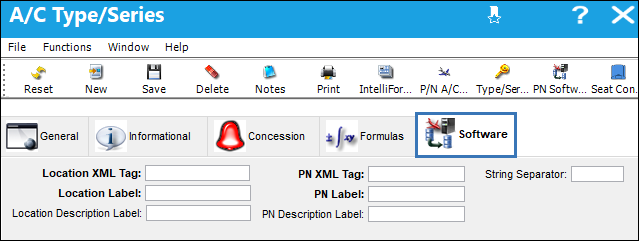
A/C Type/Series, Software Tab

The Software tab in the A/C Type/Series window appears when the Software Configuration Control checkbox is selected in the A/C Type/Series, General Tab. The Software tab allows customers to enter XML reference points (tags) identified in the XML file provided by the A/C manufacturer.
Before the A/C manufacturer’s XML file is loaded, it’s necessary for the XML reference points to be identified; these reference points are tags that will serve as markers during the Manufacture Data Import load process. Once identified, the reference points need to be entered in the Software tab. During the import, when the system comes across the reference points it will know what to include in the import process and where to load the data. With this process, a single file can now be used to import software into the system.
Note: Please contact the aircraft manufacturer for XML reference points (tags) assistance.
Note: Switch  PNSOFTEC must be set to Yes for the Software tab to appear. For more information, refer to Switch PNSOFTEC via the Settings Switches Training Manual.
 The Software tab is security controlled via Security Explorer/ Settings/ Update/ Aircraft Type/Series/ Software Tab. For more information refer to the Security Explorer via the System Administration Training Manual.
Share
Print
|
©1997-2026 Trax USA Corp. All rights reserved. This manual may not be copied, photocopied, reproduced, translated, or converted to any electronic or machine-readable form, in whole or in part, without prior written approval from Trax USA Corp. |
 |