
 Share
Share
 Print
Print
|
|
|
|
|


eTech Logbook Detail Query, Defect Tab

The Defect tab displays defects that were recorded and linked to the Pilotlog logbook.
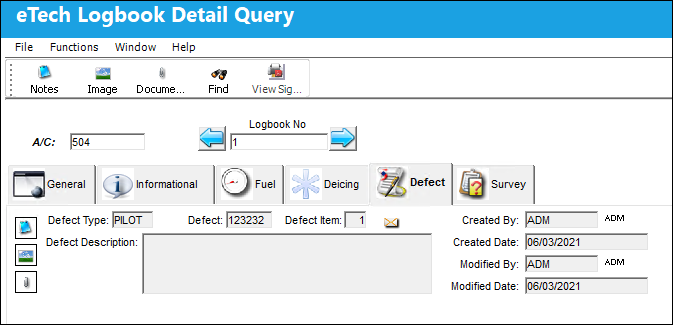
The Notes,  , Image,
  , and Document Control
  buttons are available in this window.
The following information/options are available in this window:
_____________________________________________________________________________________
View Signed PDF  button
Select this button to view any signed PDFs that have been attached to the eTech Logbook record.
A/C
The individual aircraft tail number.
Logbook No.
The eTech Logbook number associated with the SN. This field is populated when saved. Displays the current logbook number. The left  button and right
  buttons can be used to display the previous or next logbook entry.
Defect Type
The category that the recorded Defect falls into.
Defect
The numerical identifier of the recorded Defect.
Defect Item
The Defect's associated item.
Defect Description
A detailed note of what the Defect was.
Created By
The employee that created the record.
Created Date
The date the record was created.
Modified By
The employee that modified the record.
Modified Date
The date the record was modified.
_____________________________________________________________________________________
Share
Print
|
©1997-2026 Trax USA Corp. All rights reserved. This manual may not be copied, photocopied, reproduced, translated, or converted to any electronic or machine-readable form, in whole or in part, without prior written approval from Trax USA Corp. |
 |