
 Share
Share
 Print
Print
|
|
|
|
|


eTech Logbook Detail Query, Survey Tab

The Survey tab displays the survey questions and answers recorded in the Pilotlog's logbook.
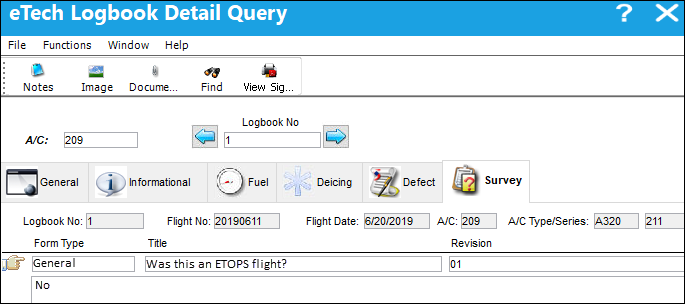
The Notes,  , Image,
  , and Document Control
  buttons are available in this window.
The following information/options are available in this window:
_____________________________________________________________________________________
View Signed PDF  button
Select this button to view any signed PDFs that have been attached to the eTech Logbook record.
A/C
The individual aircraft tail number.
Logbook No.
The eTech Logbook number associated with the SN. This field is populated when saved. Displays the current logbook number. The left  button and right
  buttons can be used to display the previous or next logbook entry.
Flight No
The flight reference number/information.
Flight Date
Date of flight.
A/C
The individual aircraft tail number.
A/C Type/Series
The Aircraft Type and Series/Fleet assignment.
Form Type
The user defined purpose of the survey form (e.g, Fluids, Bird Strike).
Title
The survey question.
Revision
The revision number of the survey.
Revision Date
The last date the survey was revised.
_____________________________________________________________________________________
Note: Survey questions are set up in the main system via the Aircraft Type/Series master.
There are multiple ways that survey questions can be created, as such, there are numerous ways that a user might need to answer the question:
- AlphaNumeric - The response can include both letters and numbers.
- Numeric - The response will include only numbers.
- Yes/No - The response will be either Yes or No. Based on the answer, supplemental functionality may be trigger and additional questions may need to be answered.
- Multiple Choice - The response will be a selection made from one of the available options provided. Based on the answer, supplemental functionality may be trigger and additional questions may need to be answered.
- Date - The response will be a specific date.
- Date Range - The response will consist of a range of dates.
- Signature - The response will require an electronic signature.
- On/Off - The response will require the On/Off gate time.
- Up/Down - The response will require the wheels up (takeoff) time and wheels down (landing) time.
- RH/LH - The response will identify the right hand or left hand side of the aircraft.
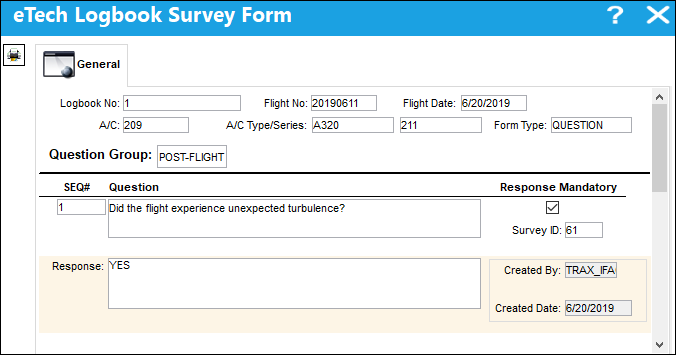
Select on a survey question and the eTech Logbook Survey Form window appears displaying both survey questions and user responses.
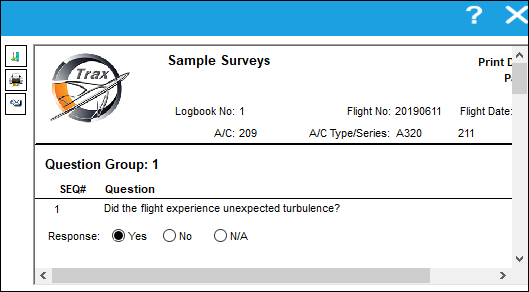
Select the Print  button and a pop up window appears; the user can print or email the survey details.
Share
Print
|
©1997-2026 Trax USA Corp. All rights reserved. This manual may not be copied, photocopied, reproduced, translated, or converted to any electronic or machine-readable form, in whole or in part, without prior written approval from Trax USA Corp. |
 |