
 Share
Share
 Print
Print
|
|
|
|
|


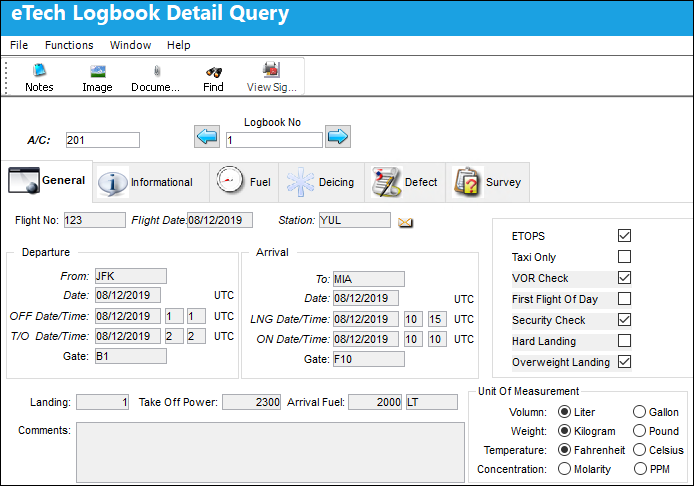
eTech Logbook Detail Query, General Tab

The General tab displays the flight information as recorded in the Pilotlog logbook.
The Notes,  , Image,
  , and Document Control
  buttons are available in this window.
The following information/options are available in this window:
_____________________________________________________________________________________
View Signed PDF  button
Select this button to view any signed PDFs that have been attached to the eTech Logbook record.
A/C
The individual aircraft tail number.
Logbook No.
The eTech Logbook number associated with the SN. This field is populated when saved. Displays the current logbook number. The left  button and right
  buttons can be used to display the previous or next logbook entry.
Flight No.
The flight reference number/information.
Flight Date
Date of flight.
Station
The station where the defect was worked on.
Departure
From - The airport of origin for the flight.
Date - Date the flight departed its origin.
OFF Date/Time - The out of gate or off blocks time (HHMM).
T/O Date/Time - The take-off time (HHMM).
Gate - The departure gate number.
Arrival
To - The airport of destination for the flight.
Date - Date the flight arrived at its destination.
LNG Date/Time - The landing time (HHMM).
ON Date/Time - The arrival at the gate or on blocks time (HHMM).
Gate - The arrival gate number.
ETOPS checkbox
When selected, indicates the flight is an ETOPS flight.
Taxi Only checkbox
When selected, indicates the aircraft taxied but turned back to the gate.
First Flight Of Day checkbox
When selected, indicates this logbook entry was for the aircraft's first flight of the day.
Security Check checkbox
When selected, indicates a security check was carried out on the aircraft.
Hard Landing checkbox
When selected, indicates that the aircraft experienced a hard landing upon arrival.
Overweight Landing checkbox
When selected, indicates that the aircraft exceeded recommended landing weight upon arrival.
Landing
Number of landings. Default is 1, however if the aircraft wheels touch-down and then aborts landing the number may be increased.
Take Off Power
Pounds of thrust used for take-off.
Arrival Fuel
The amount of fuel remaining after the flight. This value is calculated by adding the amount of fuel in each tank after the flight.
Unit Of Measurement
The unit types used for the fuel measurements.
Comments
Comment text.
_____________________________________________________________________________________
Share
Print
|
©1997-2026 Trax USA Corp. All rights reserved. This manual may not be copied, photocopied, reproduced, translated, or converted to any electronic or machine-readable form, in whole or in part, without prior written approval from Trax USA Corp. |
 |