
 Share
Share
 Print
Print
|
|
|
|
|


Associating E/Cs with the Received Part
The P/N E/C Selection window will appear to associate E/Cs with the received part upon save.
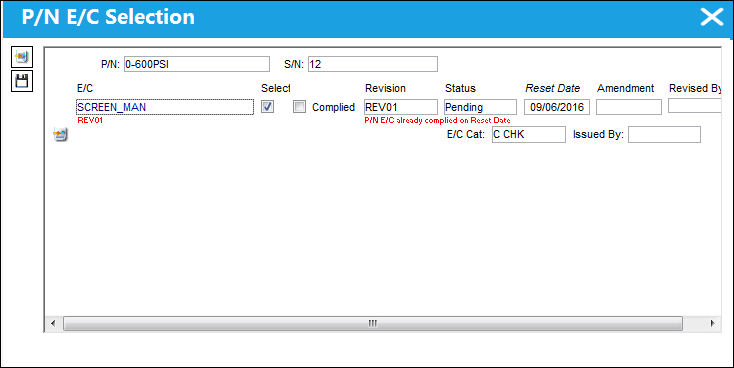
The following information/options are available in this window:
_____________________________________________________________________________________
P/N
The Part Number reference for the aircraft part.
S/N
The Serial Number for the specific serialized part.
E/C
The Engineering Control that specifies aircraft or component scheduled maintenance intervals.
Select checkbox
The Select checkbox will make the Complied checkbox, Revision, and Status fields appear. Select this checkbox to make the P/N effective to the P/N E/C. De-selecting the checkbox will disassociate the P/N to the P/N E/C.
Complied checkbox
If selected, compliance is written against the P/N E/C. This will also increment the number of "Complete" for the P/N E/C. When the Complete NO equals the Repeat NO, the status of the P/N E/C will change to closed.
Revision
The current revision number of the P/N E/C. The revision can be alpha numeric. Revised By will be automatically updated with the user code, and revision date.
Status
Choose the current status of the P/N E/C here.
Reset Date
The current reset date of the P/N E/C. This is the date from which to reset the P/N E/C schedule for this item. If the compliance checkbox is selected, the reset date will be used as the date of compliance.
Amendment
The amendment field normally relates to AD amendment numbers. This is alpha numeric and issued by the authority or company issuing the P/N E/C.
E/C Cat
The category of the E/C (e.g., AD, SB, CHECK).
Issued By
The authority or company that issues the P/N E/C.
_____________________________________________________________________________________
Click on the New  button to enter new E/C information for the part being received.
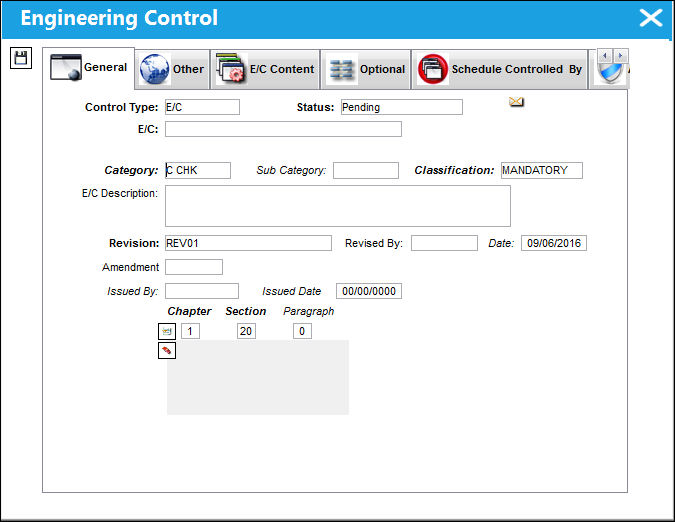
Complete all required fields. Click on the Save  button to save all information.
For more information, refer to the Engineering Control, General Tab which can be found in the Engineering - E/C Training Manual.
Share
Print
|
©1997-2026 Trax USA Corp. All rights reserved. This manual may not be copied, photocopied, reproduced, translated, or converted to any electronic or machine-readable form, in whole or in part, without prior written approval from Trax USA Corp. |
 |