
 Share
Share
 Print
Print
|
|
|
|
|


Create References to Task Cards Loaded via the MEDL Option
Once a manual is loaded, the user can create references to items in the manual. An example of an item can be a Task Card.
First, create a new Task Card. Please see the Task Card section of the Engineering manual for additional information.
Once the user has created and Saved the new Task Card, select the Manual  button to associate any maintenance manuals that may be required to carry out the work. Other documents, such as drawings, can also be listed. The system can produce a list of all the documents required once a Work Order has been created.
From the Task Card window, create or select a Task Card. Select the Manual button. TRAX displays the Task Card Manual window as shown below. Populate all mandatory information and any other desired information.
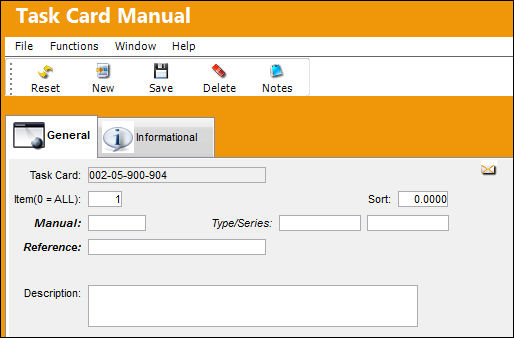
The following information/options are available in this window:
_____________________________________________________________________________________
Task Card
The Task Card / Job Card that details the scheduled maintenance work.
Item (0 = ALL)
The specific item number on the Task Card that this manual reference is to be associated with. Enter “0” to have this manual reference associated with all item numbers on the Task Card.
Sort
The sort order of the manuals as they appear in the above window.
Manual
Related Manual reference to be utilized for the record.
Type/Series
The Aircraft Type and Series/Fleet assignment.
Reference
The reference number of the manual.
TraxDoc No.
Select a TraxDoc No. from the TraxDoc Module.
TraxDoc Revision
The TraxDoc Revision number.
Description
A description of the manual reference.
_____________________________________________________________________________________
After saving, the Task Card reference is now active.
Once references to this Task Card have been established, they will appear in the list at the bottom of the window.
Please refer to the Task Card section of the Engineering manual for additional information regarding the creation of Task Cards.
Share
Print
|
©1997-2026 Trax USA Corp. All rights reserved. This manual may not be copied, photocopied, reproduced, translated, or converted to any electronic or machine-readable form, in whole or in part, without prior written approval from Trax USA Corp. |
 |