
 Share
Share
 Print
Print
|
|
|
|
|


The W/O Shop Detail, Informational tab displays a variety of information about the W/O entered. It is automatically populated as the Shop W/O is created and/or modified.
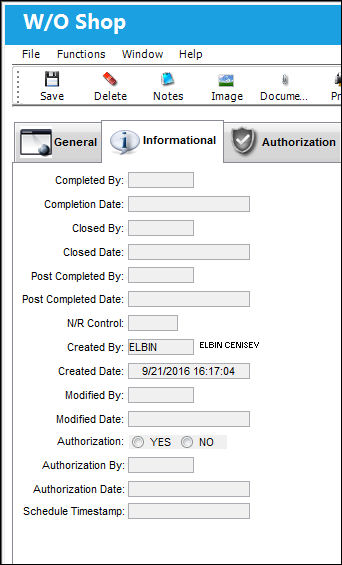
The following information/options are available in this window:
_____________________________________________________________________________________
Completed By
The individual who completed the Shop Work Order.
System Completion Date
The date that the shop work order was completed.
Closed By
The individual who closed the shop work order.
Closed Date
The date the shop work order was closed on.
Post Completed By
The individual who placed the shop work order into Post Complete status.
 WOPOSTCM - If set to Yes, the Close Material checkbox will not appear when closing the Shop W/O. Upon Save, the status of the Shop W/O will go from Completed to Postcomplt. Unused materials that were issued to the Shop W/O can be returned to stock (RTS will be allowed).
Once all unused material have been returned to stock, change the status of the Shop W/O from Postcomplt to Closed.
If set to No, the Close Material Checkbox will appear at Shop Work Order Closing and be checked at default. Upon save, the system will update the status of the Shop W/O from Completed to Closed. RTS will not be allowed.
Uncheck the Close Material checkbox to allow for unused materials that were issued to the Shop W/O to be returned to stock. In this scenario, once saved, the Shop W/O will remain in Complete status. When all unused materials have been returned to stock, close the Shop W/O again with the Close Material checkbox checked and the Shop W/O will go from Completed to Closed.
Post Completed Date
The date that the shop work order went into Post Complete status.
N/R Control
Number of Non-Routine task cards on a shop work order.
Created By
The user who created the record.
Created Date
The date the record was created.
Modified By
The user who last modified the record.
To view changes made to the work order, the user may view the Audit Tab.
Modified Date
The date the record was last modified.
Authorization
Indicates whether or not the Shop Work Order has been authorized. The options are Yes or No.
Authorization By
The user who authorized the Shop Work Order.
Authorization Date
The time and date that the Shop Work Order was authorized.
Schedule Timestamp
The schedule timestamp as indicated by a Shop W/O Interface.
 This field is part of a customized interface and is not available for all customers. For more information consult with a TRAX System Administrator.
_____________________________________________________________________________________
Share
Print
|
©1997-2026 Trax USA Corp. All rights reserved. This manual may not be copied, photocopied, reproduced, translated, or converted to any electronic or machine-readable form, in whole or in part, without prior written approval from Trax USA Corp. |
 |