
 Share
Share
 Print
Print
|
|
|
|
|


The W/O Shop Detail, Optional tab displays the following information:
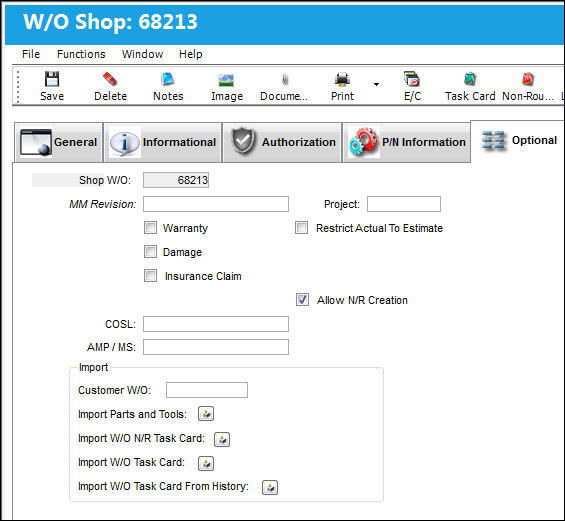
The following information/options are available in this window:
_____________________________________________________________________________________
Shop W/O
The Shop Work Order reference number.
MM Revision
The current Maintenance Manual Revision.
Warranty Checkbox
This is checked if the Shop Work Order is associated with a warranty condition. This is informational only.
Damage Checkbox
Select this checkbox if the Shop Work Order is associated with a damaged condition. This is informational only.
Field Trip Checkbox
Select this checkbox if the Shop Work Order is performed at a location other than a non-maintenance location or contract maintenance available location. This is informational only.
W/O Initial Issued Checkbox
Select to expense the rotable Fixed Asset if the rotable part is being installed for the first time. This checkbox is intended to allow the removal of Fixed Assets from the F/A Registry when the parts installed on the Aircraft will not be removed. Because another F/A would not take their place on the F/A Registry, they need to be removed (for example, when installing a new seat).
All of the parts assigned to a Shop Work Order where the Shop W/O Initial Issued checkbox has been selected will be removed from the Fixed Asset Registry once the Shop Work Order is closed. The removed F/A may not be the one on the Initial Issued Shop Work Order and installed on the Aircraft. The system will follow the FIFO method (First In, First Out) to remove the F/A from the Registry.
Insurance Claim Checkbox
Select this checkbox when the Shop Work Order is associated to an Insurance Claim. When selected, the Claim Number field appears.
Claim Number - Specify an Insurance Claim Number to associate with the Shop Work Order Item.
Vendor
This field is populated when maintenance is performed by an outside vendor. (i.e. This is commonly used for major maintenance such as a C-Check).
This information comes from the Vendor Master.
COSL
The Component Operating Storage Limits for the Work Order. This field is informational only.
AMP/MS
The Aircraft Maintenance Program/Maintenance Schedule for the Work Order. This field is informational only. When Switch  AUTOPAMP is set to Yes, the information in this field will be auto populated from the AMP field in A/C Type/Series, General tab. For additional information, refer to the Production Switches Manual. This field will be mandatory when Switch MANDATAMP is set to Yes. For additional information, refer to the Production Switches Manual.
Import W/O Task Card  button
Select this button to import customer Task Cards. The import file must be in de-limited text file. For additional information refer to the Import W/O Task Card Button via Work Order Buttons which can be found in the Production Training manual.
This is only used for Third Party Work Orders. The Third Party Checkbox must be checked for this option to be available.
Customer W/O
The Shop Work Order number of the customer for third party maintenance.
Import W/O N/R Task Card button
Select this button to import customer Non-Routine Task Cards. The import file must be in de-limited text file. For additional information refer to the Import W/O N/R Task Card Button via Work Order Buttons which can be found in the Production Training manual.
This is only used for Third Party Work Orders. The Third Party Checkbox must be checked for this option to be available.
Import Parts and Tools button
Select this button to import parts and tools. The import file must be in de-limited text file. For additional information, refer to the Import Parts and Tools Button via Work Order Buttons which can be found in the Production Training manual.
_____________________________________________________________________________________
Share
Print
|
©1997-2026 Trax USA Corp. All rights reserved. This manual may not be copied, photocopied, reproduced, translated, or converted to any electronic or machine-readable form, in whole or in part, without prior written approval from Trax USA Corp. |
 |