
 Share
Share
 Print
Print
|
|
|
|
|


The Import W/O N/R Task Card option is used to import customer Non-Routine Task Cards which do not exist in the Engineering Task Card database. This option allows the vendor to receive or create a digital file listing these N/R Task Cards and related information for the import and quick creation of the Work Order package.
 The system allows users to import Non-Routine Task Cards using the STYLESHEET Editor. For additional information, refer to the Switch
  NREDITOR, via the Production Switches Manual.
First, the user must prepare the file. For information regarding how to prepare the import file, refer to Preparing File For Import, via the Import Button of the System Standards Training Manual.
Although the W/O N/R Task Card Import file has 44 fields, only the following 10 fields will be imported into the system.
- AT WO
- WO
- Non-Routine
- Work Card
- Discrepancy
- Corrective Action
- Corrosion
- Corrosion Level
- Structure Repair
- Structure Repair Classification
- Status

Criteria for W/O N/R Task Card Import file:
Release |
Column Name |
Imported? |
Data Type |
Limitation |
Path |
|
Aircraft |
N |
Alphanumeric |
10 |
Production/Update/Work Order/W/O Non-Routine Task Card , General Tab |
|
Check |
N |
Alphanumeric |
10 |
Production/Update/Work Order/W/O N/R Task Card, General Tab |
|
AT WO |
Y |
Numeric |
6 |
Production/Update/Work Order/W/O N/R Task Card, General Tab |
|
WO |
Y |
Numeric |
6 |
Production/Update/ Work Order/W/O N/R Task Card, General Tab |
|
Non-Routine - leave blank so it auto generates |
Y |
Alphanumeric |
|
Production/ Update/Work Order/W/O N/R Task Card, General Tab |
|
Date Open |
N |
Numeric |
8 |
Production/Update/Work Order/W/O N/R Task Card, General Tab |
|
Date Closed |
N |
Numeric |
8 |
Production/Update/Work Order/W/O N/R Task Card, General Tab
|
|
Work Card |
Y |
Alphanumeric |
35 |
Production/Update/Work Order/W/O N/R Task Card, General Tab |
|
ATA Chapter |
N |
Numeric |
2 |
Production/Update/Work Order/ W/O Non-Routine Task Card, Optional 2 Tab
|
|
Discrepancy (Defect Description/Information) |
Y |
Alphanumeric |
4000 |
Production/Update/ Work Order/ W/O N/R Task Card, Optional 2 Tab |
|
Corrective Action (Work Accomplished) |
Y |
Alphanumeric |
4000 |
Production/Update/Work Order/ W/O N/R Task Card, Work Accomplished Tab |
|
Defect Type |
N |
Alphanumeric |
8 |
Production/Update/Work Order/W/O Non-Routine Task Card, General Tab |
|
Item |
N |
Numeric |
2 |
Production/Update/Work Order/W/O Non-Routine Task Card, General Tab |
|
Reported Date |
N |
Numeric |
8 |
Production/Update/Work Order/Non-Routine Task Card/Defect Button, General Tab |
|
Reported By |
N |
Alphanumeric |
10 |
Production/Update/Work Order/Non-Routine Task Card/Defect Button, General Tab
|
|
Station |
N |
Alphanumeric |
10 |
Production/Update/Work Order/Non-Routine Task Card/Defect Button, General Tab |
|
Resolved By |
N |
Alphanumeric |
10 |
Production/Update/Work Order/Non-Routine Task Card/Defect Button, Resolution Tab
|
|
Resolved Date |
N |
Alphanumeric |
8 |
Production/Update/Work Order/Non-Routine Task Card/Defect Button, Resolution Tab |
|
Resolved Station |
N |
Alphanumeric |
10 |
Production/Update/Work Order/Non-Routine Task Card/Defect Button, Resolution Tab |
|
Corrosion |
Y |
Alphanumeric |
10 |
Production/Update/Work Order/Non-Routine Task Card/Defect Button, Corrosion Prevention and Protection Tab |
|
Corrosion Level |
Y |
Alphanumeric |
8 |
Production/Update/Work Order/Non-Routine Task Card/Defect Button, Corrosion Prevention and Protection Tab |
|
Section |
N |
Numeric |
2 |
Production/Update/Work Order/Non-Routine Task Card/Defect Button, General Tab
|
|
Structure Repair |
Y |
Alphanumeric |
10 |
Production/Update/W/O/N/R Task Card, Optional 1 Tab This field is invisible and appears only in the background. |
|
Structure Repair Classification |
Y |
Alphanumeric |
10 |
Production/Update/W/O N/R Task Card, Optional 1 Tab This field is invisible and appears only in the background. |
|
Description |
N |
Alphanumeric |
2000 |
Production/Update/W/O N/R Task Card, General Tab
|
|
Scheduled Start Date |
N |
Numeric |
6 |
Production/Update/W/O/ Non-Routine Task Card/ Schedule Tab |
|
Hour (Start) |
N |
Numeric |
2 |
Production/Update/W/O/ Non-Routine Task Card/ Schedule Tab |
|
Min (Start) |
N |
Numeric |
2 |
Production/Update/W/O/ Non-Routine Task Card/ Schedule Tab |
|
Scheduled End Date |
N |
Numeric |
6 |
Production/Update/W/O/ Non-Routine Task Card/ Schedule Tab |
|
Hour (End) |
N |
Numeric |
2 |
Production/Update/W/O/ Non-Routine Task Card/ Schedule Tab |
|
Min (End) |
N |
Numeric |
2 |
Production/Update/W/O/W/O Non-Routine Task Card/ Schedule Tab |
|
Additional Work |
N |
N/A |
Y/N |
Production/Update/W/O/W/O N/R Task Card, General Tab |
|
Source Code |
N |
Alphanumeric |
25 |
Production/Update/W/O/W/O N/R Task Card, Optional 1 Tab This column must be populated with a valid NRTC/SOURCECODE transaction code. The system will validate this transaction code and if it does not exist in the system, the import will fail. |
|
RII |
N |
N/A |
Y/N |
Production/Update/W/O/W/O N/R Task Card, Optional 3 Tab |
|
CDCCL |
N |
N/A |
Y/N |
Production/Update/W/O/W/O N/R Task Card, Optional 3 Tab |
|
Critical Task |
N |
N/A |
Y/N |
Production/Update/W/O/W/O N/R Task Card, Optional 3 Tab |
|
ETOPS |
N |
N/A |
Y/N |
Production/Update/W/O/W/O N/R Task Card, Optional 3 Tab |
|
Informational Only |
N |
N/A |
Y/N |
Production/Update/W/O/W/O N/R Task Card, Items button, General tab |
|
Main Skill |
N |
N/A |
Y/N |
Production/Update/W/O/W/O N/R Task Card, Items button, Skills tab |
|
Mechanic |
N |
N/A |
Y/N |
Production/Update/W/O/W/O N/R Task Card, Items button, Skills tab |
|
Skill |
N |
Alphanumeric |
10 |
Production/Update/W/O/W/O N/R Task Card, Items button, General tab The Skill field will be validated against the Skills set up in the Skill Master. |
|
Man Hours |
N |
Numeric |
8 |
Production/Update/W/O/W/O N/R Task Card, Items button, Skills tab |
|
Men Required |
N |
Numeric |
8 |
Production/Update/W/O/W/O N/R Task Card, Items button, Skills tab |
|
Quotation NO |
N |
Alphanumeric |
10 |
Production/Update/W/O/W/O N/R Task Card, General Tab |
|
Reference Task Card |
Y |
Alphanumeric |
35 |
Production/Update/W/O/W/O N/R Task Card, Optional 2 |
|
Item Text |
Y |
Alphanumeric |
2500 |
Production/Update/W/O/W/O N/R Task Card, Optional 2 Note: For the Item Text field to be imported the Config Other field of Switch NREDITOR should be set to NONE. |
|
Status |
Y |
Alphanumeric |
Y/N |
Production/Update/WO/W/O N/R Task Card, General Tab Note: When the status column is populated, the associated N/R T/C is set to 'Closed'. This column overrides the effectivity of Switch - Task Card Description - Resolved/Reported By - Section - ATA Chapter - Date Closed Furthermore, the 'Paper Copy Required' checkbox will be unchecked by default once the N/R T/C is successfully imported. |


 If any exception is generated during the import, all of the records in the file will be rejected. For additional information, refer to Exceptions topic via the System Standards Training Manual.
Go to Production/ Update/ Work Order and create a new Work Order, or find an existing one.
From the Work Order Detail, Optional tab, select the Import W/O N/R Task Card  button.
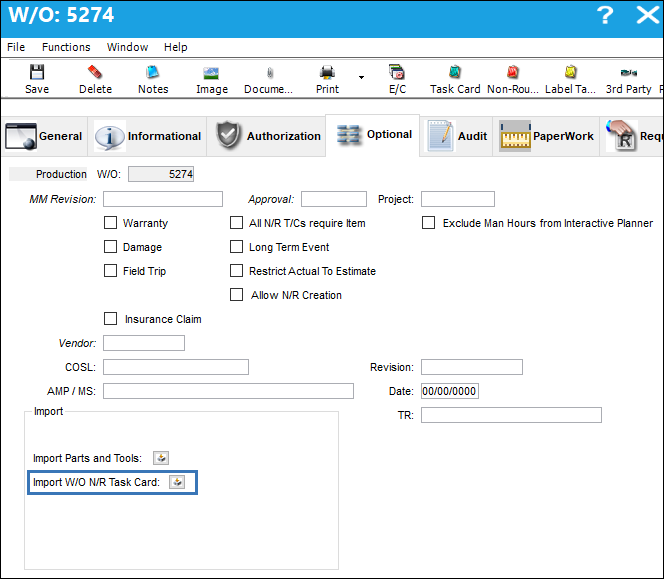
Complete all of the import steps. For information regarding how to import a file, refer to Importing a File via Import Button of the System Standards Training Manual.
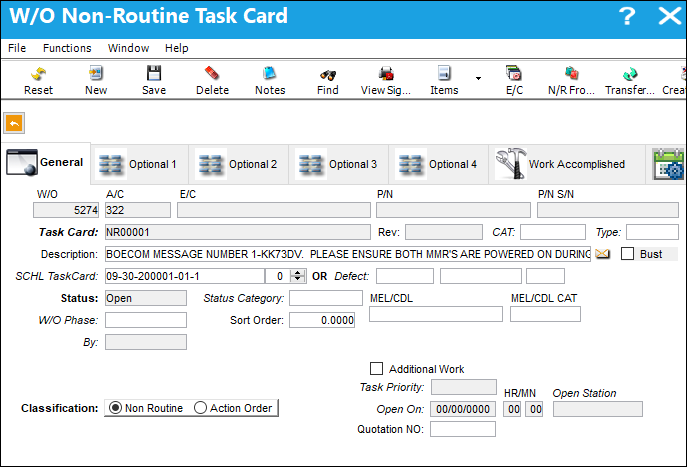
After the import, the user may go to the W/O Non-Routine Task Card window to view the Non-Routine Task Card(s) that have been imported.
Share
Print
|
©1997-2026 Trax USA Corp. All rights reserved. This manual may not be copied, photocopied, reproduced, translated, or converted to any electronic or machine-readable form, in whole or in part, without prior written approval from Trax USA Corp. |
 |