
 Share
Share
 Print
Print
|
|
|
|
|


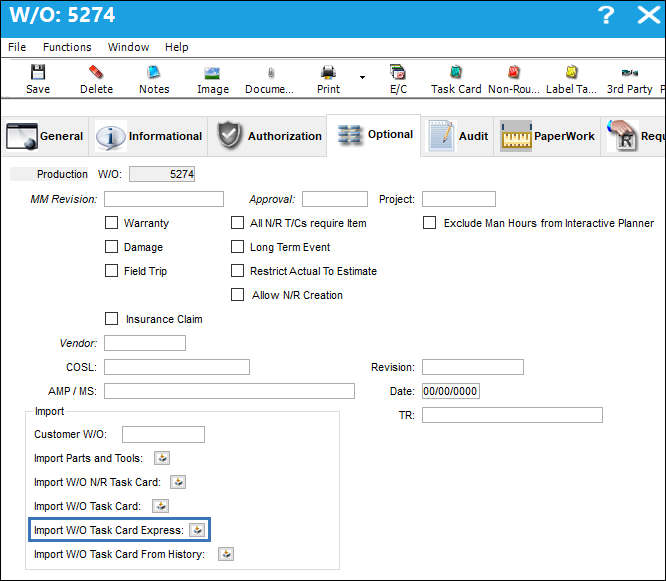
The Import Work Order Task Card Express  button allows the user to import Task Cards that already exists in the system onto the Work Order. The only column in the import file is 'Task Card' and as long as the Task Card exists in the system. When the file is imported, all of the Task Card details will populate onto the Work Order.
An exceptions report will generate after the import and display all Task Cards that imported successfully and all Task Cards that failed to import because they did not exist in the system.
The TPW (Third Party Work) checkbox must be selected, via the W/O General tab for this option to be available.
 The Import Work Order Task Card From History button is security controlled via Security Explorer/ Production/ Update/ W/O/ W/O Task Card Express Import. For more information refer to the Security Explorer via the System Administration Training Manual.
From the Work Order Detail, Optional tab, select the Import Work Order Task Card Express button.
Complete all of the import steps. For information regarding how to Import a file, refer to Importing a File via Import Button of the System Standards Training Manual.
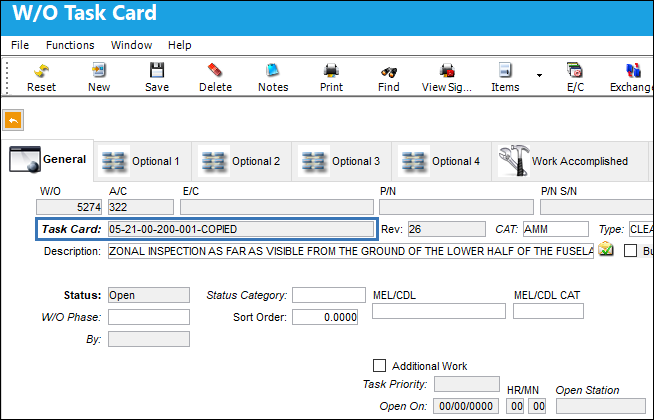
After the import, the user may go to the W/O Task Card window to view the Task Card information that was imported.
Share
Print
|
©1997-2026 Trax USA Corp. All rights reserved. This manual may not be copied, photocopied, reproduced, translated, or converted to any electronic or machine-readable form, in whole or in part, without prior written approval from Trax USA Corp. |
 |