
 Share
Share
 Print
Print
|
|
|
|
|


The Import W/O Task Card option is used to import customer Task Cards which may not exist in tab Engineering Task Card DB. This option allows the vendor to receive or create a digital file listing these task cards and related information for the import and quick creation of the Work Order package.
 The system now allows users to import Task Cards using the STYLESHEET Editor. For additional information, refer to the Switch
  TCEDITOR, via the Engineering Switches Manual.
The TPW (Third Party Work) checkbox must be selected, via the W/O General tab for this option to be available.
 The Import W/O Task Card button is security controlled via Security Explorer/ Production/ Update/ W/O/ W/O Task Card Import. For more information refer to the Security Explorer via the System Administration Training Manual.
First, the user must prepare the file. For information regarding how to prepare the import file, refer to Preparing File For Import, via the Import Button of the System Standards Training Manual.
Criteria for W/O Task Card Import file:
Release |
Column Name |
Data Type |
Limitation |
Path |
|
Task Card |
Alphanumeric |
25 |
Production/Update/W/O Task Card, General Tab |
|
Aircraft |
Alphanumeric |
10 |
Production/Update/W/O Task Card, General Tab |
|
Phase |
Alphanumeric |
8 |
Production/Update/W/O Task Card, General Tab |
|
Part Number |
Alphanumeric |
35 |
Production/Update/W/O Task Card, General Tab |
|
Serial Number |
Alphanumeric |
20 |
Production/Update/W/O Task Card, General Tab |
|
Task Card Description |
Alphanumeric |
250 |
Production/Update/W/O Task Card, General Tab |
|
EC |
Alphanumeric |
25 |
Production/Update/W/O Task Card, General Tab |
|
Revision |
Alphanumeric |
20 |
Production/Update/W/O Task Card, General Tab |
|
Corrosion |
Alphanumeric |
10 |
Production/Update/W/O Task Card, Optional 1 Tab |
|
NDT |
Alphanumeric |
10 |
Production/Update/W/O Task Card, Optional 3 Tab |
|
SSID |
Alphanumeric |
10 |
Production/Update/W/O Task Card, Optional 3 Tab |
|
Allow Defer |
Alphanumeric |
10 |
Production/Update/W/O Task Card, Optional 3 Tab |
|
MPD |
Alphanumeric |
25 |
Production/Update/W/O Task Card, Optional 1 Tab |
|
Area |
Alphanumeric |
70 |
Production/Update/W/O Task Card, Optional 1 Tab |
|
ETOPS |
Alphanumeric |
10 |
Production/Update/W/O Task Card, Optional 3 Tab |
|
Chapter |
Numeric |
2 |
Production/Update/W/O Task Card, Optional 2 Tab |
|
Section |
Numeric |
2 |
Production/Update/W/O Task Card, Optional 2 Tab |
|
Mod No |
Alphanumeric |
25 |
Production/Update/W/O Task Card, Optional 2 Tab |
|
Task Card Item |
Alphanumeric |
5 |
Production/Update/W/O Task Card Item/General Tab |
|
Skill |
Alphanumeric |
10 |
Production/Update/W/O Task Card Item/Skills Tab |
|
Manhours |
Numeric |
2 |
Production/Update/W/O Task Card Item/Skills Tab |
|
Men Required |
Numeric |
2 |
Production/Update/W/O Task Card Item/Skills Tab |
|
Task Card Text |
Alphanumeric |
4000 |
Production/Update/W/O Task Card Item/General Tab |
|
Mechanic checkbox |
Alphanumeric |
1 |
Production/Update/W/O Task Card Item/Skills Tab |
|
Inspector checkbox |
Alphanumeric |
1 |
Production/Update/W/O Task Card Item/Skills Tab |
|
Duplicate Inspection checkbox |
Alphanumeric |
1 |
Production/Update/W/O Task Card Item/Skills Tab |
|
Inspector Skill |
Alphanumeric |
10 |
Production/Update/W/O Task Card Item/Skills Tab |
|
Inspector Man Hours |
Numeric |
2 |
Production/Update/W/O Task Card Item/Skills Tab |
|
Inspector Man Require |
Numeric |
2 |
Production/Update/W/O Task Card Item/Skills Tab |
|
Dual Inspector Skill |
Alphanumeric |
10 |
Production/Update/W/O Task Card Item/Skills Tab |
|
Dual Inspector Man Hours |
Numeric |
2 |
Production/Update/W/O Task Card Item/Skills Tab |
|
Dual Inspector Man Require |
Numeric |
2 |
Production/Update/W/O Task Card Item/Skills Tab |
|
Schedule Start Date |
Numeric |
6 |
Production/Update/W/O/ Task Card/ Schedule Tab |
|
(Start) Hour |
Numeric |
2 |
Production/Update/W/O/ Task Card/ Schedule Tab |
|
(Start) Min |
Numeric |
2 |
Production/Update/W/O/ Task Card/ Schedule Tab |
|
Schedule End Date |
Numeric |
6 |
Production/Update/W/O/ Task Card/ Schedule Tab |
|
(End) Hour |
Numeric |
2 |
Production/Update/W/O/ Task Card/ Schedule Tab |
|
(End) Min |
Numeric |
2 |
Production/Update/W/O/ Task Card/ Schedule Tab |
|
Additional Work |
Checkbox |
Y/N |
Production/Update/W/O Task Card Item/General Tab |
|
Task Card Category |
Alphanumeric |
8 |
Engineering/update/Task Card |
|
Critical Task |
N/A |
Y/N |
Production/Update/W/O/ Task Card/ Optional 3 Tab |
|
RII |
N/A |
Y/N |
Production/Update/W/O/ Task Card/ Optional 3 Tab |
|
CDCCL |
N/A |
Y/N |
Production/Update/W/O/ Task Card/ Optional 3 Tab |

If a field designated for a checkbox is left unpopulated, TRAX considers this 'N' for Null, and the field is left blank once the import has been completed.
 If any exception is generated during the import, all of the records in the file will be rejected. For additional information, refer to Exceptions topic via the System Standards Training Manual.
Go to Production/ Update/ Work Order and create a new Work Order or find an existing one.
From the Work Order Detail, Optional tab, select the Import Work Order Task Card  button.
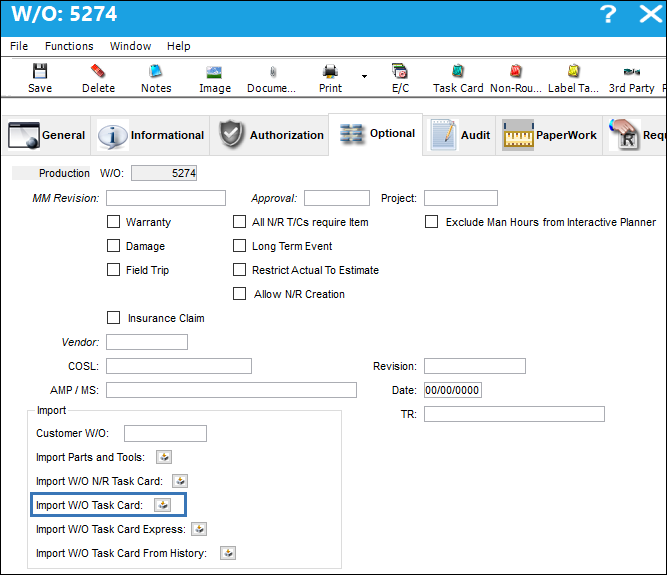
Complete all of the import steps. For information regarding how to import a file, refer to Importing a File via Import Button of the System Standards Training Manual.
After the import, the user may go to the W/O Task Card window to view the Task Card information that was imported.
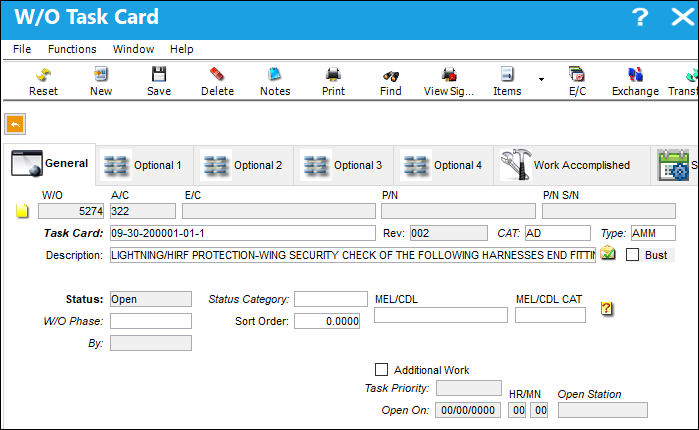
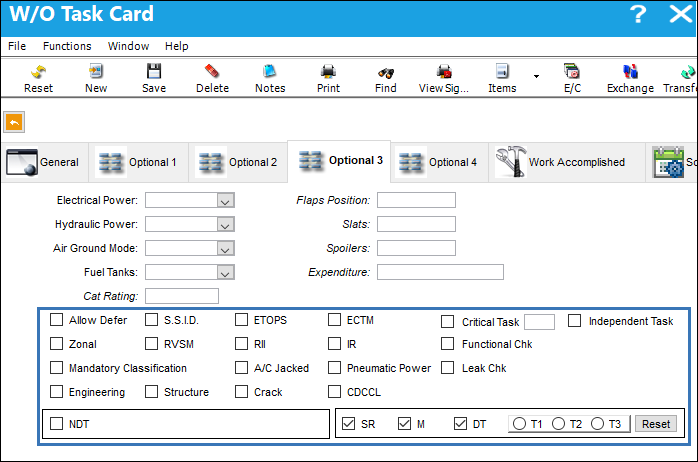
In the Optional 3 Tab of the Task Card, the following checkboxes, S.S.I.D, Allow Defer, etc. if not checked, will appeared blank in the Excel file.
When importing something (i.e. a file) that doesn't exist in the database, users can easily use the Label Task  button to create Non-Routine labels for the task cards that don't exist in the system.
This function is only used for companies currently using the Work Order Task Card Work In Progress option.
For more information regarding the Label Task button, please refer to the Label Task Card button section of this manual.
Share
Print
|
©1997-2026 Trax USA Corp. All rights reserved. This manual may not be copied, photocopied, reproduced, translated, or converted to any electronic or machine-readable form, in whole or in part, without prior written approval from Trax USA Corp. |
 |