
 Share
Share
 Print
Print
|
|
|
|
|


Within the Engineering module, security at the Aircraft Type/Series level can be set to allow/prevent users from performing functions on specific A/C Type/Series. The TRAX System Administrator should set security for each user as required. Go to System Administration/ Explorer/ Security Explorer and find the user that security needs to be set up for. Using the Expand  buttons, open the users security profile/ Engineering/ Update/ Engineering Control/ A/C Control; right-click on the A/C Type/Series and select Change Security Status to change the users security status for A/C under that Type/Series.
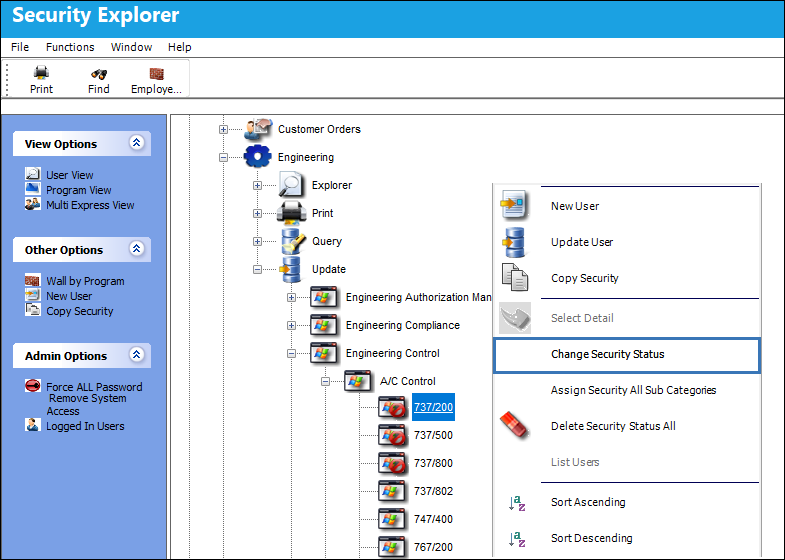
When the A/C Type/Series shows with the Access Denied  symbol, the user does not have security access to the A/C that fall under that Type/Series.
If the A/C Control selection in this list cannot be viewed, from the main Control Panel go to System Administration/ Update/ Control Panel/ Engineering/ Engineering Control/ A/C Control and check the A/C Type/Series Control checkbox.
For additional information regarding security refer to Security Explorer via the System Administration Manual.
Share
Print
|
©1997-2026 Trax USA Corp. All rights reserved. This manual may not be copied, photocopied, reproduced, translated, or converted to any electronic or machine-readable form, in whole or in part, without prior written approval from Trax USA Corp. |
 |