
 Share
Share
 Print
Print
|
|
|
|
|


A/C Actual Flights, General Tab
The A/C Actual Flights window is used to input actual aircraft flight times, and can be used as a way to enter additional data such as fuel uplift or oil defect data. The actual flight data essentially drives the system's Planning features.
Existing flights will appear at the bottom of the window. Select the New  button to create a new flight record.
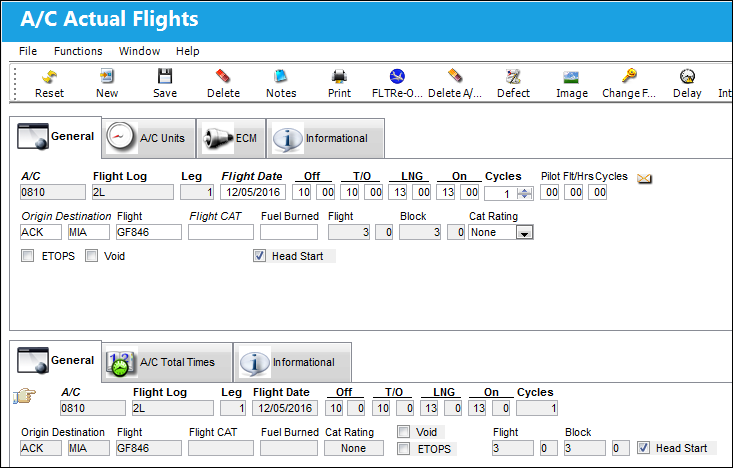
 The A/C Actual Flights program is security-controlled via the Security Explorer/ Technical Records/ Update/ A/C Actual Flights. For additional information, refer to the Security Explorer section via the System Administration Training Manual.
There are additional fields for Helicopter aircraft. See below.
The following information/options are available in this window:
_____________________________________________________________________________________
A/C
The aircraft performing the flight.
If an aircraft that is registered as a Rotor Wing (i.e., a helicopter) is entered in the A/C field, the Take Off, Landing, and On/Off Block times fields are removed from the General tab, and are replaced by the Hours, Landings, Hoist Times, Hoist Cycles, and Sling Pole fields. The Engine 1 & 2 tab also becomes available for Rotor Wing Aircraft. For detailed information on these helicopter fields and tab, see below.
Flight Log
The unique Flight Log number for the flight.
This number is typically not re-used by an airline.
Leg
The Flight Leg number for the flight.
Flight Date
The Flight date.
This field is security controlled via Technical Records/ Update/ A/C Actual Flights/ A/C Flight Data. For detailed information refer to the Security Explorer via the System Administration Training Manual.
Off
The out of gate or off blocks time (HHMM).
This field is security controlled via Technical Records/ Update/ A/C Actual Flights/ A/C Flight Data. For detailed information refer to the Security Explorer via the System Administration Training Manual.
T/O
The take-off time (HHMM).
This field is security controlled via Technical Records/ Update/ A/C Actual Flights/ A/C Flight Data. For detailed information refer to the Security Explorer via the System Administration Training Manual.
LNG
The landing time (HHMM).
This field is security controlled via Technical Records/ Update/ A/C Actual Flights/ A/C Flight Data. For detailed information refer to the Security Explorer via the System Administration Training Manual.
On
The arrival at the gate or on blocks time (HHMM).
This field is security controlled via Technical Records/ Update/ A/C Actual Flights/ A/C Flight Data. For detailed information refer to the Security Explorer via the System Administration Training Manual.
Cycles
The Number of cycles flow (for crew training, enter total number of touch and go's).
Pilot Flt/Hrs/Cycles
The pilot-recorded hours/cycles from the log (HHMM).
Origin
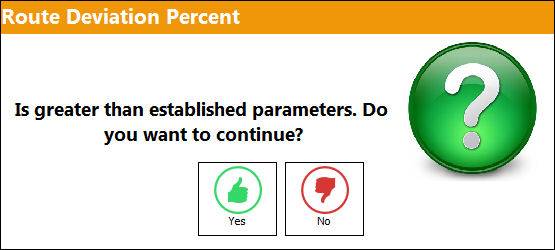
The airport of Origin for the flight. Select into this field to access a drop down of available routes as entered in Settings/Update/Routes. If a route is entered that is not known to the system, a message will pop up, the route can nevertheless be used. For routes that are entered into the system, the system will compare actual flight duration with the entered duration.
If the difference is too large, the following message will appear:
Destination
The airport of destination for the flight.
Flight
The flight reference number/information.
This number may be re-used depending on the airline's business plan.
This field is necessary to be populated for logging Aircraft Units in the A/C Units window. For more information, refer to the A/C Units.
Flight CAT (Category)
The airline flight category.
Fuel Burned
The fuel burned for this leg.
Flight
The calculated flight hours for this leg.
Block
The calculated block hours for this leg.
Cat Rating
The CAT Rating is the description of the type of A/C landing system and is informational only.
ETOPS checkbox
When selected, indicates the flight is an ETOPS flight.
Void checkbox
Select this checkbox if the flight log number was void (i.e. used for maintenance and not for a flight). When the Void checkbox is selected, the Maintenance Log checkbox will appear. Selecting this checkbox will clear all data that is currently populated except for the A/C, Flight Log, Leg, Flight Date, and Cat Rating, and all information will be unable to be entered/edited except for the Flight Date and Cat Rating.
Maintenance Log checkbox
Select this checkbox to indicate that the entry was for maintenance only. Logs flagged as Maintenance Logs will appear on reports as “MX” rather than “Void."
Head Start checkbox
Select this checkbox to have the first flight of the day after the RON (Remaining Over Night). For additional information regarding the RON, refer to the RON Process, via A/C Type Series of the Settings Training Manual.
 This checkbox is set through interface. For additional information, contact a TRAX Interface Administrator.
_____________________________________________________________________________________
If a flight arrives after midnight (thus, the following day) the correct date of the flight should be the date that the aircraft is OFF Blocks (not the take off date).
During data entry, if some of the flight parameters are incorrect, the system may give warning messages. Some can be overridden if required.
Helicopter Actual Flight Fields:
When entering actual flight data for a rotor wing aircraft (i.e., a helicopter), the following fields become available. These fields are only available for A/C Type/Series that have the 'Rotor Wing Aircraft' checkbox selected.
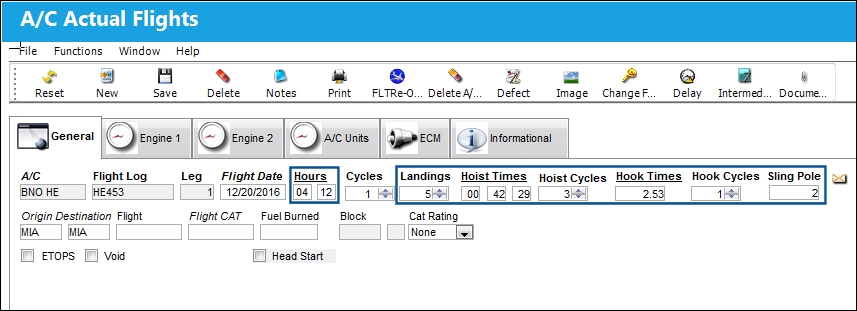
For more information on how the helicopter functionality works in the system, refer to Helicopter Integration (Rotor Wing Aircraft) in the online help.
The following fields are displayed when a helicopter is entered in the A/C field:
_____________________________________________________________________________________
A/C
The aircraft that has an A/C Type/Series with the Rotor Wing Aircraft checkbox selected. This A/C Type/Series checkbox indicates that the A/C is a rotor wing aircraft. When an A/C rotor wing aircraft is inserted into the A/C field, the active window changes. Several fields are removed, while the following fields are added to the window. When a rotor wing aircraft is entered into the A/C field, the Engine 1 and Engine 2 tabs become available. For more information refer to the A/C Actual Flights, Engine 1 & 2 Tabs.
Hours
The hours that the rotor wing aircraft was in flight. The hours can be measured to the hundredth decimal (e.g., '4.55'). This field is only available for A/C Type/Series that have the 'Rotor Wing Aircraft' checkbox selected.
This field replaces the Block On/Off times and the Takeoff/Landing times.
Landings
The number of times the rotor wing aircraft (i.e., helicopter) touches ground during the flight. Each landing does not necessarily indicate a cycle for a rotor wing aircraft. This field is only available for A/C Type/Series that have the 'Rotor Wing Aircraft' checkbox selected.
Hoist Times
The amount of time during the flight that the rotor wing aircraft (i.e., helicopter) was operating its hoist mechanism. This field can include hours, minutes, and seconds. This field is only available for A/C Type/Series that have the 'Rotor Wing Aircraft' checkbox selected.
Hoist Cycles
The number of cycles where the hoist was operated during the rotor wing aircraft's (i.e., helicopter's) flight. Partial Hoist Cycles may be indicated and measured to the hundredth decimal (e.g., '4.55'). This field is only available for A/C Type/Series that have the 'Rotor Wing Aircraft' checkbox selected.
Hook Times
The amount of time during the flight that the rotor wing aircraft (i.e., helicopter) was operating its hook mechanism. The hours in this field can be measured to the hundredth decimal (e.g., '4.55'). This field is only available for A/C Type/Series that have the 'Rotor Wing Aircraft' checkbox selected.
Hook Cycles
The number of cycles where the hook was operated during the rotor wing aircraft's (i.e., helicopter's) flight. Partial Hook Cycles may be indicated and measured to the hundredth decimal (e.g., '4.55'). This field is only available for A/C Type/Series that have the 'Rotor Wing Aircraft' checkbox selected.
Sling Pole 
The number of times the Sling Pole was utilized during the helicopter's flight. This field is only available for A/C Type/Series that have the 'Rotor Wing Aircraft' checkbox selected.
_____________________________________________________________________________________
The following fields are not available for helicopter aircraft: Off, T/O, LNG, On, Pilot Flt/Hrs Cycles, and Flight.
Share
Print
|
©1997-2026 Trax USA Corp. All rights reserved. This manual may not be copied, photocopied, reproduced, translated, or converted to any electronic or machine-readable form, in whole or in part, without prior written approval from Trax USA Corp. |
 |