
 Share
Share
 Print
Print
|
|
|
|
|


Intermediate Z-Logs can be added to an aircraft if the aircraft has been loaned out and therefore requires its logged times to be updated.
From the A/C Controller Panel, select the Intermediate Z Log  button. The Intermediate Z-log window displays as follows.
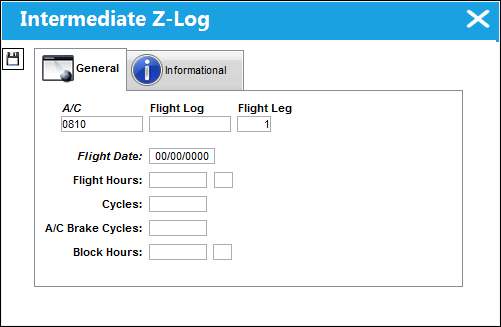
There are additional fields for Helicopter aircraft. See below.
The following information/options are available in this window:
_____________________________________________________________________________________
A/C
The aircraft that is having its Z-record updated.
Flight Log
The unique Flight Log number for the flight.
Flight Leg
The Flight Leg number for the flight.
Flight Date
The flight date.
Flight Hours
The intermediate amount of aircraft flight hours.
Cycles
The intermediate number of cycles flow (for crew training, enter total number of touch and goes).
A/C Brake Cycles
Initial Aircraft Brake cycles.
Block Hours
The intermediate aircraft flight cycles.
_____________________________________________________________________________________
Helicopter Aircraft Intermediate Z-Log Fields:
When a Rotor Wing Aircraft (i.e., helicopter) is entered into the A/C field, the additional Rotor Wing tracking fields become available.
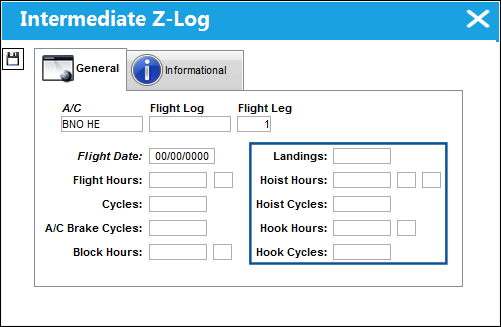
Aircraft are designated as helicopters when the Rotor Wing Aircraft checkbox is selected in the A/C Type/Series, General tab. For more information on the system's helicopter functionality refer to Helicopter Integration (Rotor Wing Aircraft) via the online help.
The following fields are also available in this window when a helicopter is entered in the A/C field:
_____________________________________________________________________________________
Landings
The number of times the rotor wing aircraft touched ground while it was loaned out. Each landing does not necessarily indicate a cycle for a rotor wing aircraft. This field is only available for A/C Type/Series that have the 'Rotor Wing Aircraft' checkbox selected (i.e., helicopters).
Hoist Hours
The amount of time that the rotor wing aircraft was operating its hoist mechanism. This field can include hours and minutes. This field is only available for A/C Type/Series that have the 'Rotor Wing Aircraft' checkbox selected (i.e., helicopters).
Hoist Cycles
The number of cycles that the hoist was operated. Partial Hoist Cycles may be indicated and measured to the hundredth decimal (i.e., '4.55'). This field is only available for A/C Type/Series that have the 'Rotor Wing Aircraft' checkbox selected (i.e., helicopters).
Hook Hours
The amount of time that the rotor wing aircraft was operating its hook mechanism. The hours in this field can be measured to the hundredth decimal (i.e., '4.55'). This field is only available for A/C Type/Series that have the 'Rotor Wing Aircraft' checkbox selected (i.e., helicopters).
Hook Cycles
The number of cycles that the hook was operated. Partial Hook Cycles may be indicated and measured to the hundredth decimal (i.e., '4.55'). This field is only available for A/C Type/Series that have the 'Rotor Wing Aircraft' checkbox selected (i.e., helicopters).
_____________________________________________________________________________________
Share
Print
|
©1997-2026 Trax USA Corp. All rights reserved. This manual may not be copied, photocopied, reproduced, translated, or converted to any electronic or machine-readable form, in whole or in part, without prior written approval from Trax USA Corp. |
 |