
 Share
Share
 Print
Print
|
|
|
|
|


The Crew Member  button allows the user to create crew member records.
From the A/C Actual Flights window, select the Crew Member button. The system displays the Crew Member Entry for A/C Flights window:
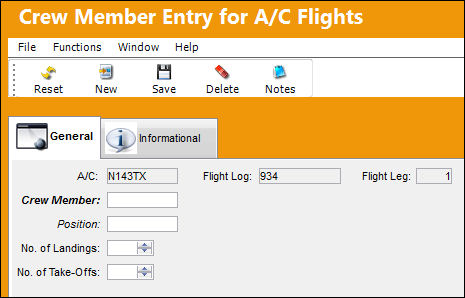
The following information/options are available in this window:
_____________________________________________________________________________________
A/C
The individual aircraft tail number.
Crew Member
The employee reference for the crew member.
Position
The position of the crew member. (i.e. Pilot)
No. of Landings
The number of landings to date the crew member has completed
No. of Take-Offs
The number of take-offs to date the crew member has completed.
Flight Log
The unique Flight Log number for the flight.
Flight Leg
The Flight Leg number for the flight.
_____________________________________________________________________________________
Additional information relevant to the record can be viewed or included through the Crew Member Entry for A/C Flights, Informational Tab and the Notes  button.
Share
Print
|
©1997-2026 Trax USA Corp. All rights reserved. This manual may not be copied, photocopied, reproduced, translated, or converted to any electronic or machine-readable form, in whole or in part, without prior written approval from Trax USA Corp. |
 |