
 Share
Share
 Print
Print
|
|
|
|
|


From the MEL Master window, select the Revision Control  button. The MEL Revision Control window appears. In the Revision field, enter a Revision number and select the Save
  button.
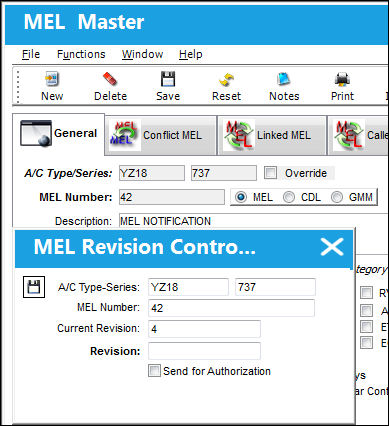
The following information/options are available in this window:
_____________________________________________________________________________________
Type/Series
The Aircraft Type and Series/Fleet assignment.
MEL Number
Existing Minimum Equipment List number.
Current Revision
The Current Revision of the MEL. If this is new MEL this field will be blank.
Revision
Enter a Revision Number.
Send for Authorization checkbox
Check this box to send the MEL directly to the Authorization Queue. If this box is NOT checked the MEL must be released to the Authorization via the MEL Authorization Management.
_____________________________________________________________________________________
The MEL item must go through the initial authorization process before it can be used to defer defects.
Share
Print
|
©1997-2026 Trax USA Corp. All rights reserved. This manual may not be copied, photocopied, reproduced, translated, or converted to any electronic or machine-readable form, in whole or in part, without prior written approval from Trax USA Corp. |
 |