
 Share
Share
 Print
Print
|
|
|
|
|


Registration Change, via A/C Registration Change/Hold/Release
The following screen is displayed:
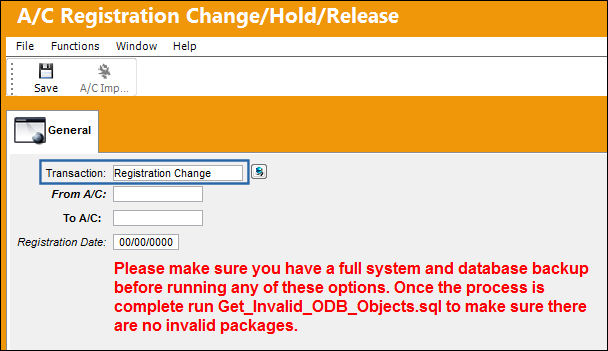
The following information/options are available in this window:
_____________________________________________________________________________________
Transaction drop down
Select the appropriate transaction type from the drop list.
Registration Change - 'Registration Change' is used to change the A/C tail number. The system will locate all the current and historical data regarding the A/C in question, and change the aircraft registration number. Please be prepared for a waiting period (an average aircraft with some history could take thirty minutes and a large aircraft with extensive history could take hours).
From A/C
The current A/C registration.
To A/C
The new registration that the 'From A/C' will change to.
Registration Date
The date to be associated with the registration change.
_____________________________________________________________________________________
A/C Registration Change is a change in the A/C Registration Number. All A/C related records will then have the new Registration Number. Whenever there is an A/C placed on hold for any reason, the A/C records are frozen, and therefore no transactions can be performed on that A/C or its records.
Share
Print
|
©1997-2026 Trax USA Corp. All rights reserved. This manual may not be copied, photocopied, reproduced, translated, or converted to any electronic or machine-readable form, in whole or in part, without prior written approval from Trax USA Corp. |
 |