
 Share
Share
 Print
Print
|
|
|
|
|


A/C Registration Change
TRAX displays the A/C Registration Change/ Hold/ Release window:
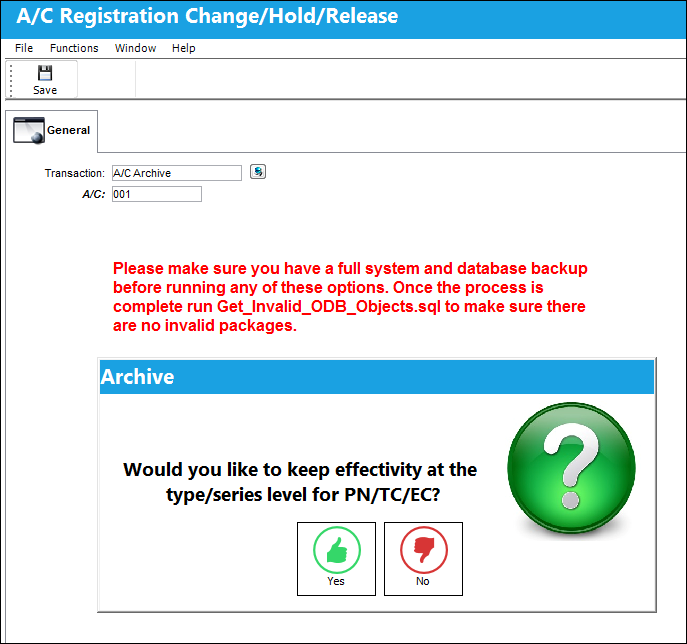
The following information/options are available in this window:
_____________________________________________________________________________________
Transaction drop down
Select the appropriate transaction type from the drop down menu:
Registration Change - 'Registration Change' is used to change the A/C tail number. The system will locate all the current and historical data regarding the A/C in question, and change the aircraft registration number. Please be prepared for a waiting period (an average aircraft with some history could take thirty minutes and a large aircraft with extensive history could take hours). For additional information, refer to Registration Change.
A/C Hold - When an A/C is placed on 'Hold' status, the system will prevent the creation or modification of any transactions against that A/C throughout the entire system. Query of history records for the A/C is also prevented (unless the user has been granted security access). For additional information, refer to A/C Hold.
 Upon placing an A/C on Hold, if multiple users are attempting to conduct this action, the following users will be prevented from repeating the action with a hard warning.
A/C Release - 'A/C Release' is used after the A/C has been placed on 'Hold.' For additional information, refer to A/C Release.
A/C Archive - The 'A/C Archive' is the same as the A/C Hold transaction, but without the ability to perform the 'A/C Release' afterwards. For additional information, refer to A/C Archive.
Change Archive to Hold  button
Select this button to change an aircraft that has been archived to 'Hold' status. For additional information, refer to the Change Archive to Hold Button via A/C Registration Change of the Technical Records Training Manual.
From A/C
The current A/C registration.
To A/C
The new registration that the 'From A/C' will change to.
Registration Date
The date to be associated with the registration change.
_____________________________________________________________________________________
Share
Print
|
©1997-2026 Trax USA Corp. All rights reserved. This manual may not be copied, photocopied, reproduced, translated, or converted to any electronic or machine-readable form, in whole or in part, without prior written approval from Trax USA Corp. |
 |