
 Share
Share
 Print
Print
|
|
|
|
|


P/N E/C Authorization
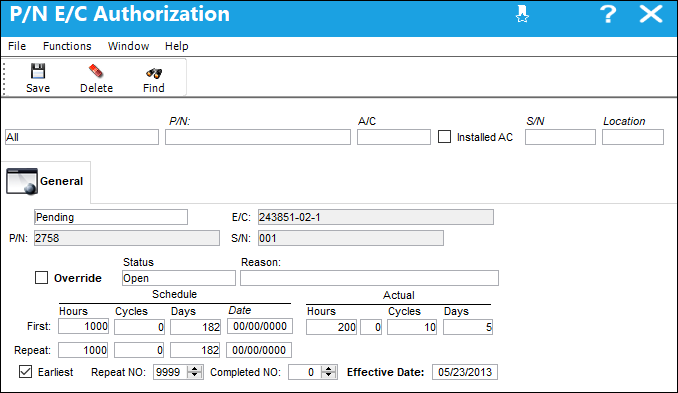
The P/N E/C Authorization window allows the user to view all P/N E/Cs attached to serialized parts and update, edit, and override the authorization status, schedule, and actuals. When a P/N E/C is set up with 'Load at Receiving', the P/N E/C will load with a Pending authorization status and can then be updated in the P/N E/C Authorization window. Each customer will define their own steps for a P/N E/C authorization status process. Please note, the P/N E/C authorization status should not be confused with the actual P/N E/C status (i.e. Open, Terminated, N/A, Applicable/Not Embodied), or the status of the authorization steps to approve and release the E/C.
Query:
The following information/options are available in this window:
_____________________________________________________________________________________
Authorization Status
The Authorization Status of the P/N Control: Acknowledge, All, Authorized, Pending, or Unknown.
P/N
The Part Number reference for the aircraft part.
A/C
The individual aircraft tail number.
Installed A/C
When selected, the system will display all P/N E/Cs for all parts installed on-wing, regardless of the A/C.
If the Installed AC checkbox is selected the system will ignore any entry made in the A/C field.
S/N
The Serial Number for the specific serialized part.
Location
The Location for maintenance events, inventory stores, orders, transactions, or training events.
_____________________________________________________________________________________
Results:
The following information/options are available in this window:
_____________________________________________________________________________________
P/N E/C Authorization Status
The authorization status of the E/C for the P/N S/N.
Note: Based on each customer's authorization status process, these definitions may vary.
Acknowledge - Indicates the control has been acknowledged.
Authorized - Indicates the control has been authorized.
Pending - Indicates the control is pending.
Unknown - Indicates the control status is unknown.
E/C
The Engineering Control that specifies aircraft or component scheduled maintenance intervals.
P/N
The Part Number reference for the aircraft part.
S/N
The Serial Number for the specific serialized part.
Override checkbox
When selected, the user is able to override the schedule hours, cycles, days, date, and the earliest, repeat number, completed number, and effective date fields.
If the override checkbox is left selected, the override status for that P/N S/N E/C is set to yes in the Engineering Effectivity Override window. If the main P/N E/Cs schedule is modified, any P/N S/N records that have the override set to yes will not be updated with the new P/N E/C schedule.
Status
The status of the E/C for the P/N S/N.
Applicable/Not Embodied - The E/C is applicable to an A/C Type/Series or Part Number, but may not be mandatory. This status allows the E/C to be entered in the system, but does not require compliance.
Cancel - The E/C has been cancelled.
N/A - The originating document (AD, SB, MOD, etc.) has been evaluated and is deemed not effective to a specific A/C or P/N.
Open - The E/C is Open.
Pending - This is the default status. This will be the status until the E/C is authorized. If the user requires holding this E/C until ready, it can be left as Pending even after the record has been saved. Once the E/C is authorized the status will show as Open.
Rejected - The E/C was rejected or not authorized and may need to be sent back through the authorization process for revision. This status should not be selected manually.
Terminated - The E/C is no longer in use. It has either been complied with for all effective aircraft or components, or the action of another E/C has terminated it. When an E/C is terminated, the termination applies to the entire fleet. This status should not be selected manually.
Reason
Free text reason.
Schedule Hours/Cycles/Days
The control's hours/cycles/days schedule, as applicable.
Actual Hours/Cycles/Days
The number of hours/cycles/days accumulated against the time control schedule.
Earliest
The Earliest checkbox option is selected if the E/C Schedule parameters are to be planned at the earliest occurrence. By selecting the Earliest checkbox, the schedule will be determined by which occurrence comes first: the Hours, Cycles, Days, or Date. For the latest occurrence, this checkbox should not be selected. This same logic is used independently by the parameters of the Effective Date-based Schedule (left) and of the Total Schedule (right).
Repeat NO
The parameter for the subsequent repetitive occurrences of the Engineering Control.
Completed NO
The number of times that the E/C has been complied with against the P/N.
Effective Date
The Effective Date is the date from which hours/cycles/days accumulate. It is used to calculate times accrued and due dates in the Planning Query.
_____________________________________________________________________________________
Share
Print
|
©1997-2026 Trax USA Corp. All rights reserved. This manual may not be copied, photocopied, reproduced, translated, or converted to any electronic or machine-readable form, in whole or in part, without prior written approval from Trax USA Corp. |
 |