
 Share
Share
 Print
Print
|
|
|
|
|


The Engineering Effectivity Override window, via the Override  button in the Engineering Control P/N window, displays all the S/Ns that are in inventory or installed on-wing for the P/N.
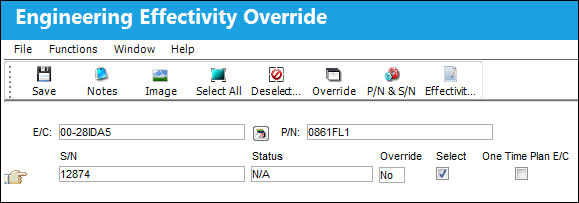
 When a new aircraft is added to an E/C that is in revision status, the P/N S/N of the aircraft will be applied to the P/N E/C effectivity of the E/C.
The following information/options are available in this window:
_____________________________________________________________________________________
E/C
The Engineering Control that specifies aircraft or component scheduled maintenance intervals.
P/N
The Part Number reference for the aircraft part.
S/N
The Aircraft's Serial Number which is provided by the manufacturer. This serial number is like a registration number, but it is not dependent on a country code and therefore never changes.
Status
The status of the P/N S/N effectivity on the E/C.
 If any E/Cs that the part is linked to has Position controls, this position change in Inventory will be validated in the Engineering Effectivity Override window. For example, if a Serial Number for a Position-controlled E/C is not installed on the adequate position, the S/N's Status in the Engineering Effectivity Override window will be 'N/A' (instead of 'Open'). For more information refer to the P/N-S/N Position Change Button via the Inventory module.
Override
This indicates whether the schedule for an individual serial number of a fleet has been overridden. Select the Override button to override the schedule for an individual serial number of a fleet.
Yes - The schedule for the S/N has been overridden.
No - The schedule for the S/N has not been overridden.
Select checkbox
When this checkbox is deselected, the E/C will not be effective against the currently selected P/N S/N.
P/N S/Ns cannot be selected or deselected when Engineering Switch  NOSELECTEFECTIVITY is set to Yes. For detailed information refer to NOSELECTEFECTIVITY via the Engineering Switches Manual.
One Time Plan E/C checkbox
Indicates that the Child E/Cs schedule is being overridden as a one-time only E/C for the selected Aircraft. For Child E/Cs that are adopting its parent E/Cs schedule for a Work Order, if the Child E/C is transferred from that Work Order to another W/O, then this checkbox is selected for the W/Os specific Aircraft. Once the Child E/C is complied with for that Aircraft, the checkbox is automatically deselected. The One Time Plan checkbox should only be used through the functionality of Switch ECCHLDTRC (when set to Yes). The functionality of this checkbox is for correcting purposes through the switch's automated functionality, and should therefore not be selected manually from the override window.
This checkbox can be selected or deselected for a specific Serial Number either from this window (the main Override Button window), or by selecting into the specific Serial Number's Engineering Effectivity Override window.
- ECCHLDTRC - (Set One Time Plan to Checked status if Transferred/Canceled from a W/O) - When set to Yes, when a child E/C is TRANSFERRED or CANCELED (via TC cancel) from a W/O; the respective Child E/C will set to 'one time plan' on its own. After it takes the next compliance, the E/C will reset the one time plan. This functionality works if the transferred Child E/C has its own schedule; if not, the system will prevent the transfer/cancel.
The Child E/C must be brought onto the Work Order via a Parent E/C for this to function correctly.
Installed A/C
The aircraft the S/N has been installed on. For additional information, refer to the A/C P/N Transaction section via the Technical Records Training Manual.
Location
The Location for maintenance events, inventory stores, orders, transactions, or training events. The location of the P/N S/N.
_____________________________________________________________________________________
The following buttons are available for additional functionality:
Share
Print
|
©1997-2026 Trax USA Corp. All rights reserved. This manual may not be copied, photocopied, reproduced, translated, or converted to any electronic or machine-readable form, in whole or in part, without prior written approval from Trax USA Corp. |
 |