
 Share
Share
 Print
Print
|
|
|
|
|


P/N N/L/A Installation and Removal
This option can be used to strip and build assemblies in the system. This is normally used in a workshop situation, but can also be used for other purposes such as engine or landing gear assembly.
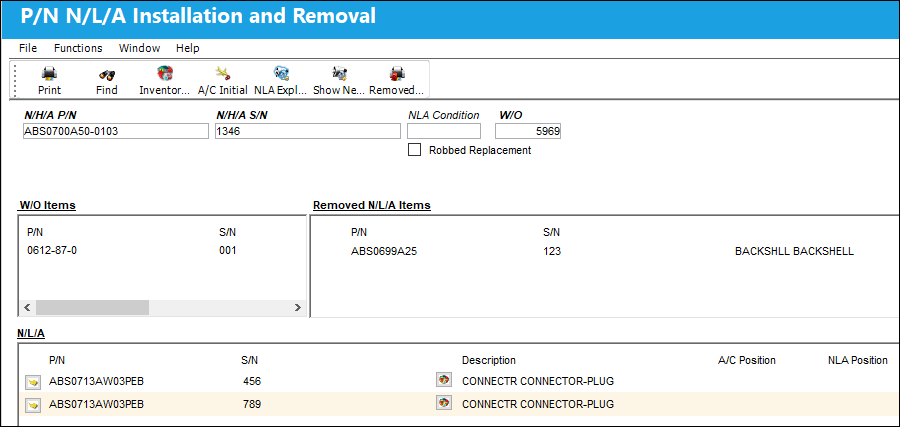
The top section of this window has three search fields: the N/H/A P/N, S/N and Work Order for the assembly that you are working on. Once entered, select the Find  button to see the current state of the assembly.
 Note: When Switch
  FARMVINS is set to Yes, the system will swap Fixed Asset records for N/L/As removed and installed on the N/H/A.
The following information/options are available in this window:
_____________________________________________________________________________________
N/H/A P/N
The Next Higher Assembly requiring an NLA part to be removed/installed.
N/H/A S/N
The Serial Number of the N/H/A requiring an NLA part to be removed/installed.
W/O
The Work Order used to categorize, manage, and schedule work requirements for aircraft maintenance. Work Order that has parts issued to it for installation to the assembly (mandatory).
Robbed Replacement checkbox 
Select this checkbox if the NLA to be installed will replace a robbed part in the assembly.
This checkbox is an indicator for financial purposes only.
_____________________________________________________________________________________
The window is divided into three different sections: The W/O Items, N/L/A and Removed N/L/A Items section.
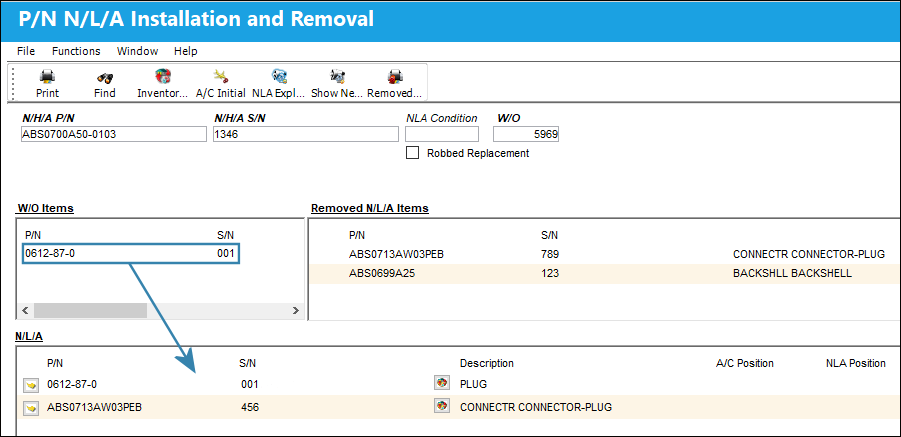
The W/O Items section lists all N/L/A parts that have been issued to the W/O. These parts can be installed on the assembly by dragging/dropping the item from the W/O Items section into the bottom section (N/L/A).
Technical Records Switch NLAPERF restricts part installations on assemblies based on the N/H/A's setup in the P/N Next Lower Assembly window (accessible from P/N Master). If the N/L/A part being installed has one or multiple designated NLA Position(s), the system will prompt users to enter the NLA Position that the N/L/A should be installed on. For more information, refer to N/L/A Button, via P/N Master.
Parts that are effective to the selected N/H/A can also be installed on the assembly by right-clicking on any entry in the bottom section, which will open the following a drop-down selection window:
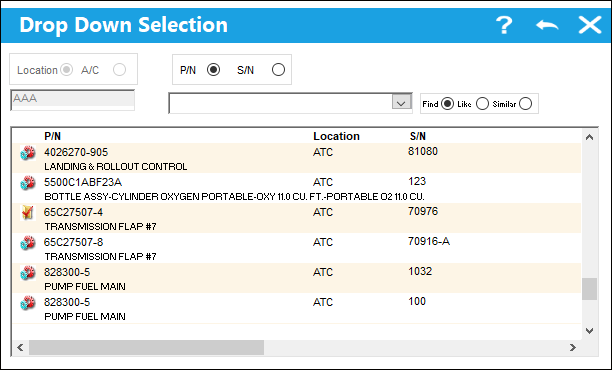
Technical Records Switch NLA/LOC locks the selection to P/N S/N's that are located at the W/O location.
From here, select the P/N that should be installed.
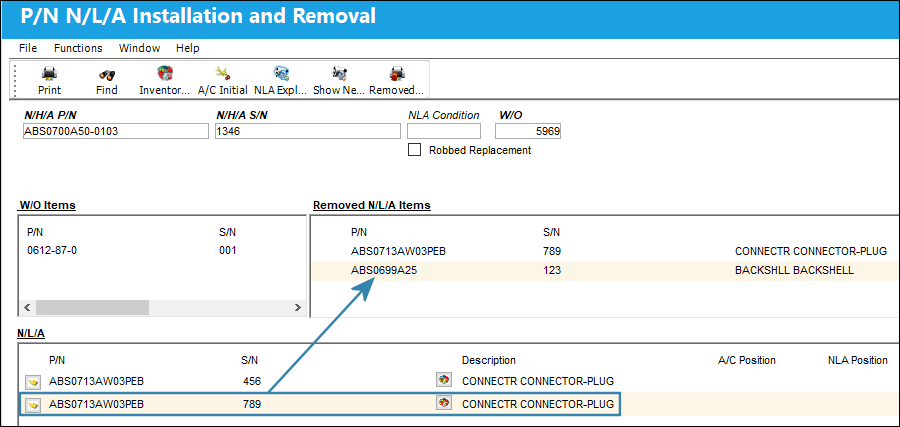
To remove parts from an assembly, drag/drop the relevant part from the N/L/A section to the Removed N/L/A Items section on the right side of the window.
With Technical Records Switch NLAASSERV set to Yes, users will have the option of returning unserviceable parts directly to stock and make them serviceable upon removing them from the assembly.
Once the assembly has been built or stripped down, click on the Exit button to return to the menu. The pending status will be updated on the parts following transaction.
The following buttons are available for additional functionality:
- Print Button
- Inventory Initial Button
- A/C Initial Button
- NLA Explorer Button
- Show Next Higher Part Number Button
- Removed Tag Print Button
Share
Print
|
©1997-2026 Trax USA Corp. All rights reserved. This manual may not be copied, photocopied, reproduced, translated, or converted to any electronic or machine-readable form, in whole or in part, without prior written approval from Trax USA Corp. |
 |