
 Share
Share
 Print
Print
|
|
|
|
|


This button helps the user to establish lower assembly components for a specific P/N.
Select the NLA  button. TRAX displays the following screen:
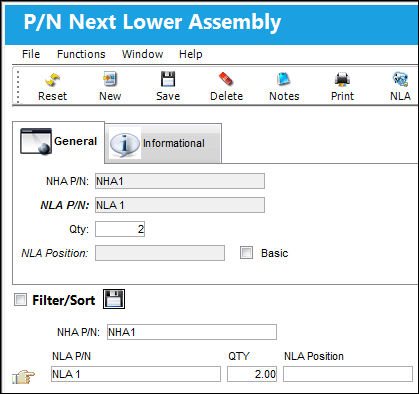
The following information/options are available in this window:
_____________________________________________________________________________________
NHA P/N
Verify that the P/N selected in the previous screen is correct and listed in this field. This part is now designated as the NHA, or Next Higher Assembly P/N.
NLA P/N
Select into the part that is to become part of the NLA of the part in the previous field.
Qty
Quantity of the NLA P/N that can be installed on the specified NLA Position.
Technical Records Switch  NLAPERF will ensure that users will not install more N/L/A's on an assembly than the Quantity field specifies via the P/N N/L/A Installation and Removal window.
NLA Position
Position of the NLA P/N.
Technical Records Switch NLAPERF will ensure that users can only install N/L/A's on the specified NLA Position via the P/N N/L/A Installation and Removal window.
Basic checkbox
This checkbox indicates that the assembly is the basic model of the engine. This checkbox is informational only.
_____________________________________________________________________________________
Select the Save  button to save all information. Upon selecting 'Save' in the confirmation window, TRAX re-displays the window.
Notice how the entered part is now part of the NHA's Next Lower Assembly. The user can add as many parts to the NLA of the NHA as needed. Also, TRAX allows for multi-level assemblies, so you can continue to add NLAs to NLAs and NHAs as required.
Additional functionality is available through the following:
- P/N Next Lower Assembly, Informational Tab
- Notes button
- Print button
- NLA button
- Change Position button
- Interchangeable button
- NLA Explorer button
 Share
Print
Share
Print
|
©1997-2026 Trax USA Corp. All rights reserved. This manual may not be copied, photocopied, reproduced, translated, or converted to any electronic or machine-readable form, in whole or in part, without prior written approval from Trax USA Corp. |
 |