Publication Date: 8/17/2026 Share Print

Previous Topic

Next Topic

Book Contents

Book Index

R/O Capability Button, via P/N Master

This option allows the user to create a listing of Locations and Vendors with their repair capability and pricing. This information can be electronically loaded (via TRAX conversion). These prices are viewable from the Repair Quotes option. The user would then select the P/N to enter capability. Select the R/O Capability but_ro_capability_small button, enter or change the details required.

The following tabs and buttons are available.

Vendor P/N Repair Capability Tabs

Vendor P/N Repair Capability Buttons

General Tab

Warranty Tab

Informational Tab

Vendor Global Warranty Tab

Auto R/O Tab

but_new_small New button

but_delete Delete button

but_save_small Save button

but_reset_sm Reset button

but_notes_small Notes button

but_print (small) Print button

but_image_small Image button

but_ro_capability_(via_vendor_ro_capability)_small RO Capability button

but_import_(software_bin replacement)_small Import button

but_audit_sm Audit button


Example: Creating an R/O via the R/O Capability Functionality

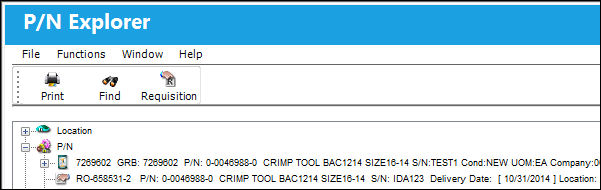
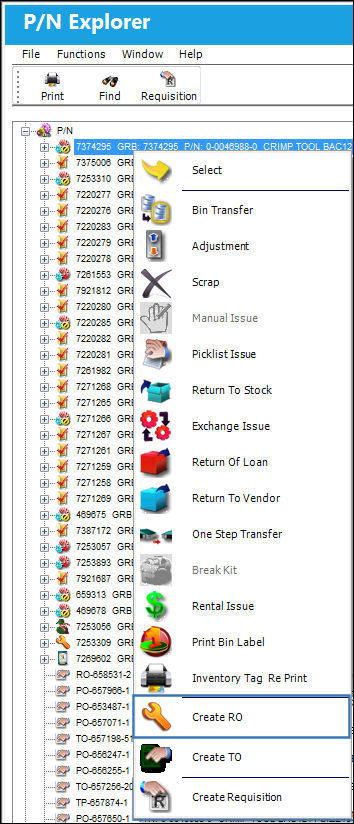
Go to Inventory/Explorer/P/N Explorer.

Select the 'Create R/O' option.
12_ROCapability3

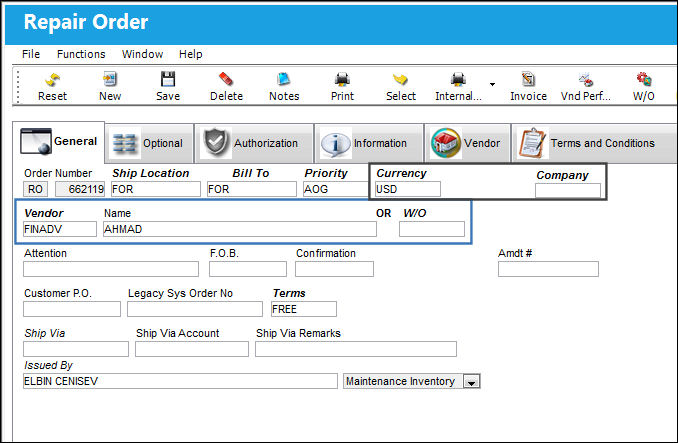
TRAX displays the Repair Order window.

Note: The Preferred Vendor information is auto populated from the Vendor P/N Repair Capability window.

Populate all required information and select the Save but_save_small button.

12_ROCapability4

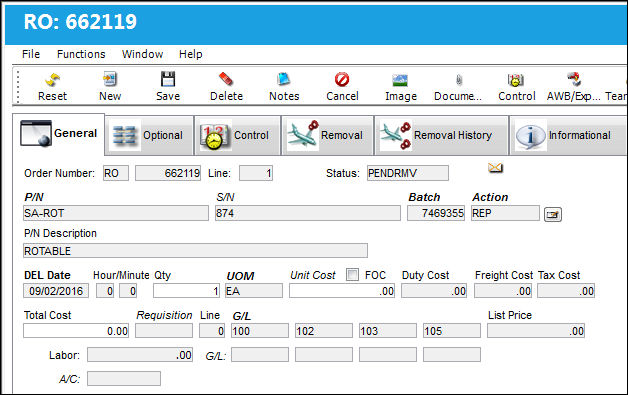
TRAX displays the Repair Order Detail window.

Note: The Preferred Vendor information is auto populated from the Vendor P/N Repair Capability window.

Populate all required information and select the Save but_save_small button.

12_ROCapability5

The Repair Order is created successfully using the R/O Capability but_ro_capability_small button:

12_ROCapability6

In This Section

Vendor P/N Repair Capability, General Tab

Vendor P/N Repair Capability, Warranty Tab

Vendor P/N Repair Capability, Informational Tab

Vendor P/N Repair Capability, Vendor Global Warranty

Vendor P/N Repair Capability, Auto R/O Tab

Vendor P/N Repair Capability, Optional Tab

Vendor P/N Repair Capability Buttons

See Also

P/N Master Buttons

Notes Button, via P/N Master

Interchangeable Button, via P/N Master

P/N Control Button, via P/N Master

Inventory Levels Button, via P/N Master

N/L/A Button, via P/N Master

Software Button, via P/N Master

Kit Button, via P/N Master

P/N Break-Down Button, via P/N Master

Effectivity Button, via P/N Master

Bin Control Button, via P/N Master

Positions Button, via P/N Master

P/N Category Change Button, via P/N Master

P/N UOM (Unit of Measure) Change Button, via P/N Master

Change P/N To Interchangeable Button, via P/N Master

P/N Shop Control Button, via P/N Master

Cost Button, via P/N Master

Sell Button, via P/N Master

Issue With Button, via P/N Master

NLA Explorer Button, via P/N Master

Image Button, via P/N Master

Document Control Button, via P/N Master

Engineering Button, via P/N Master

History Button, via P/N Master

IPC Reference Button, via P/N Master

Audit Button, via P/N Master

Top of Page Publication Date: 8/17/2026 Share Print