
 Share
Share
 Print
Print
|
|
|
|
|


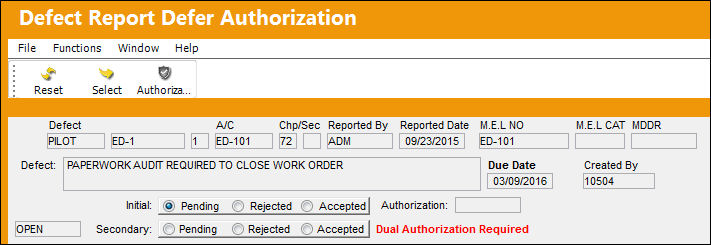
Defect Report Defer Authorization
The Defect Report Defer Authorization window allows users to authorize Defect Reports.
This option is security controlled via Technical Records/ Update/ Defect Report Defer Authorization. For additional information, refer to the Security Explorer via the System Administration Training Manual.
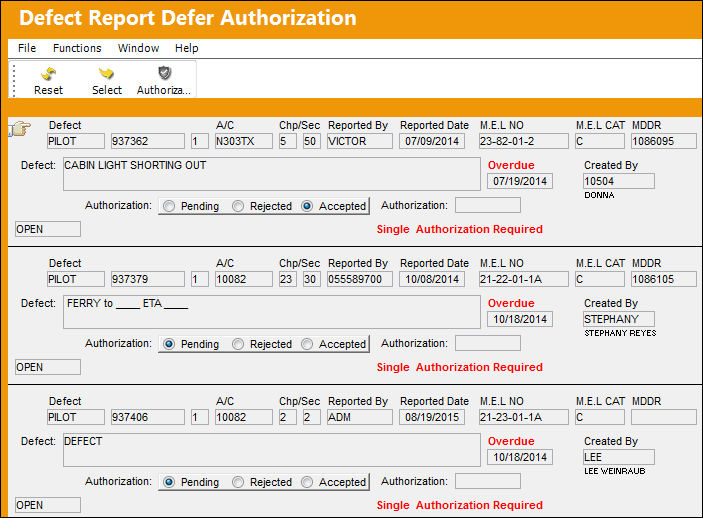
The following information/options are available in this window:
_____________________________________________________________________________________
Defect
The defect number (or log book number). For additional information, refer to the Defect Report Detail, General Tab.
A/C
The individual aircraft tail number.
Chp
The ATA Chapter classification associated to the Defect Report. The chapters which appear for selection are those ATA Chapters which are flagged for Defect in the ATA Master. This Chapter/Section must have Alert levels set up in order for Recurrent Items to be created via the Reliability module.
Sec
The specific Section of the ATA Chapter associated to the Defect Report. The Sections which appear for selection are those ATA Chapters which are flagged for Defect in the ATA Master. This Chapter/Section must have Alert levels set up in order for Recurrent Items to be created via the Reliability module.
Reported By
The Person reporting the Defect.
Reported Date
The Date other Defect was reported.
M.E.L NO
The Minimum Equipment List Number that flight crews agree to accept as inoperative for short periods. Operator creates an MEL unique to his or her own configuration. For additional information, refer to the MEL Master via the Settings Training manual.
M.E.L CAT
Minimum Equipment List Category code. For additional information, refer to the the Defect Report Detail, Defer Tab.
MDDR
This is also known as a Deferred Maintenance Item (DMI). This field allows users to enter the deferment on one defect report (aircraft log page) by using the MDDR number on another defect report (aircraft log page) so that the user may resolve the MDDR. For additional information, refer to the Defect Report Detail, Defer Tab.
Defect Description
The description of the defect which describes the problem found or notes the service being performed. This field also works with the Defect Description Phrase Transaction code via the Technical Records Transaction Code manual.
Due Date
The date that the Defect is being deferred to. Based on system configuration, this date may be used in the calculated defect Due Date. If a Defect Report is associated to a W/O Task Card, when the W/O Task Card is closed, the Defer Date of the Defect Report will be changed to the closing date of the W/O Task Card. Additionally, when the Defect Report is attached to a W/O Non-Routine Task Card and is then deferred, the Defer Date and time is updated to match the Defer Date and Time of the W/O N/R Task Card. When the prompt appears, select Yes to update the Defer Date and Time.
Created By
The user who created the record.
Initial Pending radio button
Select this radio button if the initial authorization is pending.
Initial Rejected radio button
Select this radio button if the initial authorization has been rejected.
Initial Accepted radio button
Select this radio button if the initial authorization has been accepted.
Authorization
The user who authorized the defer.
Secondary Pending radio button
Select this radio button if the secondary authorization is pending.
Secondary Rejected radio button
Select this radio button if the secondary authorization has been rejected.
Secondary Accepted radio button
Select this radio button if the secondary authorization has been accepted.
_____________________________________________________________________________________
Authorization Required:
The type of authorization required is determined by the configuration of three Transaction Codes when creating the Defect Report. The user can predefine the authorization type by selecting from one of the following authorization requirements, which can be found in the Defer, Defer Category and Defect Type Transaction Codes.

_____________________________________________________________________________________
None
No authorization required.
Single
One authorizer is required.
Dual
Two authorizers are required.
_____________________________________________________________________________________
For additional information, refer to the Defer, Defer Category and Defect Type Transaction Codes via the Technical Records Switches Manual.
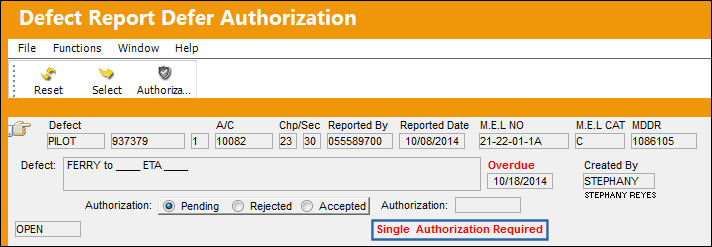
Single Authorization Required:
The Single Authorization Requirement only requires that one user authorize the Defect.
Place the Hand  Pointer on the desired record to be authorized. Select the Authorization
  button.
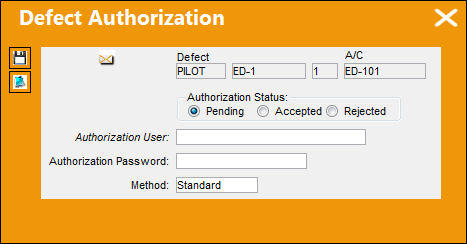
The Defect Authorization window appears:
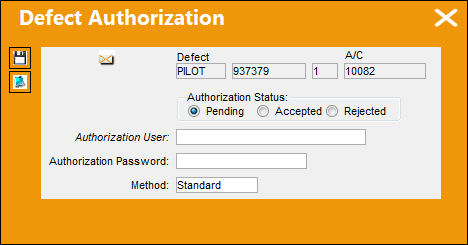
The following information/options are available in this window:
_____________________________________________________________________________________
Defect
The defect number (or log book number).
A/C
The individual aircraft tail number.
Authorization Status
Select the status the Defect Report is to be saved as. Choose from one of the following statuses:
- Pending
- Accepted
- Rejected
Authorization User
The name of the User who is authorizing the defect.
Authorization Password
Enter the correct password to authorize the defect.
Method Dropdown
Select one of the following sign on methods. For additional information refer to Sign On Methods via Logging Into TRAX, which can be found in the System Administration Training manual.
- Standard
- LDAP
- Session

_____________________________________________________________________________________
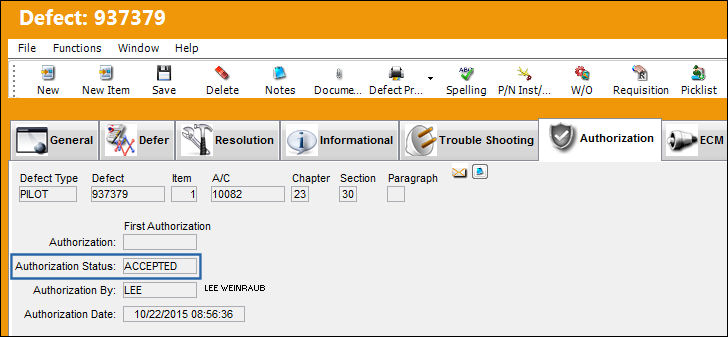
Select the 'Accepted' radio button, populate all mandatory and optional fields and select the Save  button. The Save prompt appears. Select 'OK.'
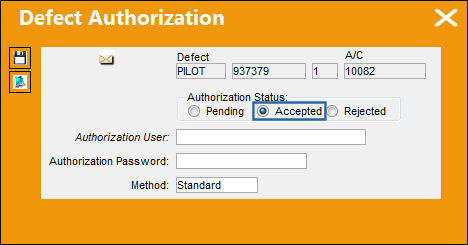
The defect no longer appears in the Defect Report Defer Authorization window and is now authorized:
Dual Authorization Required:
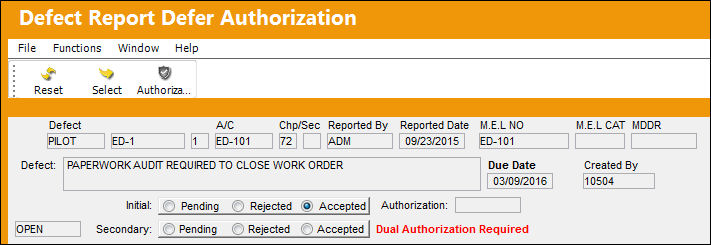
The Dual Authorization Requirement requires that two different users authorize the Defect.
Place the Hand Pointer on the desired record to be authorized. Select the Authorization button.
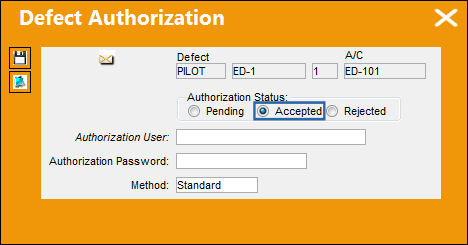
The Defect Authorization window appears:
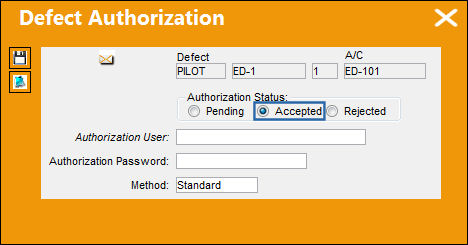
Select the 'Accepted' radio button, populate all mandatory and optional fields and select the Save button. The Save prompt appears. Select 'OK.'
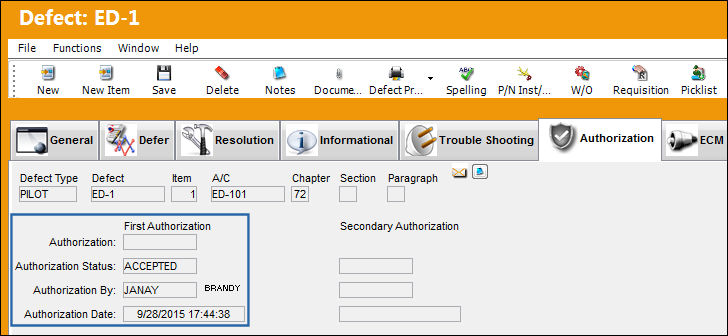
The First Authorization has been accepted:
Log into the system as another user and navigate to the Defect Report Defer Authorization window. Select the Authorization button.
The User is going to be the second authorizer. Select the Save button. The Save prompt appears. Select 'OK.'
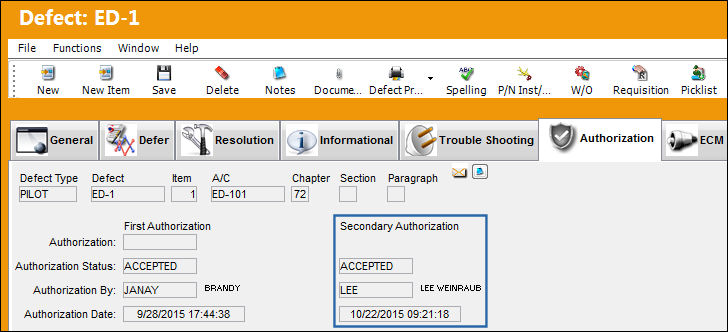
The defect is now completely authorized since it has both the First and Second Authorization:
Share
Print
|
©1997-2026 Trax USA Corp. All rights reserved. This manual may not be copied, photocopied, reproduced, translated, or converted to any electronic or machine-readable form, in whole or in part, without prior written approval from Trax USA Corp. |
 |