
 Share
Share
 Print
Print
|
|
|
|
|


Defer
The System Transaction Codes are displayed with both the Code Names and Descriptions. The Code Descriptions directly illustrate their functionality and role in the system, as fields are populated and tasks are performed.
Transaction Code: |
DEFER |
General Description: |
Defer codes used for categorizing deferred items. |
Are Authorization Steps Available? |
Y |
Is System Notification Available? |
Y |
Trax Control Panel Path(s): |
Technical Records/ Update/ Defect Report/ General Tab. |
Functions: |
Designates codes needed to classify deferred items. |
Available Functionality:
TRAX displays this Transaction Code.
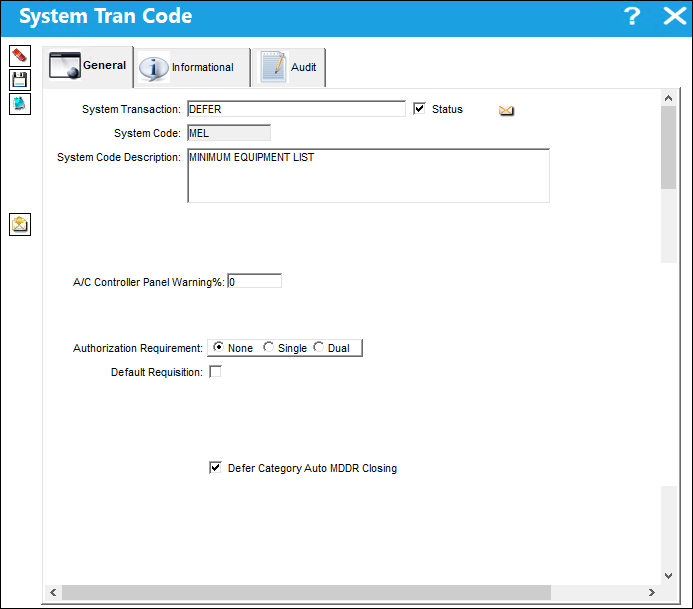
The following information/options are available in this window:
_____________________________________________________________________________________
System Code
Enter a name for the code (maximum 10 characters). It is recommended that you choose a name, abbreviation, or acronym that reflects the function of the group.
System Code Description
Enter a description of the Group or the full name of the group.
A/C Controller Panel Warning %
The percentage value for the A/C Controller Panel. This field is used to make planners more effective so as not to perform a Defect too early. For example, if a Defect has a schedule of 100 flight hours with an A/C Controller Panel Warning % of 90, when the Defect has accumulated 90 flight hours of actual time (usage from the last compliance) the planner will be flagged in the A/C Controller Panel. Enter the percentage of the schedule that must be used before this Defect becomes highlighted in yellow within the A/C Controller Panel.
 This is a customized request for the A/C Controller Panel and must be requested if a customer would like this information displayed.
Authorization Requirement
Select one of the following radio buttons regarding the authorization requirement:
None - No authorization required.
Single - One authorizer required.
Dual - Two authorizers required.
Note: The Authorization Requirement option set for the applicable Transaction Code drives the functionality of Technical Records switch  MDDRVSBL. For more information, refer to switch MDDRVSBL via the Training Manual.
Default Requisition
When this checkbox is selected, when a Defect is created with the specified transaction code, upon saving the Defect, an existing requisition can be linked to the Defect, or a new one can be created by default.
Defer Category Auto MDDR Closing
Select this checkbox if there is a deferred Category Auto MDDR Closing.
System Notification  button
System Notifications can be set up by specific Defers to trigger whenever a deferral is created, saved, or deleted. For information on how to set up System Notifications, refer to Setup - System Notification, via System Notifications of the Settings Training Manual.
_____________________________________________________________________________________
Share
Print
|
©1997-2026 Trax USA Corp. All rights reserved. This manual may not be copied, photocopied, reproduced, translated, or converted to any electronic or machine-readable form, in whole or in part, without prior written approval from Trax USA Corp. |
 |