
 Share
Share
 Print
Print
|
|
|
|
|


Fault Code Type
The System Transaction Codes are displayed with both the Code Names and Descriptions. The Code Descriptions directly illustrate their functionality and role in the system, as fields are populated and tasks are performed.
Transaction Code: |
Fault Code Type |
General Description: |
Types of Fault Codes. |
Are Authorization Steps Available? |
No |
Is System Notification Available? |
No |
TRAX Control Panel Path(s): |
Settings/Update/Fault Code Master Technical Records/Update/Defect Reports/Fault Code Tab |
Window(s): |
w_fault_code_master_detail w_fault_code_reports_eu |
Related Switch(s) |
None |
Functions: |
None |
Reports: |
None |
Available Functionality:
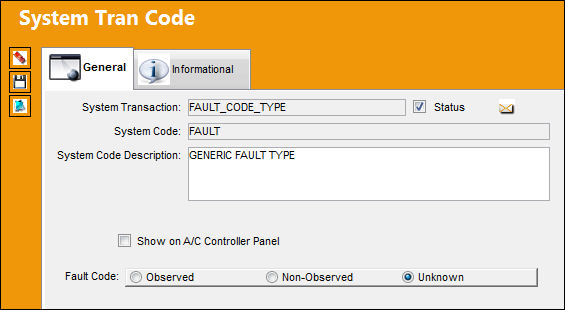
The following information/options are available in this window:
_____________________________________________________________________________________
Show on A/C Controller Panel checkbox
Select this checkbox to have the Fault code appear in the A/C Controller Panel. For additional information, refer to the A/C Controller Panel via the Technical Records Training manual.
Observed Fault Code radio button
Select the radio button if the Fault Code was observed.
Non-Observed Fault Code radio button
Select the radio button if the Fault Code was non-observed.
Unknown Fault code radio button
Select the radio button if the Fault Code was unknown.
_____________________________________________________________________________________
For additional information regarding setting up Fault codes, refer to the Fault Code Master, General Tab via the Settings Training manual.
Share
Print
|
©1997-2026 Trax USA Corp. All rights reserved. This manual may not be copied, photocopied, reproduced, translated, or converted to any electronic or machine-readable form, in whole or in part, without prior written approval from Trax USA Corp. |
 |