
 Share
Share
 Print
Print
|
|
|
|
|


Defect Defer Notes Phrase
The System Transaction Codes are displayed with both the Code Names and Descriptions. The Code Descriptions directly illustrate their functionality and role in the system, as fields are populated and tasks are performed.
Transaction Code: |
DEFECT DEFER NOTES PHRASE |
General Description: |
Pre-defined phrases to be selected (double-clickable) when creating notes. |
Are Authorization Steps Available? |
N |
Is System Notification Available? |
N |
Trax Control Panel Path(s): |
Technical Records/Update/ Defect Report/ New Button/ Defer Tab |
Windows(s): |
w_defect_reports_eu |
Related Switch(s): |
Not Applicable |
Functions: |
Pre-defined phrases to be added to the defer defect tab notes field |
Reports: |
None |
Available Functionality:
Allows the user to select from pre-defined phrases to be added to the Defer Note field on the Defect report Detail, Defer tab when creating a deferred defect and in addition filters phrases by Chapter/ Selection/ Paragraph. The Defer Defect Notes Phrase code may be entered via Setting/ Explorer/ System Transaction Codes. Set-up is identical to the creation of any other System Transaction Code except the additional fields for the Chapter, Section and Paragraph.
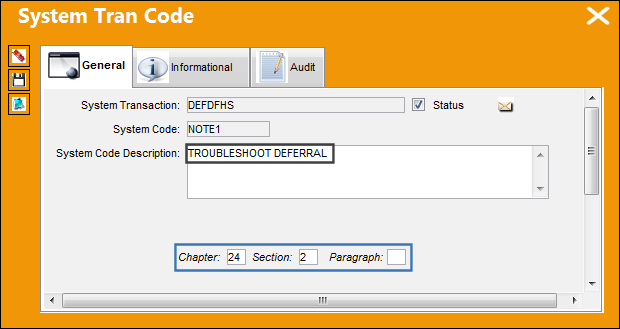
With the Chapter, Section and/ or Paragraph (derived from the ATA Specifications via Settings/Update) associated to the Defer Defect Notes Phase code, only those related codes as per the Defect Report Chapter, Section and/ or paragraph will appear for selection on the Defer Tab, via Technical Records/ Update/ Defect Report/ Defect Report Detail.
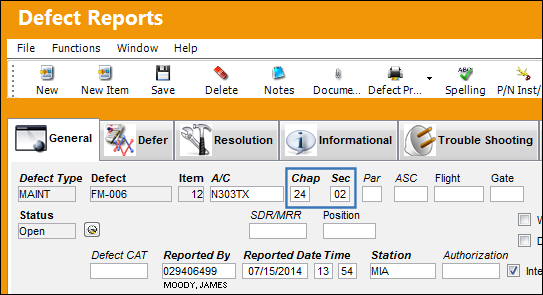
Once the user has entered the defect’s Chapter, Section and/ or paragraph, the filter is applied and only those Defer Defect Notes Phrases for the user’s selection. To select the phrase the users need only double-click on the code and it will populate the Defer Note field.
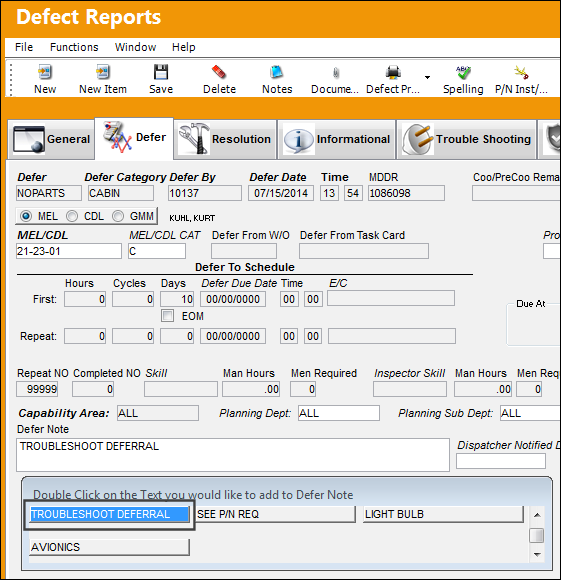
If no Chapter, Section and/ or Paragraphs are associated to the code, then all will appear for selection regardless of the Defects Chapter, Section and Paragraph combination.
Share
Print
|
©1997-2026 Trax USA Corp. All rights reserved. This manual may not be copied, photocopied, reproduced, translated, or converted to any electronic or machine-readable form, in whole or in part, without prior written approval from Trax USA Corp. |
 |