
 Share
Share
 Print
Print
|
|
|
|
|


A/C Hold, via A/C Registration Change/Hold/Release
In the event of an incident or accident, an aircraft can be placed on hold status. Both 'active' or 'inactive' aircraft can be placed on 'Hold' status.
When an A/C is placed on 'Hold' status, the system will prevent the creation or modification of any transactions against that A/C throughout the entire system. Query of history records for the A/C is also prevented (unless the user has been granted security access).
If an aircraft incident occurs, please contact TRAX Customer Support.
Please follow these steps to place an A/C on 'Hold.' The A/C Registration Change option can be used to place an aircraft on 'Hold' or to change the registration number.
1. Remove access to TRAX from all TRAX users. There are two options:
- User accounts can be disabled, which would prevent users from logging in to TRAX. This can be achieved quickly by selecting the Temporary Remove System Access option in the Security Explorer. At that point, all current user sessions must be terminated. This is achieved by selecting the Cancel All Sessions
 button which is located via the Logged In Users Button of the Security Explorer.
 - Temporarily disable the Oracle database. This option should be used with caution.
2. Make a backup of the Oracle database using the export utility. (See note at the bottom of this topic.)
3. Place A/C on 'Hold' via Technical Records/Update/A/C Registration Change and select the Save  button.
Companies also have the option of placing the Aircraft on Inactive status instead of on Hold. For instance, if the Aircraft requires a shorter period of inactivity (perhaps while determining all feasible options or if the A/C requires a short term hold), the Aircraft can be placed in Inactive status through the A/C Master, General tab. While Inactive, the Aircraft cannot be linked to any new records or transactions. For more information refer to the Settings Training Manual.
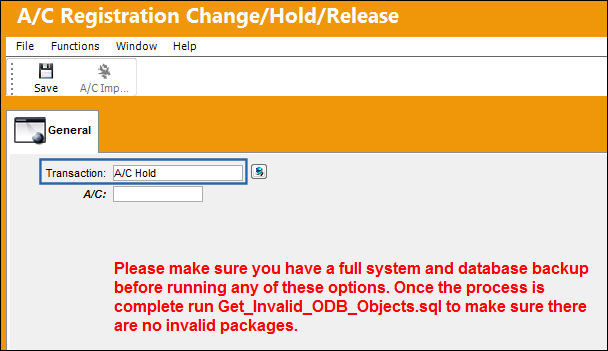
The following information/options are available in this window:
_____________________________________________________________________________________
Transaction
A/C Hold
A/C
The A/C that will be placed on 'Hold.'
_____________________________________________________________________________________
- Upon placing the A/C on 'Hold', the system will automatically create tables named with an extension indicating the 'Hold' status (“_HD “ ). TRAX will transfer all the data (related to the A/C on 'Hold') to the '_HD' tables.
- Once the '_HD ' tables are created, the information can be accessed as required. The data in these tables can be opened and analyzed using a third party application such as MS ® Access, MS ® Excel, ® Crystal Reports, Sybase ® Infomaker, etc. Alternatively, the user can use the Oracle ® backup and restore it to a stand alone server or workstation that is isolated from the network in order to query and print TRAX reports. Note that the organization's System Administrator or Database Administrator will typically perform these tasks.
A full system database backup should be created before running any of the tasks included in the A/C Registration Change option! Exercise these options with caution. These tasks must be run out of normal business hours. Data should not be entered for this aircraft while the change takes place. Avoid interrupting or canceling the process while it is running. If TRAX detects an error during this process, it will rollback any changes made and restore to its original state.
For additional information regarding aircraft in Hold Status, refer to Querying Records for Aircraft Currently on 'Hold' Status.
 Additional Functionality:
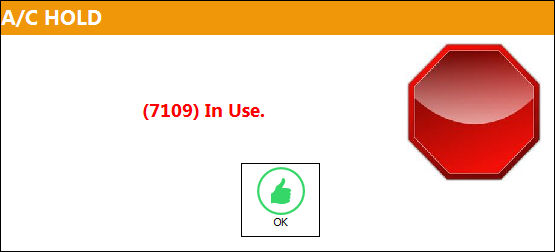
Upon placing an A/C on Hold, if multiple users are attempting to conduct this action, the following users will be prevented from repeating the action with the following hard warning:
Share
Print
|
©1997-2026 Trax USA Corp. All rights reserved. This manual may not be copied, photocopied, reproduced, translated, or converted to any electronic or machine-readable form, in whole or in part, without prior written approval from Trax USA Corp. |
 |